Purchasing items from eBay using the Global Shipping Program Part 2

May 7th, 2016

So this blog is the final conclusion and update to Purchasing items from eBay using the Global Shipping Program Part 1.

I’ve read lots of negative comments about eBay’s Global Shipping Program, calling it a scam, con, don’t use it, ask sellers not to use it, the problem, in life, is people often tell 10 people or more if something goes wrong or something bad happens, BUT people do not often share good, positive results. But here is my Parcel! It works read on!

eBay originally stated the item would be delivered between Friday 6. May. 2016 – Saturday, 14. May. 2016, see here

Here are the final tracking details

The item was finally delivered on Friday 6th May 2016, by YODEL. eBay had originally advised it would be delivered on this date.

I cannot complain about the Global Shipping Program, I was able to track the items fully from the US, it was delivered on-time, as advised on eBay, and considering the number of logistics companies involved (I count 8!) I’m very impressed at the accuracy in the expected delivery. I paid no VAT, Import Duty, Administration fees, and this worked out cheaper for me, than using a Seller that does not use the GSP, when Royal Mail or Parcel Force, charge you the additional administration fee on top of the VAT.

Compared to sending items in the UK with a single logistics company, e.g. Royal Mail, Parcelforce, Hermes, DPD, YODEL, where there is no guarantee of delivery, and items go missing within the UK.

My parcel has travelled 5,000 miles from the US to Yorkshire, gone through 8 logistics companies, and I think that’s impressive!

Well done eBay!

Purchasing items from eBay using the Global Shipping Program Part 1

May 4th, 2016

I’ve read lots of bad press about eBay and the Global Shipping Program…..so here goes this is my experience..

On occasions I purchase items from the US from eBay or direct:- 16 years ago, items would enter the UK, and you would pay zero Import Duty, Value Added Tax and Administration fees.

That was 16 years ago, it would seem the world of Online shopping from around the world, especially from the US has now caught up with UK Customs, and today, if an item has a declared value of over £15 GBP, you will have to pay VAT@20% on the total amount, if the declared value is in USD $, it’s converted at the exchange rate on the day it’s received at UK Customs, and most often an administration fee of £8 or £11 depending upon if it’s Royal Mail or Parcelforce, that have handled your parcel.

Something relatively new, has started to appear on eBay on seller listings, it’s called the Global Shipping Program or GSP, my understanding is that US or UK sellers, do not have to worry about shipping overseas, they pack up the items, and ship it to a logistics company in the country or origin, this company then forwards to the destination, and also handles the Customs, Import Duty, Value Added Tax in advance, by passing this cost direct to the Buyer.

This payment is processed by Pitney Bowes, and appears on your Paypal Account as a direct payment to Pitney Bowes. You will see, two payments for the item, one to the seller, and one to Pitney Bowes for the Customs charges. The theory is that the item, is not delayed in Customs, and you pay no charges when it’s delivered!

I’ve actually been fascinated by the logistics involved in this process. I first got the following:-

It stated Multiple Carriers, and that didn’t help much in tracking…

And then this

I did some more digging, and found the following, it got handed to wnDirect

I tracked down the flight, using the Air Way Bill number 45494864, and it was on a Virgin Atlantic Cargo flight using this site, and 932 and VS (IATA code).

This led me to Virgin Atlantic Cargo Site

My item is in that parcel container, along with 26 other items! Received in London, 03 May 2016 @ 10.20.

I believe it’s now with 13ten

It will be interesting to see HOW QUICK 13ten, get it to me now it’s in the UK, as they use Royal Mail, Hermes, YODEL or DPD, that’s probably the weakest link!

Experiments with different Intel Processors in a HPE ProLiant Microserver Gen8 – Part 2

April 28th, 2016

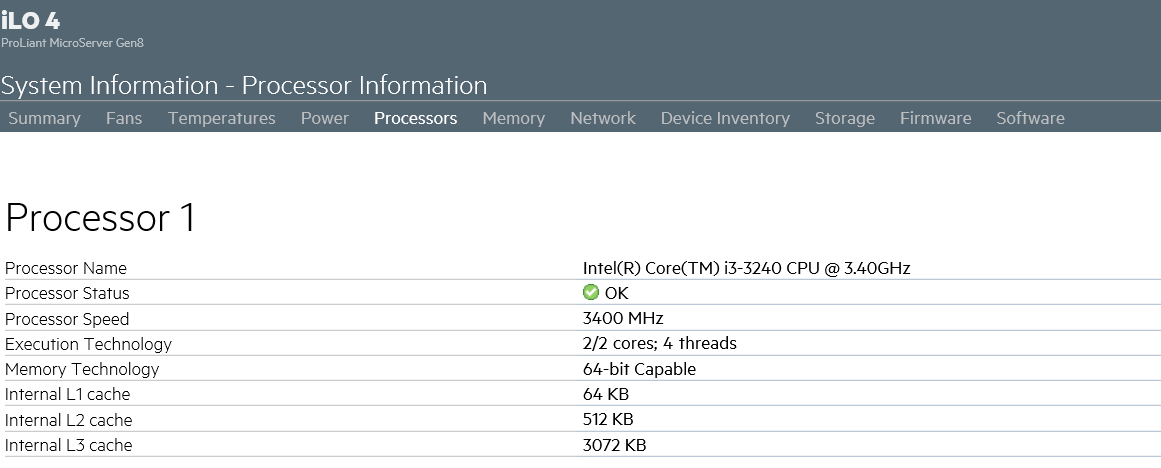
So, I’ve managed to get my hands on some new Intel Processors to test in the HPE ProLiant Microserver Gen8, now supported and the microcode has been updated in the latest BIOS as reported in this blog here, I’ve got two of the following

Intel® Core™ i3-3240 (3.4GHz/2-core/3MB/65W) Processor packaged in Costa Rica and Malaysia. I’ve been to Costa Rica here, didn’t notice any Intel fabs, whilst I was there!

Intel® Core™ i3-3240 (3.4GHz/2-core/3MB/65W) Processor - Costa Rica

Intel® Core™ i3-3240 (3.4GHz/2-core/3MB/65W) Processor - Malaysia

Intel® Celeron® Processor G1610T (2M Cache, 2.30 GHz)

collection of procs for Gen8

HPE Gen8 POST with i3-3240 installed

HPE Gen8 POST with i3-3240 installed

Intel Core i3-3240

Intel Core i3-3240

The HPE ProLiant Microserver can be purchased with an Intel® Core™ i3-3240 (3.4GHz/2-core/3MB/65W) Processor see here , but oddly it’s supplied with NON-ECC RAM, and here is the weirdness, if you inspect the “Intel Ark” for the processor it’s displayed as not supporting ECC RAM.

WOT NO ECC support ?

WOT NO ECC support ?

Is this an Intel conspiracy, the Intel ARK used to show it as supported, but later it has now been changed, to No. Is this to encourage people to purchase a Xeon which supports ECC, or did Intel find a support issue?

Anyway proof of the pudding the Intel® Core™ i3-3240 (3.4GHz/2-core/3MB/65W) Processor supports ECC RAM, and is a very inexpensive upgrade for a HPE ProLiant Microserver Gen8 from the stock Intel® Celeron® G1610T (2.3Hz/2-core/2MB/35W) Processor. So Andy says, upgrade your Gen8 today with a Intel® Core™ i3-3240 (3.4GHz/2-core/3MB/65W) Processor! what are you waiting for!

It works! and a very cost effective upgrade with 6784.63 bogomips!!! compared to 4589.69 which the G1610T has!

You may have concerns that the Intel® Core™ i3-3240 (3.4GHz/2-core/3MB/65W) Processor has a TDP of 55 or 65 watts, and the stock heatsink in the HPE ProLiant Microserver Gen8 for the Intel® Celeron® G1610T (2.3Hz/2-core/2MB/35W) Processor is 35 watt. If you purchase a HPE ProLiant Microserver Gen8 with a Intel® Core™ i3-3240 (3.4GHz/2-core/3MB/65W) Processor it’s supplied with an uprated and different 65 watt heatsink.

so we will test that to in my next blog, and see if I can melt a HPE ProLiant Microserver Gen8!

I’m now testing which performs best the Costa Rica or Malaysia package ? Blog soon!

Experiments with different Intel Processors in a HPE ProLiant Microserver Gen8 – Part 1

April 27th, 2016

I’ve recently managed to get hold of a HPE ProLiant Microserver Gen8 server, to test and maybe eventually replace my aging HP ProLiant Microserver N36L’s see here. I cannot believe it’s been almost 5 years since, I purchased my cluster of N36L to run VMware vSphere.

The HPE ProLiant Microserver Gen8 has been around for some time now, and represents good value for money, and is closer specification to the original ProLiant range than the previous Microserver offerings, e.g. iLo4 support, dual network interfaces, ECC ram support, and a socketed Intel 1155 processor socket.

Four different processor models of the HPE ProLiant Microserver Gen8 are available direct from HP resellers. See the quick specs here.

Intel® Celeron® G1610T (2.3Hz/2-core/2MB/35W) Processor

Stock G1610T

Stock G1610T

Intel® Pentium® G2020T (2.5GHz/2-core/3MB/35W) Processor

Intel® Core™ i3-3240 (3.4GHz/2-core/3MB/65W) Processor

Intel Core i3-3240

Intel Core i3-3240

Intel® Xeon® E3-1220Lv2 (2.3GHz/2-core/3MB/17W) Processor

Xeon E3-1220LV2

Xeon E3-1220LV2

The first two models are commonly available, the Xeon version is not as common, and the Intel® Core™ i3-3240 (3.4GHz/2-core/3MB/65W) Processor version seems a new addition, after noticing this in a recent BIOS update – which states Added support for Intel i3-2130 and i3-3240 processors.

It’s often much cheaper to purchase and fit an aftermarket Intel CPU, than purchasing the HPE model of the Gen8. Let the testing commence…

Stock 35 watt heatsink in Gen8

Heatsink removed on Gen8 G1610T

G1610T nicely cleaned

New Xeon E3-1220LV2 installed

added the thermal grease silver cross

Update – See Part 2 – Experiments with different Intel Processors in a HPE ProLiant Microserver Gen8 – Part 2

Breaking Bad and Better Call Saul

April 24th, 2016

A bit late to the party, a close friend and my brother suggested I watch Breaking Bad, and then Better Call Saul, so I’ve just finished watching all 5 Seasons of Breaking Bad, and 2 Seasons of Better Call Saul, that’s approximately 3 days of Box Set viewing!

And coincidently, Better Caul Saul, Season 2 has just aired and finished!

Mystery box from Experts Exchange?

April 20th, 2016

This morning I had a delivery from Experts Exchange.

What's in the box ?

This is what's in the box!

The reason for so many shirts, I give them to friends, staff colleagues, and students! If you want a shirt just ping me an email!

Join the next VMware vSphere Public Beta Program

April 15th, 2016

I’ve been given the nod, I can publish this…..

Want to get a head start, and look and test the next VMware vSphere release, VMware vSphere Public Beta Program

Click the link and Join Here

VMware vSphere Public Beta Program

Participants are expected to:

Online acceptance of the Master Software Beta Test Agreement will be required prior to visiting the Private Beta Community

Install beta software within 3 days of receiving access to the beta product

Provide feedback within the first 4 weeks of the beta program

Submit Support Requests for bugs, issues and feature requests

Complete surveys and beta test assignments

Participate in the private beta discussion forum and conference calls

vSphere Beta Program Overview

We are excited to announce the upcoming VMware vSphere Beta Program. This program enables participants to help define the direction of the most widely adopted industry-leading virtualization platform. Folks who want to participate in the program can now indicate their interest by filling out this simple form. The vSphere team will grant access to the program to selected candidates in stages. This vSphere Beta Program leverages a private Beta community to download software and share information. We will provide discussion forums, webinars, and service requests to enable you to share your feedback with us.

You can expect to download, install, and test vSphere Beta software in your environment or get invited to try new features in a VMware hosted environment. All testing is free-form and we encourage you to use our software in ways that interest you. This will provide us with valuable insight into how you use vSphere in real-world conditions and with real-world test cases, enabling us to better align our product with your business needs.

Some of the many reasons to participate in this beta opportunity:

Receive early access to the vSphere Beta products

Interact with the vSphere Beta team consisting of Product Managers, Engineers, Technical Support, and Technical Writers

Provide direct input on product functionality, configurability, usability, and performance

Provide feedback influencing future products, training, documentation, and services

Collaborate with other participants, learn about their use cases, and share advice and learnings

RARE – Intel Xeon E3-1220LV2 Processor for my HP ProLiant MicroServer Gen8

April 12th, 2016

Here is the replacement processor for my HP ProLiant MicroServer Gen8. It has taken me a while to track this one down. It has a TDP of only 17 watts, compared to the stock Intel Celeron G1610T, which has a TDP of 35 watts.

These are like rocking horse dodo…

It’s an Intel Xeon E3-1220L V2, it’s a low power, 17 watt, 2 Core, 4 Thread Xeon with Intel VT-d.

I’m waiting for my thermal compound, before I install it.

Synology NAS and SSD Cache Part III – Is cache better for VMware vSphere (ESXi)? Confusing results!

April 11th, 2016

So in today’s, crude and experimental research I thought I would connect all our VMware vSphere Hypervisors (ESXi 5.5 build 1892794) to a NFS datastore presented to the ESXi Hosts from a Synology NAS, and we’ll try the following tests

I deployed a small Windows 7 template, onto the NFS datastore as follows

  • No Cache Enabled – 3 minutes 27 seconds to deploy
  • Read and Write Cache Enabled – 2 minutes and 40 seconds to deploy.

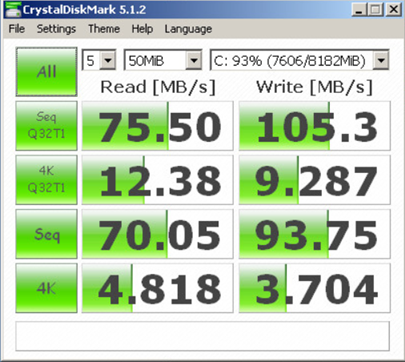
Time for some more testing – The template deployed to the datastore was converted to a virtual machine, and the following tests were performed using CrystalDiskMark 5.1.2 in the virtual machine.

NFS Exported volume No SSD Cache on the Synology NAS.

NFS Exported volume Read and Write SSD Cache on the Synology NAS.

NFS Exported volume Read only SSD Cache on the Synology NAS.

Some a bunch of very confusing results! And every time I test the results are similar.

Synology NAS and SSD Cache Part II – Is cache better for Plex Media Server ?

April 10th, 2016

In my recent article comparing the performance of the addition of a Read and Write SSD Cache to a volume on a Synology NAS, I started to look in detail at whether this cache benefits any other services on a Synology NAS running DSM 5.2.

In this experiment I’m looking at the Plex Media Server, and I’ve setup two identical Synology NAS, running DSM 5.2 Build 5644 Update 5, both with Plex Media Server 0.9.15.2.1663, both are streaming the same 1080P Blue Ray movie to the same Plex client via WiFi, at the same time. The first NAS has no cache, the second NAS has 120GB of read and write cache, and these are the results.

The second NAS with the read and write cache enabled shows, lower Disk Utilization 1% compared to 5%.

Again you can see here, 6% (no cache), 1% (cache)

The same stats from both NAS, No cache and cache enabled, what is interesting is the CPU load results are lower on the cache enabled version!