Archive for the ‘mobile’ Category

Problems Unlocking a Pocket MiFi, Pocket WiFi, E585

Thursday, December 30th, 2010

Look familiar, I have the information you are looking for…

Problems Unlocking E585 Pocket WiFi, Pocket MiFi

Problems Unlocking E585 Pocket WiFi, Pocket MiFi

Checkout these posts

https://andysworld.org.uk/2010/12/30/newflash-3-uk-e585sp01-firmware-pocket-wifi-unlock-download/

https://andysworld.org.uk/2010/12/30/newflash-vodafone-australia-e585-pocket-wifi-unlock-download/

Please dontate towards my hosting and bandwith costs, and I’ll send you the information, on how to get around this issue, which may help you unlock your E585.

Newflash: 3 UK E585 sp01 firmware Pocket Wifi Unlock download!

Thursday, December 30th, 2010

3 in the UK have released a later firmware on their E585 Pocket Wifi prevent unlocking by using different firmware.

Comment from a happy blog reader:-

“I do appreciate your kind assistance with this – if it looks as if it’s going to be too much trouble I will understand”

Paul, Essex, United Kingdom

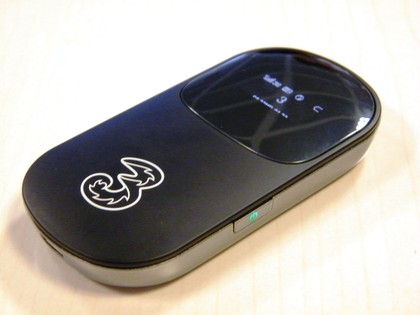
3 UK E585 Pocket Wifi with larter firmware

3 UK E585 Pocket Wifi with larter firmware

Newflash: 3 UK E585 Pocket Wifi Unlock download!

Comments from happy blog readers from around the world, that have donated towards my hosting and bandwidth costs, that have successfully unlocked their ‘MiFi’ Huawei E585 using my information. Please note this is NOT an automated service, and I get many hundreds of emails a day about the information posted on andysworld.org.uk, please be patient!
YOU ARE A LEGEND
Pierre, Randburg, South Africa

“Daime u fast !!! Thanks andy u da man ! “
Nasser, Dubai, United Arab Emirates

“Brilliant, worked a treat. Thanks.”
Adam, Northumberland, United Kingdom

“It really works, Thanks Andy”
Anthony, Hong Kong

“Thank you it worked”
Kevin, London, United Kingdom

Followed all the great instructions and have unlocked device. Thanks Andy”
Paul, New Zealand

“it is up and working”
Chris, India

“Excellent. Thanks.”
Peter, Wales, United Kingdom

“Very quick, excellent unlock, thanks Andy”
Donny, USA

“Thank you so much Andrew. Now i can unlock my huawei e535.”
Thawatchai, Bangkok, Thailand

“Thank you!! It worked! Sucessfully unlocked. Great job!”
Eirc, South Africa

A breeding pair of Huawei E585 Unlocked for Orange and T-Mobile

A breeding pair of Huawei E585 Unlocked for Orange and T-Mobile

Newflash: Vodafone Australia E585 Pocket Wifi Unlock download!

Thursday, December 30th, 2010

Vodafone Australia E585 Pocket Wifi prevent unlocking by using different firmware to the UK models.

Vodafone Australia E585 Pocket Wifi Unlock

Vodafone Australia E585 Pocket Wifi Unlock

Newflash: Vodafone Australia E585 Pocket Wifi Unlock download!

Comments from happy blog readers from around the world, that have donated towards my hosting and bandwidth costs, that have successfully unlocked their ‘MiFi’ Huawei E585 using my information. Please note this is NOT an automated service, and I get many hundreds of emails a day about the information posted on andysworld.org.uk, please be patient!

YOU ARE A LEGEND
Pierre, Randburg, South Africa

“Daime u fast !!! Thanks andy u da man ! “
Nasser, Dubai, United Arab Emirates

“Brilliant, worked a treat. Thanks.”
Adam, Northumberland, United Kingdom

“It really works, Thanks Andy”
Anthony, Hong Kong

“Thank you it worked”
Kevin, London, United Kingdom

Followed all the great instructions and have unlocked device. Thanks Andy”
Paul, New Zealand

“it is up and working”
Chris, India

“Excellent. Thanks.”
Peter, Wales, United Kingdom

“Very quick, excellent unlock, thanks Andy”
Donny, USA

“Thank you so much Andrew. Now i can unlock my huawei e535.”
Thawatchai, Bangkok, Thailand

“Thank you!! It worked! Sucessfully unlocked. Great job!”
Eirc, South Africa

A breeding pair of Huawei E585 Unlocked for Orange and T-Mobile

A breeding pair of Huawei E585 Unlocked for Orange and T-Mobile

andysworld! Blog: Huawei E585 Unlock download!

Saturday, November 13th, 2010

iPad Gadget of the Year – Huawei E585 – also called MiFi device.

The Huawei E585 MiFi Moble WiFi Wireless 3G Modem is currently exclusively only available on the Three network and it’s SIM-locked to this network, if you insert another SIM from another provider O2, Voda UK, Orange or T-Mobile you’ll receive an “Insert SIM”, “Bad Sim”, “Sim Lock”, “Invalid SIM” or similiar error. If you would like to use this fanastic 3G Wireless Router on another network you’ll need to remove the SIM-LOCK. This is where you need to be very careful, there are various different ways of removing the SIM-LOCK, the correct way and the wrong way, some hacks have re-written the firmware, the result removes the SIM-LOCK, but leaves you with a E585 modem with modified firmware, and you’ll not be able to change the firmware in the future.

This method reveals the true SIMLOCK code, and then you enter this SIMLOCK code into the E585 via the web interface.

Huawei 585 Hidden Unlock Menu

Huawei 585 Hidden Unlock Menu

The method is very simple

  1. Insert SIM card from another network.
  2. Turn on MiFi (E585) Invalid SIM will be displayed.
  3. Connect MiFi (E585) to computer.
  4. Read and download flash contents from MiFi (E585).
  5. Unlock code is hidden in flash contents.
  6. Enter Unlock code in hidden menu.
  7. UNLOCKED.
  8. For details on unlocking and software please make a 10 GBP donation via PayPal.
  9. and by return I’ll send you the PDF document and software to unlock your E585.
  10. The donation pays for the hosting of this website, and thousands of hits and free information I’ve provided on unlocking Three Mobile Modems.
Comments from happy blog readers from around the world, that have donated towards my hosting and bandwidth costs, that have successfully unlocked their ‘MiFi’ Huawei E585 using my information. Please note this is NOT an automated service, and I get many hundreds of emails a day about the information posted on andysworld.org.uk, please be patient!
“Daime u fast !!! Thanks andy u da man ! “
Nasser, Dubai, United Arab Emirates

“Brilliant, worked a treat. Thanks.”
Adam, Northumberland, United Kingdom

“It really works, Thanks Andy”
Anthony, Hong Kong

“Thank you it worked”
Kevin, London, United Kingdom

Followed all the great instructions and have unlocked device. Thanks Andy”
Paul, New Zealand

“it is up and working”
Chris, India

“Excellent. Thanks.”
Peter, Wales, United Kingdom

“Very quick, excellent unlock, thanks Andy”
Donny, USA

“Thank you so much Andrew. Now i can unlock my huawei e535.”
Thawatchai, Bangkok, Thailand

“Thank you!! It worked! Sucessfully unlocked. Great job!”
Eirc, South Africa

A breeding pair of Huawei E585 Unlocked for Orange and T-Mobile

A breeding pair of Huawei E585 Unlocked for Orange and T-Mobile

Unlocking a 3 Mobile Broadband MiFi (Huawei E585)

Sunday, August 8th, 2010

iPad Gadget of the Year – Huawei E585 – also called MiFi device.

The Huawei E585 MiFi Moble WiFi Wireless 3G Modem is currently exclusively only available on the Three network and it’s SIM-locked to this network, if you insert another SIM from another provider O2, Voda UK, Orange or T-Mobile you’ll receive an “Insert SIM”, “Bad Sim”, “Sim Lock”, “Invalid SIM” or similiar error. If you would like to use this fanastic 3G Wireless Router on another network you’ll need to remove the SIM-LOCK. This is where you need to be very careful, there are various different ways of removing the SIM-LOCK, the correct way and the wrong way, some hacks have re-written the firmware, the result removes the SIM-LOCK, but leaves you with a E585 modem with modified firmware, and you’ll not be able to change the firmware in the future.

This method reveals the true SIMLOCK code, and then you enter this SIMLOCK code into the E585 via the web interface.

Huawei 585 Hidden Unlock Menu

Huawei 585 Hidden Unlock Menu

The method is very simple

  1. Insert SIM card from another network.
  2. Turn on MiFi (E585) Invalid SIM will be displayed.
  3. Connect MiFi (E585) to computer.
  4. Read and download flash contents from MiFi (E585).
  5. Unlock code is hidden in flash contents.
  6. Enter Unlock code in hidden menu.
  7. UNLOCKED.
  8. For details on unlocking and software please make a 10 GBP donation via PayPal.
  9. and by return I’ll send you the PDF document and software to unlock your E585.
  10. The donation pays for the hosting of this website, and thousands of hits and free information I’ve provided on unlocking Three Mobile Modems.
Comments from happy blog readers from around the world, that have donated towards my hosting and bandwidth costs, that have successfully unlocked their ‘MiFi’ Huawei E585 using my information. Please note this is NOT an automated service, and I get many hundreds of emails a day about the information posted on andysworld.org.uk, please be patient!

“Daime u fast !!! Thanks andy u da man ! “
Nasser, Dubai, United Arab Emirates

“Brilliant, worked a treat. Thanks.”
Adam, Northumberland, United Kingdom

“It really works, Thanks Andy”
Anthony, Hong Kong

“Thank you it worked”
Kevin, London, United Kingdom

Followed all the great instructions and have unlocked device. Thanks Andy”
Paul, New Zealand

“it is up and working”
Chris, India

“Excellent. Thanks.”
Peter, Wales, United Kingdom

“Very quick, excellent unlock, thanks Andy”
Donny, USA

“Thank you so much Andrew. Now i can unlock my huawei e535.”
Thawatchai, Bangkok, Thailand

“Thank you!! It worked! Sucessfully unlocked. Great job!”
Eirc, South Africa

A breeding pair of Huawei E585 Unlocked for Orange and T-Mobile

A breeding pair of Huawei E585 Unlocked for Orange and T-Mobile

3G Killer Accessory – Huawei E585

Sunday, August 8th, 2010
Huawei E585 MiFi Mobile WiFi Wireless 3G Modem

Huawei E585 MiFi Mobile WiFi Wireless 3G Modem

If you have an iPadtastic iPad without 3G or have many mobile WiFi devices that could benefit from 3G connectivity, then the Huawei E585 MiFi Mobile WiFi Wireless 3G Modem is for you.  The Huawei E585 has already won Best iPad Accessory, its sold exclusively by Three here :- http://www.three.co.uk/Mobile_Broadband/MiF.

It’s basically a WiFi router with in-built 3G mobile modem, rather than ADSL or Cable modem. At present, I’m finding I’ve got four devices that all require 3G mobile internet connectivity, Laptop, Netbook, iPad and PDA and trying to keep all contracts up to date is costing me, so this one device, I can use one mobile SIM contract, and up to five devices can connect to this mobile WiFi access point, and use 3G mobile connectivity.

It’s an excellent device, with clear excellent instructions if you need them, and good software and configuration available from a web gui.

Huawei E585 MiFi Mobile WiFi Wireless 3G Modem

Huawei E585 MiFi Mobile WiFi Wireless 3G Modem

Personally in the UK, I would continue using the network Three for data, using the loophole, I’ve blogged about before. This still makes Three the cheapest data mobile provider in the UK.

If Three’s not for you, and you want to try it on another network, the Three Huawei E585 is sim-locked to the Three network.

(I’ll post later how you remove the sim-lock).

How to beat the UK TV License and save £145.50 a year!

Wednesday, July 21st, 2010

I’ve just received my new UK TV License for another 12 months, at a cost of £145.50 a year. I think everybody knows in the UK, if you use a service like BBC iPlayer to watch pre-recorded shows, what the TV License calls “on-demand”, a UK TV License is not required. What I didn’t know, and I’ve been told this by UK TV Licensing is if you purchase any computer or high tech mobile phone or games console your details (name and address) will also be sent to UK TV Licensing, I only thought it was TV receiving equipment, but on reading my new TV License it states “You’re now covered to do more than just watch TV at home on a TV set. You can also watch and record television programmes as they’re being shown on TV through your computer, games consoles, and digital box, DVD/VHS recorder, even your mobile phone”.

So therefore TV Licensing assumes that every household in the UK should have a TV License.

I’ve made some enquiries about the defintion of “on-demand” which doesn’t require a TV License, it doesn’t require a TV License because it’s pre-preorded content. The content was also not received by you, as you didn’t record it. In the same way, Homeowner A records a program for you as it’s broadcast, they are covered by their TV License to receive this program, they give the program to you on a USB stick, Homeower B doesn’t require a TV license to watch the program.

If you examine the above further, and watch a program, which is recorded elsewhere, not at your home, and transmitted/played-back 50 seconds later – no TV License is required.

I’ve just come off the telephone discussing this with Amie, TV Licensing on 0300 790 6055. The telephone conversation was recorded, she also stated that the Field Agents are also aware of this information.

So how do you save £145.50 a year,

  1. Firstly you must stop using your TV equipment, e.g. TV and Set-Top-Boxes that receive television through a UHF aerial (e.g. live broadcasts)
  2. Remove the TV aerial from the TV equipment.
  3. You do not have to remove the TV equipment from the premises (I’ve also discussed this with TV Licensing – they have to prove you are using it, and I was told, they would take your word that you are not using it!).
  4. Use BBC iPlayer, Sky Player, ITV Player, 4od, Demand Five to watch pre-recorded “on-demand” content from the Internet, either via computer, laptop or Internet connected TVs.
  5. Live Content use – TVCatchuphttp://www.tvcatchup.com/ from your computer, laptop, iPhone or iPad.
  6. tvcatchup_ipad1a1You can turn your iPad into a TV with TVCatchup iPad Service.

NEWSFLASH! Evicted from The Orange Shop, 16/17 Coney Street, YORK TODAY!

Sunday, July 18th, 2010

I went into The Orange Shop, 16/17 Coney Street, YORK today at approx 14:00 to make an enquiry about the iPhone 4 32GB Black on an Orange Contract. I was greeted by a Sales Person called Mark.

He was quick to explain to me, that Apple fix the prices of the iPhone 4.0 32GB Black, and Mobile Airtime companies cannot set the price of the phone, he asked if I wanted it on Pay As You Go or Contract, I replied I was interested in a Contract, he told me the cost of the phone was £319, and monthly costs of £35, for 18 months.

tesco-mobile-logoI told him the monthly cost was tool high, and I mentioned Tesco Mobile at £20 a month,

and in his next breath Mark said

“if you go with Tesco Mobile you’ll get no signal, because Orange have more transmitters across the country than Tesco Mobile

Personally, when a Sales Person resorts to this sort of tactic to make a sale, it make me suspicious, I always remember a old friend/work colleague, when I worked in Sales, hundreds of years ago, when dinosaurs ruled the earth, telling me NEVER disrespect the competitor to make a Sale.

When Mark told me this, I gave him my mobile phone, and asked him to tell me what current network it’s on, it happens to be Orange (he didn’t know this before I handed him the phone, he didn’t even bother to ask me). I then reminded Mark, that I’ve probably been with Orange as a Customer, longer than he’s been an Employee, which now is about approx 11-12 years, and I don’t have reception at home with Orange, but I do with O2, Tesco Mobile, Vodafone, T-Mobile and 3! So I don’t think what he’s saying is valid and I don’t like the way he’s slagging off the Competition, at this point he asked me to LEAVE THE SHOP! He then started stating I’m now SLAGGING him off!

I pointed out as I left the Shop, I was surprised they were happy to lose a potential sale, and told him I would make him famous, and Tweet later about this incident! I don’t know why Mark lost his rag with me, and I hadn’t even had my Red Bull for the day!

So Happy Sales Mark……..

Looks like I’ll be joining Tescos Mobile then…..so much for 11 years Customer Loyality! (not that Mark would know, he didn’t ask the question!)

PS Mr Orange/Mr Tescos if your reading this, iPhone 4 32GB Black on Contract in the post would be very nice Free of Charge!

Network Provider 3 Mobile Mast!

Wednesday, December 16th, 2009

I’ve been using 3 mobile broadband from a remote site for 10 weeks with no issue, very strong end stopping, “breaking or bending me needle good buddy!” signal. UTMS and HSDPA signals here on site.

A few weeks ago, it stopped working, still the same strong signal, but the ping times, were timing out, it looked like a routing issue to me. But after long discussions with 3’s call centre, they told me they had decommisioned a cell site, and that was the issue, I’m not too sure whether to believe them, but it sounded convincing when they told me the location of the mast! (on top of my Garage, that repairs my car!) – I’d not noticed in the dark!

This is the local mobile mast, which my mobile broadband dongle used to use!

So here’s a lovely picture taken with my mobile phone….

3 Mobile Mast

3 Mobile Mast

I’m thinking of creating an Observer’s Book of Mobile Phone Masts or I-Spy UK Mobile Phone Masts!

okay, maybe a website!

Stop Press! 3 Mobile Broadband still works for a fiver!

Wednesday, December 16th, 2009

Ignore the last post!

That’s what happens when you talk to a call centre!

It still works!

My 3 Balance and Free Stuff

My 3 Balance and Free Stuff

for the moment, but technicaly, it’s exploting a loophole. I think it could have been the Add-On option had vanished, maybe because I was low on “top-up”! But it’s strange that my mobile number is now associated with a Dongle and a Mobile Phone!