Archive for the ‘computing’ Category

What’s in your Man Bag?

Tuesday, February 9th, 2010

After a few folk on-site recently have been laughing at my “hand bag”. I keep telling them it’s a man bag which I keep my notebook in and a few other things! I’m always complaining to Lindsey about not being able to find her keys in her many bags that she uses, it’s prompted me to take a photograph of the items in my man bag!

Contents of my man bag!

Contents of my man bag!

Contents Include:-

  • Sony Vaio T1XP Mini Notebook and Sony Vaio Case.
  • Sony Vaio T1XP charger and mains cable.
  • Tom Tom GO 520 in hard case.
  • SanDisk cruzer mini 1GB flash drives (2).
  • SanDisk cruzer micro clear body 4GB flash drives (2).
  • SanDisk cruzer micro 4GB flash drive (encrypted) (1).
  • hp 4GB flash drive (encrypted).
  • Corsair Survivor GT 64GB flash drive (encrypted) (including chain and dog tag!).
  • 3 3G MF627 USB Modem with 4GB micro SD card inserted. (encrypted).
  • Cisco Aironet 350 AIR-LMC350 (patched 200mW) PCMCIA card.
  • Cisco Aironet 802.11a/b/g PCMCIA Wireless Adaptor.
  • Linksys Dual-Band Wireless 802.11a, 802.11b, 802.11g WPC55AG PCMCIA card.
  • Orinoco 802.11b PCMCIA GOLD Card.
  • Senoa special PCMCIA card!
  • N-type to Wireless LAN card pigtails, various types (3).
  • Canon Ixus IS 850 Digital Camera including case.
  • Flash card case including compact flash, SD, Micro SD, Mini SD, Memory Stick, Memory Pro cards.
  • HP Smart Start CD ROMs and ESXi flash modules.
  • Carrying case full of technical CD ROMs.

I’ll not complain the next time Lindsey has difficulty finding her keys!

That’s alot of tech!

VMware ESX Server 2.5.4 build-32461

Thursday, February 4th, 2010

The Microsoft Exchange (email) store ran out of disk space today, so I thought I better add a new virtual disk to the virtual server. I then remembered we still run our office systems on an aging (non-supported) but very stable VMware ESX Server 2.5.4 build-32461!

How VMware ESX used to look!

How VMware ESX used to look!

How we edit the configuration in VMware ESX 2.5.4

How we edit the configuration in VMware ESX 2.5.4

Note to self Must upgrade to VMware vSphere 4.0 sometime soon!

The Flash Survivor GT 64GB by Corsair USB flash drive

Wednesday, February 3rd, 2010
Plastic Wrapped - Flash Survivor GT 64GB by Corsair USB flash drive CMFUSBSRVR-64GBGT

Plastic Wrapped - Flash Survivor GT 64GB by Corsair USB flash drive CMFUSBSRVR-64GBGT

Mine’s bigger than yours comes to mind!

I’ve been looking for a portable storage solution for a while to carry around some DVD isos, and VMware images but also wanted a sturdy pen drive.

Well you don’t get sturdier than this one.

  • Encased in extremely strong CNC-milled, anodized aircraft-grade aluminum.
  • Water resistant to 200M through the use of a EPDM waterproof seal.
  • Protected from vibration or impact damage through the use of a molded shock dampening collar.
  • Plug-&-Play with any USB 2.0 certified peripheral computer port (backward compatible with USB 1.1).
  • USB extension cable and Dog Tags included.
  • Protected by a Limited 10-year Warranty.
Flash Survivor GT 64GB CMFUSBSRVR-64GBGT with Dog Tags!

Flash Survivor GT 64GB CMFUSBSRVR-64GBGT with Dog Tags!

Flash Survivor GT 64GB CMFUSBSRVR-64GBGT unscrewed!

Flash Survivor GT 64GB CMFUSBSRVR-64GBGT unscrewed!

You may have noticed that the Corsair dog tag is upside down, I didn’t notice until after the photograph, am I supposed to wear the dog tag?

The 64Gb flash drive is quite long, and probably one of the longest flash drives around, it’s certainly not a short flash drive. It measures about 10cm long.

Some typical geeky, nerdy benchmarks for Read/Write

Flash Toolkit Benchmarks

Flash Toolkit Benchmarks - CMFUSBSRVR-64GBGT

CrystalDiskMark 2.2 Benchmarks

CrystalDiskMark 2.2 Benchmarks - CMFUSBSRVR-64GBGT

HD Tune Pro Benchmarks  - CMFUSBSRVR-64GBGT

HD Tune Pro Benchmarks - CMFUSBSRVR-64GBGT

So, 30MB/sec for Read and 18MB/sec for Write.

So if you want a big, rugged, 10 year warrantied flash drive opt for the Flash Survivor GT 64GB by Corsair!

Goodbye Mr 3COM!

Monday, December 21st, 2009

I’ve been using 3COM networking kit for at least 20+ years, it was a real shame that 3COM in 2000, exited the high-end enterprise markets, concentrating on the SOHO market, 3COM switches were never the same again.

I’ve now decided to replace all my 3COM networking equipment with HP Procurve kit, and shortly after doing this, Hewlett-Packard announced, it will be acquiring 3Com for $2.7 billion in cash! So maybe 3COM technology will appear in HP kit in the future.

I’m dumping all my 3COM Switch 3000/3300/1100/1000 switches for HP Procurve 1810G-24 fan less, lower power switches. I’m still keeping the Intel Gigabit Fibre switches for the moment, because the servers all use gigabit fibre connections, so I’ll connect the fibre to mini-Gbics (SFP – small formfactor pluggable) in the Procurve switches.

old 3COM 3300 and new HP 1810G switch

old 3COM 3300 and new HP 1810G switch

Wireless (WiFi) Remote Control of X10 Modules using USB Remote Access

Sunday, December 20th, 2009
  1. The Active Home Pro software is installed on/in a virtual Windows XP Professional computer, I don’t like cluttering up my main production Workstation which happens to be Vista 64-bit Ultimate.
  2. The CM15PRO Programmable Computer Interface is connected by USB to this computer. The Active Home Pro software is the software that drives the computer interface, I’ve saved the “house file” house.ahx on my NAS (network attached storage) device, so it can be easily shared on my network.
  3. This is the clever Tech bit, USB over Network by Fabula Tech, I’ve been using this software in the virtual work I do for a few years, and it allows you to share a USB device over your network, e.g. you can plug in you USB device on one computer, and connect to it on another via your network. Very handy… USB remote access!
  4. The USB over Network by Fabula Tech is installed on the computer connected to the CM15PRO Programmable Computer Interface. We will call this the server.
USB over network

USB over network

The above snapshot, shows the USB over Network server software running, and the current USB devices attached to the server, which can then be shared, just like any resource, disk, printer etc.

USB over network device shared waiting for connection

USB over network device shared waiting for connection

The device is shared, and is waiting for a client computer to connect to it.

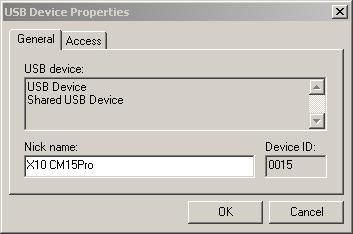
USB device properties

USB device properties

You can give the devices meaningful friendly names, that you’ll remember. On the client computer (remote computer), install another copy of Active Home Pro, making sure the drivers are installed for the CM15Pro. Run the USB over Network client software.

USB over Network client setup

USB over Network client setup

Select USB Device, Add, browser for the computer or enter IP address. You should see, a list of devices that can be connected to.

Client connecting...

Client connecting...

Right click the device, and click connect, if this is the first time you’ve connected to the device, you’ll get the usual, bing-bong tones, and plug N play will start and register the drives.

Now you can use your ActiveHome Pro software on another wireless (WiFi) computer, just open the *.AHX home file, from a shared location.

Client Connected to device

Client Connected to device

X10 Computer Control

Saturday, December 19th, 2009

With this blog post comes a warning, this post is for Geeks, Nerds, Techno-freaks, or people that just like 100% Tech! (you’ve been warned!).

This isn’t new Tech, the X10 protocol was invented 30 years ago, the X10 protocol sends packets of information across house hold mains wiring to receivers to turn items on or off. Computer software is then used to build macros and timers, which can be downloaded to the standalone programmable computer interface to instruct various modules (appliances) to turn on or off, so no need for a computer to be left on and running. What X10 can do for you is limited only by your imagination or programming skills!

I’ve recently invested in X10 computer control, because

  1. various appliances which need timers.
  2. take more advantage of Economy 7 and reduce electrical consumption.
  3. and I like my tech!

okay, I could do this with manual/electronic timers from a well known DIY store, but there would be no fun, but on a serious note, the timers I’ve been purchasing in the last few years, have all failed, the manual segment timers (which I need for the fish house, because digital timers will not start the ballast units on the lighting circuit, because digital timers will not start-up fluorescent tubes). Also various other projects, and I also wanted to create a moonlight light in the fish house, a ceiling rose light which comes on before tank lighting (goes off), and then on before tank lighting goes off – since I’ve turned off fish house main lighting 2 x 70 watt tubes, the fish frighten to easily from dark –> light (vice versa).

So I’ve purchased a Marmitek CM15PRO standalone programmable computer interface, and various X10 Modules, the modules I’ve purchased are plugin modules which plug in to a standard UK 13Amp socket, your appliance then plugs into this socket, you can also get DIN rail modules, wall switches, micro modules as well, and wired modules, and also lamp modules which plug into bayonet or edison screw light fittings. The modules I’ve purchased are:-

  1. AM12 Appliance / Switch Module
  2. AM12W Appliance / Switch Module (Wired)
  3. LM15 Bayonet Lamp module

The following screen shot shows all the modules (appliances) in the house, that are currently being computer controlled. The green light currently indicates they are on. Macros and timers vary the on and off times for every module.

Active Home Professional Software

All Rooms in the house with modules

Screen shot of the software, rooms can be created to organise your modules.

ActiveHome Professional screen shot

ActiveHome Professional screen shot

Here are some pictures of the computer interface and the actual modules in use:-

Now if you think this Tech is OTT, it gets worse, I’ve also found that sometimes I need to be able to control these modules when I’m not at my main production workstation. I could purchase an X10 remote control to send signals to the transceiver to send to the units, but hey that’s too easy, lets find a Tech way to do it!

I leave this to another exciting Geek, Nerdy, Techno-freak blog entry here!

Network Provider 3 Mobile Mast!

Wednesday, December 16th, 2009

I’ve been using 3 mobile broadband from a remote site for 10 weeks with no issue, very strong end stopping, “breaking or bending me needle good buddy!” signal. UTMS and HSDPA signals here on site.

A few weeks ago, it stopped working, still the same strong signal, but the ping times, were timing out, it looked like a routing issue to me. But after long discussions with 3’s call centre, they told me they had decommisioned a cell site, and that was the issue, I’m not too sure whether to believe them, but it sounded convincing when they told me the location of the mast! (on top of my Garage, that repairs my car!) – I’d not noticed in the dark!

This is the local mobile mast, which my mobile broadband dongle used to use!

So here’s a lovely picture taken with my mobile phone….

3 Mobile Mast

3 Mobile Mast

I’m thinking of creating an Observer’s Book of Mobile Phone Masts or I-Spy UK Mobile Phone Masts!

okay, maybe a website!

Stop Press! 3 Mobile Broadband still works for a fiver!

Wednesday, December 16th, 2009

Ignore the last post!

That’s what happens when you talk to a call centre!

It still works!

My 3 Balance and Free Stuff

My 3 Balance and Free Stuff

for the moment, but technicaly, it’s exploting a loophole. I think it could have been the Add-On option had vanished, maybe because I was low on “top-up”! But it’s strange that my mobile number is now associated with a Dongle and a Mobile Phone!

Network Provider 3 remove unlimited mobile broadband for a fiver!

Wednesday, December 16th, 2009

This maybe my last blog p0st via 3 Mobile Broadband, after having many issues with 3, with a local cell site issue, which has now been fixed. I’ve found out today, that the small loophole, where you could use a 3 Pay As You Go Phone SIM, in your 3 broadband dongle, and then Add-On for a Fiver!, Unlimited Internet access for 1 month has been discontinued, it would appear that too many people were removing SIMs from their phones and using them in a 3G Mobile Broadband Dongle! Really!

So now 3 want you to pay for your data allowance as follows:-

  • 1GB for £10
  • 3GB for £15
  • 7GB for £25

these figures are per month, and it doesn’t roll over.

Looks like I’ll be moving on from 3.

Nasty Fakeware – Anti Virus Live

Friday, December 11th, 2009

I’ve come across a some nasty fakeware that infected my business laptop, so here’s some free advice to you. Fake ware is a software trojan that finds it’s way onto your computer from a website, and this particular software program pretends to be an anti-virus program called Anti Virus Live, and if you visit their website, you can purchase options to enable it! Umm!

I’m very careful with all my computers, especially my business laptops. I only went onto two websites the day in question when the computer was “infected”.

A program called “SYSGUARD.EXE”, or in my case “WDXHSYSGUARD.EXE” is hooked into the Run line in the computers registry. It then disables various options, like the Command Prompt, Task Manager, Internet Explorer, when you try to run these applications, it states they are infected, and do you want to Purchase Protection. Also false firewall attacks pop up on screen, and multiple browser windows appear.

The first thing to do, is shutdown, and start the computer in Safe Mode (f8) at boot prompt, and Select Safe Mode. Check the computers registry for anything odd, now this might be difficult, if you don’t know what you looking at, so why not have a look now, and check what’s normally there.

easy way:-

run Msconfig at the command prompt

System Configuration

System Configuration

If anything looks weird, google it!

(for geeks and nerds! see below)

  1. At the command prompt type regedit.exe
  2. Expand HKEY_LOCAL_MACHINE
  3. Expand SOFTWARE
  4. Expand Micrsoft
  5. Expand Windows
  6. Expand CurrentVersion
  7. Expand Run

and check what is there…

registry

registry

I’m going to giveaway some of the Dark Arts’ I’ve learnt over the years….

Free tools I use:-

  1. Free Online and Virus Scan – http://www.virustotal.com/ – Upload suspect files here to check them, it will scan them with many different types of virus/malware checkers.
  2. Malwarebytes’ Anti-Malware – http://www.malwarebytes.org/ – Download and install, full scan, you’ll be surprised what you find!
  3. SuperAntiSpyware – http://www.superantispyware.com/ – Download and install, full scan, you’ll be surprised what you find!
  4. Trend Micro HiJack This – http://free.antivirus.com/hijackthis/ – Trend Micro HijackThis is a free utility that generates an in depth report of registry and file settings from your computer. HijackThis makes no separation between safe and unsafe settings in its scan results giving you the ability to selectively remove items from your machine. In addition to this scan and remove capability HijackThis comes with several tools useful in manually removing malware from a computer.
    IMPORTANT: HijackThis does not determine what is good or bad. Do not make any changes to your computer settings unless you are an expert computer user.
    Advanced users can use HijackThis to remove unwanted settings or files.

and don’t use the following tools much anymore, but always worth adding to the toolbox, if you are paranoid, I just find that Ad-aware has become very bloated!

  1. Ad-aware Free – http://www.lavasoft.com/
  2. Spybot Search andf Destroy http://www.safer-networking.org/en/ – Useful utilities, nopw detects, three quaters of a million, trojans, malware, fakeware items!
  3. Sypblaster http://www.javacoolsoftware.com/spywareblaster.html – Useful for browser protection.

The last three software products have been around for many years, but the “new kids on the block” seem to have the edge!

anyway, if you have any problems, you could always contact me!

Good Luck!!!