Archive for the ‘broadband’ Category

Damn Eclipse Broadband

Tuesday, April 20th, 2010

My broadband has been all over the place again recently, back in March Eclipse my ISP, suggested they would move my broadband line onto a different line card/circuit in the exchange, the Technical Support Engineer’s never really gave away anything tecnical as to what they are actually doing. But today after another discussion it now becomes clear that before I was on a Tiscali LLU circuit, I suspect but I cannot confirm, this, I was moved to this in January 2009, when all the issues started (maybe), although now being moved to a BT circuit, the same issues occurs, extreme hot or cold, the Signal-to-noise ratio rises, and the sync speed drops, and hence throughput is very very slow. Today was the final straw, my broadband speed was as follows at 15:30 GMT. I was told, that because my sync speed had dropped the Profile on the line was slow, and I would have to wait 72 hours before it would speed-up!

Router is reporting this G.DMT SHOWTIME 448000 192000 14.5 49.0

788504536

12717770677778827686

image001

and then later it gets worse…

788825150

I’ve not done anything, I’ve just returned from a Parish Council Meeting, and now the speed is backup to 2.2 – 2.4MB/s, this is the fastest it’s ever been, apart from that strange blip and changeover!

788868135

127179904749702514052

I put this here, so I can find it later, and refer Eclipse and BT to it! (it’s there test results!)

 For your connection, the acceptable range of speeds is 600-2500 Kbps.

For your connection, the acceptable range of speeds is 600-2500 Kbps.

Broadband Connection Moved!

Friday, March 12th, 2010

I’ve been suffering broadband issues for almost a year now, extreme hot or cold have been causing the Sync speed to drop-off to nothing. My ISP have agreed to get BT to move my broadband connection to different equipment. I must stress this has been a very difficult fault to trace, as the fault has been intermittent, but My ISP have been great! Well done Eclipse!

My broadband connection has been just moved to different equipment in the local exchange and the results look promising.

745937086

An increase of almost 1Mb/s!

12376422

Speedtest.Net & Pingtest.Net

Tuesday, March 9th, 2010

Still suffering from intermittent issues with my broadband, for the last 12 months, when the weather gets extremely cold or hot, the speed disappears to zero! My last email to my ISP, they are going to ask BT to move my line at the exchange to see if it gets any better. In the meantime I found these nice utilities, pretty pictures, when testing, nice graphics!

741906178

Try a Broadband Speed Test at http://www.speedtest.net/

12121338

and a ping test at http://www.pingtest.net

Network Provider 3 Mobile Mast!

Wednesday, December 16th, 2009

I’ve been using 3 mobile broadband from a remote site for 10 weeks with no issue, very strong end stopping, “breaking or bending me needle good buddy!” signal. UTMS and HSDPA signals here on site.

A few weeks ago, it stopped working, still the same strong signal, but the ping times, were timing out, it looked like a routing issue to me. But after long discussions with 3’s call centre, they told me they had decommisioned a cell site, and that was the issue, I’m not too sure whether to believe them, but it sounded convincing when they told me the location of the mast! (on top of my Garage, that repairs my car!) – I’d not noticed in the dark!

This is the local mobile mast, which my mobile broadband dongle used to use!

So here’s a lovely picture taken with my mobile phone….

3 Mobile Mast

3 Mobile Mast

I’m thinking of creating an Observer’s Book of Mobile Phone Masts or I-Spy UK Mobile Phone Masts!

okay, maybe a website!

Stop Press! 3 Mobile Broadband still works for a fiver!

Wednesday, December 16th, 2009

Ignore the last post!

That’s what happens when you talk to a call centre!

It still works!

My 3 Balance and Free Stuff

My 3 Balance and Free Stuff

for the moment, but technicaly, it’s exploting a loophole. I think it could have been the Add-On option had vanished, maybe because I was low on “top-up”! But it’s strange that my mobile number is now associated with a Dongle and a Mobile Phone!

Network Provider 3 remove unlimited mobile broadband for a fiver!

Wednesday, December 16th, 2009

This maybe my last blog p0st via 3 Mobile Broadband, after having many issues with 3, with a local cell site issue, which has now been fixed. I’ve found out today, that the small loophole, where you could use a 3 Pay As You Go Phone SIM, in your 3 broadband dongle, and then Add-On for a Fiver!, Unlimited Internet access for 1 month has been discontinued, it would appear that too many people were removing SIMs from their phones and using them in a 3G Mobile Broadband Dongle! Really!

So now 3 want you to pay for your data allowance as follows:-

  • 1GB for £10
  • 3GB for £15
  • 7GB for £25

these figures are per month, and it doesn’t roll over.

Looks like I’ll be moving on from 3.

Nasty Fakeware – Anti Virus Live

Friday, December 11th, 2009

I’ve come across a some nasty fakeware that infected my business laptop, so here’s some free advice to you. Fake ware is a software trojan that finds it’s way onto your computer from a website, and this particular software program pretends to be an anti-virus program called Anti Virus Live, and if you visit their website, you can purchase options to enable it! Umm!

I’m very careful with all my computers, especially my business laptops. I only went onto two websites the day in question when the computer was “infected”.

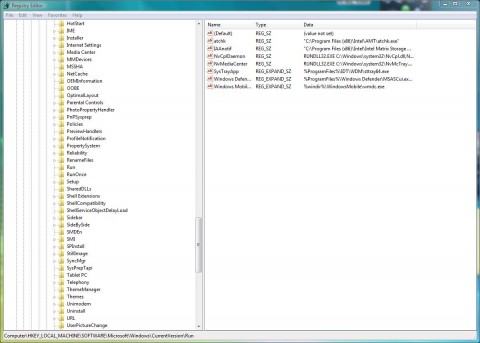
A program called “SYSGUARD.EXE”, or in my case “WDXHSYSGUARD.EXE” is hooked into the Run line in the computers registry. It then disables various options, like the Command Prompt, Task Manager, Internet Explorer, when you try to run these applications, it states they are infected, and do you want to Purchase Protection. Also false firewall attacks pop up on screen, and multiple browser windows appear.

The first thing to do, is shutdown, and start the computer in Safe Mode (f8) at boot prompt, and Select Safe Mode. Check the computers registry for anything odd, now this might be difficult, if you don’t know what you looking at, so why not have a look now, and check what’s normally there.

easy way:-

run Msconfig at the command prompt

System Configuration

System Configuration

If anything looks weird, google it!

(for geeks and nerds! see below)

  1. At the command prompt type regedit.exe
  2. Expand HKEY_LOCAL_MACHINE
  3. Expand SOFTWARE
  4. Expand Micrsoft
  5. Expand Windows
  6. Expand CurrentVersion
  7. Expand Run

and check what is there…

registry

registry

I’m going to giveaway some of the Dark Arts’ I’ve learnt over the years….

Free tools I use:-

  1. Free Online and Virus Scan – http://www.virustotal.com/ – Upload suspect files here to check them, it will scan them with many different types of virus/malware checkers.
  2. Malwarebytes’ Anti-Malware – http://www.malwarebytes.org/ – Download and install, full scan, you’ll be surprised what you find!
  3. SuperAntiSpyware – http://www.superantispyware.com/ – Download and install, full scan, you’ll be surprised what you find!
  4. Trend Micro HiJack This – http://free.antivirus.com/hijackthis/ – Trend Micro HijackThis is a free utility that generates an in depth report of registry and file settings from your computer. HijackThis makes no separation between safe and unsafe settings in its scan results giving you the ability to selectively remove items from your machine. In addition to this scan and remove capability HijackThis comes with several tools useful in manually removing malware from a computer.
    IMPORTANT: HijackThis does not determine what is good or bad. Do not make any changes to your computer settings unless you are an expert computer user.
    Advanced users can use HijackThis to remove unwanted settings or files.

and don’t use the following tools much anymore, but always worth adding to the toolbox, if you are paranoid, I just find that Ad-aware has become very bloated!

  1. Ad-aware Free – http://www.lavasoft.com/
  2. Spybot Search andf Destroy http://www.safer-networking.org/en/ – Useful utilities, nopw detects, three quaters of a million, trojans, malware, fakeware items!
  3. Sypblaster http://www.javacoolsoftware.com/spywareblaster.html – Useful for browser protection.

The last three software products have been around for many years, but the “new kids on the block” seem to have the edge!

anyway, if you have any problems, you could always contact me!

Good Luck!!!

Someone fiddling with my Broadband!

Thursday, October 29th, 2009

My sync speed has fallen to 19,200 this is ridiculous, so I thought I would just get another Draytek Vigor 2600G router out of the box to test, the router has not failed. I have three routers as backups, all the same with the same basic config and firmware on each, I just backup the config off the current active router and transfer to the new unit after power-up. Seems a little overkill, but with three routers exactly the same, it’s easier and quicker to configure, it times of need, and this is one of them.

After connecting up the new router, the sync speed jumped up to 3,136,000, this is the highest I’ve ever seen it, with a SNR Margin or 4.5. So I thought maybe the router I was using was duff, until I connected up the old, current unit and it reported the same!

sync speed as reported by Draytek Vigor 2600G

sync speed as reported by Draytek Vigor 2600G

I think someone is fiddling with my broadband connection as I type. I’m happy to say that my speed has returned to about normal at 1.6Mbps, but I’ve just run another speedtest, and it’s up at 2 Mbps, I’ve not seen 2 Mbps for many years.

2 Mbps results

2 Mbps results

speed tests over the years

speed tests over the years

Yes, I know this may appear sad, but all you City folk that live with Cable and 24Mbps, just take highspeed internet for granted, us rural folk have to put up with slow speeds. This speed increase will not last long, I have a theory, it would appear, that when we get these sunny warm spells in the village, my speed slows down, I bet it’s cold and clear outside at present!

But at least I’ll be able to work tomorrow…

unless it breaks again overnight …

Broadband gone south for the winter!

Thursday, October 29th, 2009

my broadband’s gone south for the winter and I’m getting 271.55 Kbps ( 0.3 Mbps )

Low threshold breached says Eclipse, whatever that means.

Broadband Speed Test

Broadband Speed Test

Belkin you’re Brilliant!

Monday, September 7th, 2009

Well there’s praise, I explain more tomorrow, I’m off to slump in front of the TV & TiVo to watch CSI: Miami! (I’ve also been fighting with a filter leak in the fish house for the last 3 hours!).

and my landline telephone has stopped working but I still have broadband, so the wires are still connected to the telephone exchange. Strange!