Author Archive

Driving a Rocket Ship…

Tuesday, September 28th, 2010

I finally took my car today to the garage today, the vibrations had got the better of me, and I could no longer see out of the rear view mirror, because it was vibrating so much, I’ve had the radio turned-up and could still here the vibrations, and I must have tuned out the noise! Lindsey would complain it gave her a headache, and when ‘Boot Ferrule Man’ visited me at the beginning of the month, he suspected it was the drive shaft or wheel bearing, also confirmed by ‘Bargain Cottage Man‘.

There was some Police, Stop, Action program the other evening, and after the car crashes pictured on the television, and with the darker nights and wet, damp days, I thought it wise to visit the garage and get some items fixed on the car. Back in December last year, I reported my ABS had gone offline, and I should have taken it back to the garage, but never did…..well MOT is due next week, so this stuff had to be fixed.

I dropped my car at the garage this morning, and the Mechanic, dropped me off at my clients site to take back to the garage, he confirmed it was the passenger side front wheel bearing, and was rather worried driving the car, a few miles, in fear the wheel would drop off. He said it was very bad.

Later, after parting with a monkey, the mechanic told me, you must be  a mad ****** driving that car, I wouldn’t have driven it four miles, and certainly not at speed.

Driving my car is now like driving a ****ing rocket ship!!!

Fantasticso there’s a moral here somewhere…..

(oh, and I also had new drive shaft, ABS, springs, and brake calipers), next week it’s MOT and Service! (cannot wait for that!).

Hosting Down!

Thursday, September 23rd, 2010

Whoops, you may have noticed earlier, no andysworld!

Hosting issues with the server…..it’s back now….

thanks

twitter api change for the better to reduce spam

Tuesday, September 21st, 2010

looks like the last few blog posts, didn’t make it to twitter, it appears the twitter api has changed, to stop spam taking over twitter, it was only a matter of time, before it became more complicated to auto-tweet!

Flash comes to iPad and other iOS devices

Tuesday, September 21st, 2010

so stick that in you pipe and smoke it Apple haters! So maybe you might be tempted to purchase an iPad now, it might do Flash in the future!

It would appear that Apple have made some changes to its iOS Developer Programs licence.

What the decision broadly means is that developers can use third-party development tools to create apps for the iPhone, iPad and iPod Touch.

What it really means is Flash apps are about to start flooding the App Store. A few are already awaiting approval, according to reports.

Let’s wait and see…..

3..2..1.. and Success (don’t try this at home kids)

Saturday, September 18th, 2010

After another few failed attempts, and some diagnosis, it was the sealed lead acid battery that wasn’t providing enough power (Amps) to fire the rocket cluster. I tried charging the battery with a car battery charger and that went horribly wrong and smelly, and the plastic case melted on the battery, because my special charger for the seal lead acid battery had also failed.

So I purchased a new sealed lead acid battery and here are the results

Quick disclaimer (don’t try this at home kids), you could get seriously hurt!

This test was to check the rocket mounts were secure to hold in the two rocket motors, before further completing the rocket assembly. You can clearly here the warning tone before firing the rocket motors, both rocket motors ignite simultaneously, the rockets both burn at a constant rate, until the ejection charge which would normally deploy the recovery mechanism, e.g. a parachute is heard.

Looking back at the video, I think there is a slight delay between the rocket motors!

3..2..1.. and nothing… Umm

Monday, August 30th, 2010

Now that the UK has relaxed it’s Rocketry and Explosives requirements, it’s a little easier to acquire and use rocket motors in the UK, without all the red tape and certificates, and explosives license.

so back to Model Rocketry….

Before I complete the rest of this rocket, I’m testing the motor mounts, before adding fins and painting, it’s very important to ensure that the motor mounts are fixed and glued correctly within the body of the rocket, otherwise the motors when ignited will just seperate from the model rocket body.

Test Number 1. 3..2..1.. and nothing… Umm

Time passes and sometime later that evening….. (it’s getting dark now).

Test Number 2. 3..2..1.. and nothing… Umm

Damn Damn and Fecking Damn!!!

Back to the drawing board, electrical issues maybe……not firing….

Well it’s Rocket Science you know!

A reminder of visiting Chorley!

Tuesday, August 10th, 2010

One of my favourite applications on the iPad is called Talking Tom, you speak and he repeats what you say.


Oh, did I not tell you I’ve got an iPad!

The hints were there if you hadn’t spotted them!

Unlocking a 3 Mobile Broadband MiFi (Huawei E585)

Sunday, August 8th, 2010

iPad Gadget of the Year – Huawei E585 – also called MiFi device.

The Huawei E585 MiFi Moble WiFi Wireless 3G Modem is currently exclusively only available on the Three network and it’s SIM-locked to this network, if you insert another SIM from another provider O2, Voda UK, Orange or T-Mobile you’ll receive an “Insert SIM”, “Bad Sim”, “Sim Lock”, “Invalid SIM” or similiar error. If you would like to use this fanastic 3G Wireless Router on another network you’ll need to remove the SIM-LOCK. This is where you need to be very careful, there are various different ways of removing the SIM-LOCK, the correct way and the wrong way, some hacks have re-written the firmware, the result removes the SIM-LOCK, but leaves you with a E585 modem with modified firmware, and you’ll not be able to change the firmware in the future.

This method reveals the true SIMLOCK code, and then you enter this SIMLOCK code into the E585 via the web interface.

Huawei 585 Hidden Unlock Menu

Huawei 585 Hidden Unlock Menu

The method is very simple

  1. Insert SIM card from another network.
  2. Turn on MiFi (E585) Invalid SIM will be displayed.
  3. Connect MiFi (E585) to computer.
  4. Read and download flash contents from MiFi (E585).
  5. Unlock code is hidden in flash contents.
  6. Enter Unlock code in hidden menu.
  7. UNLOCKED.
  8. For details on unlocking and software please make a 10 GBP donation via PayPal.
  9. and by return I’ll send you the PDF document and software to unlock your E585.
  10. The donation pays for the hosting of this website, and thousands of hits and free information I’ve provided on unlocking Three Mobile Modems.
Comments from happy blog readers from around the world, that have donated towards my hosting and bandwidth costs, that have successfully unlocked their ‘MiFi’ Huawei E585 using my information. Please note this is NOT an automated service, and I get many hundreds of emails a day about the information posted on andysworld.org.uk, please be patient!

“Daime u fast !!! Thanks andy u da man ! “
Nasser, Dubai, United Arab Emirates

“Brilliant, worked a treat. Thanks.”
Adam, Northumberland, United Kingdom

“It really works, Thanks Andy”
Anthony, Hong Kong

“Thank you it worked”
Kevin, London, United Kingdom

Followed all the great instructions and have unlocked device. Thanks Andy”
Paul, New Zealand

“it is up and working”
Chris, India

“Excellent. Thanks.”
Peter, Wales, United Kingdom

“Very quick, excellent unlock, thanks Andy”
Donny, USA

“Thank you so much Andrew. Now i can unlock my huawei e535.”
Thawatchai, Bangkok, Thailand

“Thank you!! It worked! Sucessfully unlocked. Great job!”
Eirc, South Africa

A breeding pair of Huawei E585 Unlocked for Orange and T-Mobile

A breeding pair of Huawei E585 Unlocked for Orange and T-Mobile

3G Killer Accessory – Huawei E585

Sunday, August 8th, 2010
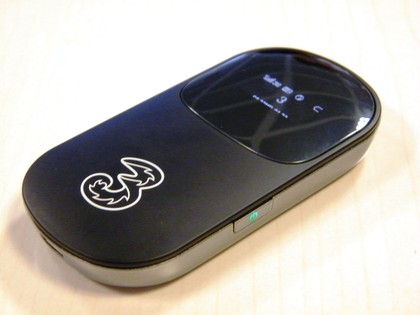
Huawei E585 MiFi Mobile WiFi Wireless 3G Modem

Huawei E585 MiFi Mobile WiFi Wireless 3G Modem

If you have an iPadtastic iPad without 3G or have many mobile WiFi devices that could benefit from 3G connectivity, then the Huawei E585 MiFi Mobile WiFi Wireless 3G Modem is for you.  The Huawei E585 has already won Best iPad Accessory, its sold exclusively by Three here :- http://www.three.co.uk/Mobile_Broadband/MiF.

It’s basically a WiFi router with in-built 3G mobile modem, rather than ADSL or Cable modem. At present, I’m finding I’ve got four devices that all require 3G mobile internet connectivity, Laptop, Netbook, iPad and PDA and trying to keep all contracts up to date is costing me, so this one device, I can use one mobile SIM contract, and up to five devices can connect to this mobile WiFi access point, and use 3G mobile connectivity.

It’s an excellent device, with clear excellent instructions if you need them, and good software and configuration available from a web gui.

Huawei E585 MiFi Mobile WiFi Wireless 3G Modem

Huawei E585 MiFi Mobile WiFi Wireless 3G Modem

Personally in the UK, I would continue using the network Three for data, using the loophole, I’ve blogged about before. This still makes Three the cheapest data mobile provider in the UK.

If Three’s not for you, and you want to try it on another network, the Three Huawei E585 is sim-locked to the Three network.

(I’ll post later how you remove the sim-lock).

In the beginning …

Friday, July 30th, 2010

On driving to the bakers at lunchtime today to get a pasty and sandwich for my lunch, I was struck down by severe stabbing chest pain, so severe that I had to emergency brake and stop the car at silly speed. (the car following me, had a surprise) – I thought I was having a heart attack it came on so quick and was terribly painful, and my immediate thoughts were to stop the car quickly for safety, on getting out of the car, I immediately took off my t-shirt, to check for insects and I found five small puncture wounds and swellings under my left nipple (the owner of the car behind got out to start having a swearing competition with me – but backed down – when I mentioned I’d been stung by an insect – and showed him my left breast!).

I was rather relieved that I’d been stung, but still a little concerned that I couldn’t find anything that had caused it, about 5 minutes later, when leaving the car in the car park, I found a dying young Wasp in the handbrake console, I must have damaged/squashed it when I grasped my chest in the car. The wasp must have flown in through the window or pinged on the wing mirror into my clothing, couldn’t get out, so stung me five times around the nipple!

I was going to call this post Heart Attack, but I thought that would be too alarmist! I could have taken a picture of the dead wasp for the post, but I didn’t think that was very exciting,

so I’ve called it In the beginning …

no reference to the Bible, God or Jesus Christ but to the IBM PC XT! to which I personally owe an awful lot – Thanks IBM!

IBM XT Personal Computer Model 5160

IBM Personal Computer XT Model 5160

IBM XT Personal Computer Model 5160 Made in Scotland

IBM Personal Computer XT Model 5160 Made in Scotland

For those of you, who know your computing history, you’ll know, that I’m not correct, as the 5150 came before this – the original IBM Personal Computer (PC), and was released in 1981, the 5160 (IBM PC XT) was released 2 years later in 1983. But I don’t have a 5150 to photograph!