So hopefully this will cure my issues – Ubiquiti Networks UAP-AC-PRO

Ubiquiti Networks UAP-AC-PRO
Available to purchase from here.
So hopefully this will cure my issues – Ubiquiti Networks UAP-AC-PRO
Ubiquiti Networks UAP-AC-PRO
Available to purchase from here.
Well the title says it all, with the addition of more WiFi Home Automation devices, it would appear I’ve used up all the WiFi beans in my Broadband Routers, or they easily get overloaded with too many devices. I’ve just added another 12 WiFi devices, and it would appear that’s overkill for a 2Wire 2700HGV and backup BT Home Hub 3 broadband routers.

2Wire 2700HGV & BT Home Hub 3
I’ve been meaning to overall my WiFi for a while, so turned off a dedicated 2.4GHz and 5GHz access points, and replaced with a single inexpensive broadband dual band 2.4GHz and 5GHz router from TP-LINK Archer D20 AC750 Wireless Dual Band ADSL2+ Modem Router for Phone Line Connections, those devices that have 5GHz have been migrated to the 5GHz WiFi, e.g. Amazon Echo, Nexus, laptops & iPads.

Boxed TP-LINK Archer D20 AC750 Wireless Dual Band ADSL2+ Modem Router for Phone Line Connections
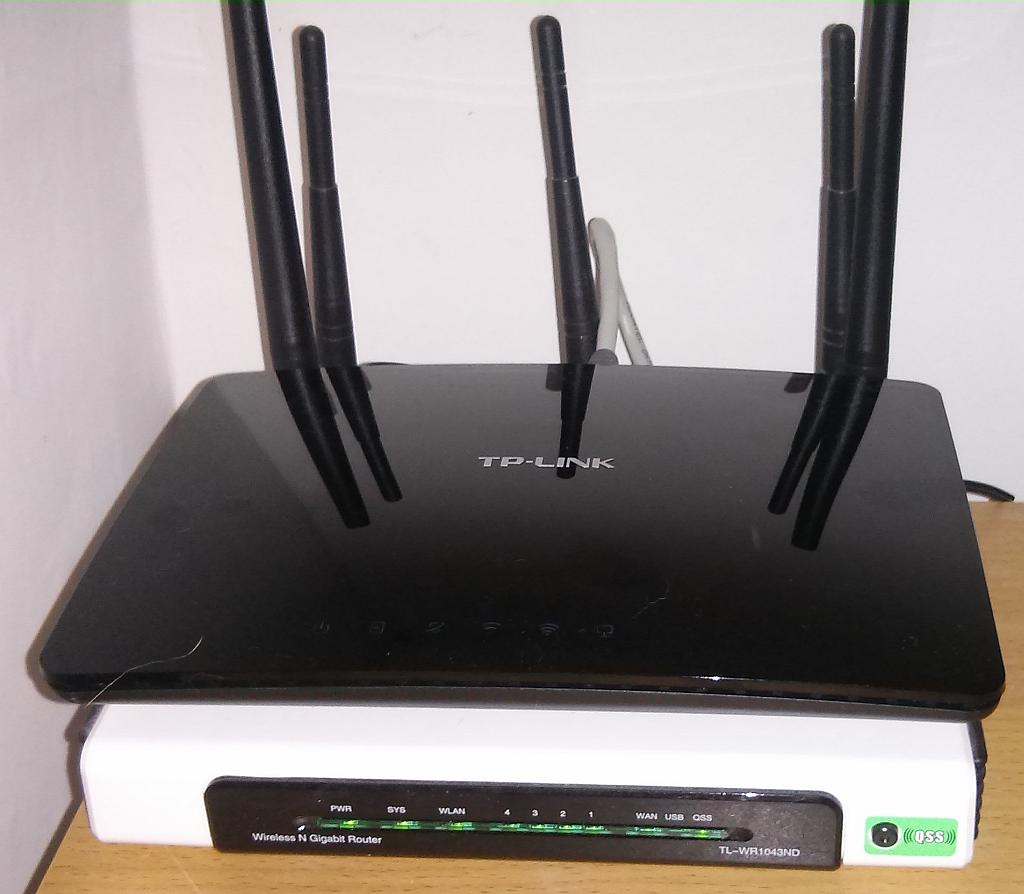
TP-LINK Archer D20 AC750 Wireless Dual Band ADSL2+ Modem Router for Phone Line Connections
It does not look very pretty, and has the standard, LEDs for Power On, 2.4GHz/5.0GHz Enabled, ADSL Connection, Internet Connected and LAN states, this router, is on the top of a shelf, so I need to standard on a stool to check the LED status, it would have been handy, if they were visible… (ignore the whitebox in the above picture, that’s the SamKnows UK Broadband Availability monitoring box)
I’ve now got a few devices from TP-Link, a Chinese company, and the products are of good quality and inexpensive. I’ve got TP-Link battery power banks, and recent WiFi smart switches, all with a 3 Year Guarantee, and 24/7 Technical Support! and if you are a real Techie Nerd, you can visit the TP-Link website, and checkout the GUI Management Interface of their products, using their TP-Link emulator

TP-Link router interface
and for shits and giggles, it has SNMP (for a budget router a bargain), you can graph traffic….

SNMP monitoring of TP-Link router
So all in all, Good value router, with 3 year guarantee, we will see if it struggles with the WiFi!
Update :- It made no difference, the end result, the WiFi radios in routers cannot cope and struggle with too many WiFi devices, in my case 30, which in the future more and more households, we will start to see the same issue….as more households embrace WiFi, how many WiFi devices are you currently using ?
So I purchased one of these – The WiFi Cure! – Ubiquiti Networks UAP-AC-PRO
On my travels, I’ve been stalking more BT Openreach “Cabs”, that have been upgraded or added to facilitate “Superfast Broadband” in the East Riding of Yorkshire, Pocklington area.

This is the largest FTTC cab I've found!

Another large FTTC cabinet, outside Co-op, in fact this cabinet obstructs your view, when pulling out of the Co-op car park!

Different older style PPC cab

Recently, these stickers have been stuck on the cabs! Note the ventilation slits to cool the switch gear inside!
Now the next photo is very interesting….(well I think so…), this is Cabinet 1, and it’s NOT been upgraded as yet, I thought all the cabinets in Pocklington, had been upgraded except Cabinet 10. Cabinet 1 is located on the main high street in Pocklington (Main Street!), which supports ALL the shops, so they’ll not be on Superfast Broadband yet!

Cabinet 1 on Main Street, Pocklington
and this is Cabinet 10

Cabinet 10 on "The Mile"

Cabinet 10 on "The Mile", plenty of space for a new FTTC cab!
and the importance of Cabinet 10, is it’s My Cab! Well not my personal cab, but where my fixed telephone line terminates!
So there is plenty of space near Cab 10 for a new FTTC cab, and I understand that Cab 1 and Cab 10 are still being evaluated, for upgrade, so there is maybe still hope!
It’s possible, that as quite of lot of work may be required for Cab1 (it’s on a busy high street), and my new Cab needs to planned, because it’s near residents garden….
Lets keep fingers crossed!
In the lasts couple of weeks, driving on the way to work, I’ve noticed these new “green daleks” appearing on the street..

older BT "PCP" distribution cabinets
near the older BT “PCP” distribution cabinets

New FTTC Cabinet

recent BT manhole cover
these are in fact the new style FTCC cabinets (fibre to the cabinet/premises), they have ventilation holes, because the new cabinets, just do not contain patch panels, but also electronic network switching gear, so they’ll run warm!
These are for Superfast Broadband, or BT Infinity. These cabinets are just off the A1079, at Bolton Lane, there are also many in Pocklington, that have been recently installed….
I’ve been stalking my cabinet, which has a cable run of 3.7km from my house, to the nearest junction box, and as yet no new FTCC cabinets has appeared, most of the others in Pocklington have now been completed!
I now fear, I could be in the 10% of Rural people, that are excluded from the Governments project to equip 90% of the country with Superfast Broadband!
As I was passing the “Save the Children” charity shop in Pocklington, at the weekend, I spyed a BT Home Hub 3, Mint, Sealed, New in Box, in he front window, for £5!


Always, after a bargain, I snapped it up for a fiver! If you didn’t know BT Home Hubs supplied by BT are “locked” to their Broadband network, you cannot change the username, but a few minutes later, I had an unlocked version, and can use it to connect to my ISP – Eclipse Internet.

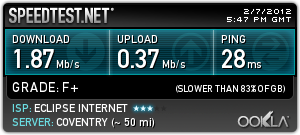
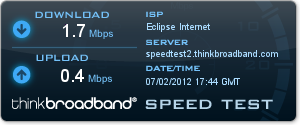
I’m interested to see, if replacing my aging, Draytek Vigor 2600G router, would I get a better connection speed, and download speed! Here are the test results
Draytek Vigor 2600G test results
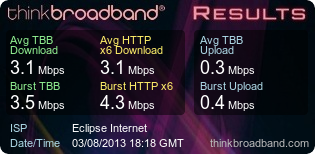
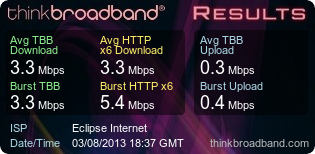
BT Home Hub 3 test results
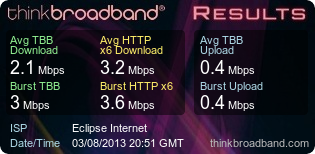
So it does not look like my aging Draytek versus BT Home Hub 3, is the cause of my slowness! and looking at these non scientific tests, the Draytek appears to be faster!
I’ve recently been running trails using 3G Wireless Internet with Celltime Provider Three and O2, you are probably thinking I’m as mad as a badger! (well once upon a time, I did study Electronic Communication Engineering, so I know a little about Radio Frequencies! – (thanks to Mum & Dad! for the funding!).
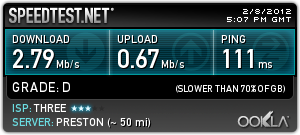
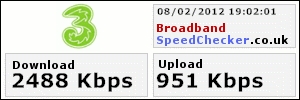
But check the results below, and this is with a -85 dBm signal (boffin speak for GOOD! or three bars good buddy! have you got your ears on!), using the internal antenna on a Option GlobalSurfer III (3G Router). I’ve recently noticed that Three have upgraded their transmitter to now support HSDPA (High-Speed Downlink Packet Access), well what does that load of gibberish mean, well other than the UMTS or 3G symbol changes to “H” on my phone or router. It means that rather than max speed of 3.6Mbps, the max speed could be 7.2MBps or 14.4MBps. Yes via Wireless!
At present I’m getting faster wireless speeds than wired!
| Eclipse Internet | Three 3G Internet |
 |
 |
 |
 |
 |
 |
 |
 |
 |
 |
I generally use this 3G router, because when normal wired ADSL fails, it automatically fails back or fails over to 3G Wireless Internet, and after the recents drop outs and faults, I noticed my 3G wireless broadband was faster!

Option GlobalSurfer III 3G Network Router
I need to complete some more calculations, and purchase a directional Yagi antenna, so I can get a stronger signal = more signal = more power = faster throughput and downloads! (does that sound like Captain Kirk to Scotty the Engineer – Give me more power! Scotty! )

Microwave Wireless Aerial or Twig on biscuit tin!
This aerial is not correct, the VSWR (sorry boffin alert) is too high, and not correctly matched at 3G frequencies! It reminds me of long ago with a DV27 on a biscuit tin!
I now understand, when I visited China, why they did not role out copper wires to peoples houses for telephones, they just jumped to wireless 2.5G communications (whilst the UK, was still using GSM! (2G)).
Well Good Buddy Signing Off!, 10-10.
Earlier in the month, I reported (here’s the blog) that my Broadband has an intermittent fault AGAIN. Back in 2010, I had similar if not the same issues, and it had to be escalted to BT, it looks like, it will have to be escalted to BT again! The problem is an unstable line, disconnects, occasional slow throughout, down to 0.4Mbps.
It’s been reported to Eclipse Internet, my ISP, who are not to blame, as they do not own the telegraph wire from my house to the exchange. British Telecommunications plc, “BT” own that!
Eclipse Internet, changed the Interleave on the line from ON to OFF, to try and stablise the line, but it did not make any difference, and the issues continues…….
stay tuned for the next installment of Broadband Woes Revisited Update Soon!

Draytek Vigor Connection Statistics Interleaved ON

ADSL STATUS Interleaved ON

Draytek Vigor Connection Statistics Interleaved OFF

ADSL STATUS Interleaved OFF
Notice the increase in sync speed (Down Speed), but unfortunately, it did not make any difference to throughput, or fix the issue.
Everything else freezes around here, so why not my Broadband “wires”
It sounds like food you have with chips and peas!
Again, I’m having broadband issues, for the last four days, during the twilight hours, under clear Yorkshire Wolds skies, the temperature has been falling to -7 degrees C, and I have a theory this causes a fault on the line! It just seems very coincidental, if we get a cold spell or very hot spell my Broadband has issues. Recently spoke to Eclipse Internet, that states that four other Eclipse Internet users on the Exchange also had issues this week, at the same time, so it was suggested it was BT, playing with their Exchange!
I’ll think I’ll be opening that call again Eclipse Internet!
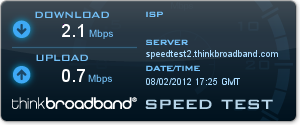
Here are some lovely test results

SpeedTest.net Broadband Speed Test Results

Thinkbroad Broadband Speed Test Results

Router Connection Statistics
Whilst the rest of the world, surfs the Net, at lighting speeds of 8, 20, 40 and 100MBps, I can only dream!
We’ve now also, added the Christmas Tree lights outside, in the Magnolia Tree.

I also got a little bored, and decided rather than using a traditional plug-in 240v 24 hour timer, I would add them to the X10 Computer Controlled System, so I can turn them off via a VMware Virtual Server, running Windows 2008 Web Services!
Lindsey asked “Why?“ – I replied, because I can do stuff like that!
So in thoery I could grant access to this Website, on the Internet to turn them off remotely, or let other people turn them on or off!

The website is basic, but it functions, just need some graphics and CSS!
Update: I’d already written this blog, and submitted for publishing, before catching an Episode of “The Big Bang Theory” – The Cooper-Hofstadter Polarisation (s1e9) – at this very start of the episode, Howard Wolowitz also demonstrates a light and stereo being power-on via x10, and enabling public access to do the same thing, which Penny also states “Why?” – you can get a really cheap wireless remote from Radio Shack!
Okay, so I’m a nerd! But we all knew that!
If your telephone master socket, looks like this example, it could be the problem!

UK BT Master Telephone Socket with many extensions
try removing a few extensions, and just connect your Broadband Modem or Router!
(this example provided by a friend, it did have more extensions, that have since been removed! The ADSL Broadband Router light did not light )

My BT Master Socket - New ADSL faceplate
If you fancy some DIY, you can change the BT Master NTE5/5A faceplate, for a modern NTE2005, (ADSL faceplate) which has a connection for telephone and Broadband USB Modem or Router, and then there is no need to use an additional broadband filter. NTE2005 (ADSL faceplate) are readily available on eBay and Online.




![[Valid RSS]](http://andysworld.org.uk/images/valid-rss.png "Validate my RSS feed")
