Archive for the ‘computing’ Category

The Roundabout, for Andy “The Return to the Mandelbrot sets!”

Thursday, February 20th, 2014

When I first started experimenting with computers in the early 80’s, I was fascinated with the Mandelbrot set, and spent many hours generating it on a BBC Micro, later I added a Second 6502 Processor, I then upgrade to a Master 128k with a Turbo Co-Processor, all in the aid of more compute power! (I search high and low for a Acornsoft GXR rom, to give me more colours, and finally got one from Plymouth Polytechnic Computer Science Department!).
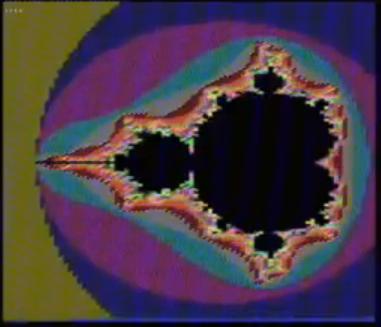
BBC Micro Mandelbrot

BBC Micro Mandelbrot

This week, I find myself with the following configuration:-

  • (2) nVidia Tesla K40 (currently the most powerful and most expensive graphics processing unit (gpu), used for compute (no video output!).
  • 1 Terra Byte PCI-e Flash Card (SSD but plugs into the motherboard!).

This is a real time, video of calculating Mandelbrot set, using CUDA 5.5 on the 2 nVidia Tesla K40, a little faster than using a BBC Microcomputer!

GoodBye from Andysworld! – LogMeIn Free will no longer be available starting Jan 21 2014 @LogMeIn, Hello @TeamViewer!

Tuesday, January 21st, 2014

I logged into  LogMeIn Free this morning, and was greeted with:-

Soon LogMeIn Free will no longer be available.

To continue using remote access, you’ll need to purchase an account subscription of LogMeIn Pro. As a loyal user, you’re entitled to discounted introductory pricing, with packages starting at $49/year for two computers.* Your new account includes our signature remote access with premium features like remote printing, file transfer and cloud data access, plus desktop and mobile apps to improve your experience.
Please note:

If you do not take action, the Free computers highlighted in your account will become inaccessible on 28/01/2014. Only 7 days left!

soon-logmein-free-will-no-longer-availablesoon-logmein-free-will-no-longer-available1Oh, well I’m not paying for it, I’ll move and use Teamviewer or Google Chrome Desktop instead…

Good Luck LogMeIn, but GoodBye from Andysworld!

FREE 50GB of Cloud Storage for Lifetime @BoxHQ – 50GB of free cloud storage in a few clicks…

Monday, January 20th, 2014

Yes, that’s correct. you read it correctly, to celebrate Box’s release of the new iOS (iPhone and iPad) app, there are giving away 50GB of cloud storage, if you sign up with a new account by February 15th 2014. This Box account can then be accessed from your iOS device, Android device, Windows PC or Mac. You must sign-up to a new account via an iOS Device! to get your FREE 50GB! 50GB of free storage in a few clicks…

50GB for Lifetime on BOX

50GB for Lifetime on BOX

Follow these quick steps, to get FREE 50GB!

  1. Go to the AppStore on your iPad or iPhone (must have iOS 6.0 of later!).
  2. Download and Install the BOX application.
  3. Start the BOX application, and Click Sign Up
  4. Enter an email address and password, and Click Sign Up (you must use a new email address, which is not registered with BOX!)
  5. BOX will Create the Account, and send an email to the email address you entered.
  6. Click the Link in the email from Box to Activate the Account.
  7. Log In on the iPad or iPhone
  8. Once you have logged in successfully, you will receive an email stating You now have 50GB of Storage!

Andy is Nominated as an MVE! “The Best of The Best at Experts Exchange” @ExpertsExchange

Friday, December 20th, 2013

An Early Christmas Present, when I discovered yesterday evening, I’ve been nominated as an Experts Exchange MVE (Most Valuable Expert).

Introducing the Most Valuable Experts Gamma Class

Mark Wills, Site Administrator explains what a MVE is…

But in Summary..

Mark explains MVE’s are:-

“kind of un-sung hereos in many repects”
“single most important people that contribute to quality”
“stand out bunch”
“fairly elite”
“fairly exclusive”
“The Best of The Best at Experts Exchange”

Mark Wills, Site Administrator

Most Valuable Expert Awards

VMware Festive Journey starts on 2nd December 2013

Wednesday, November 27th, 2013

The VMware Elves are pleased to announce that the VMware Festive Journey is back!

vmware-festive-journey-2013

Amazon.co.uk top notch delivery, Amazon.co.uk gets better! Give Amazon.co.uk a try this Christmas!

Sunday, November 10th, 2013

Google-ing the Internet where I could purchase a particular item on Friday afternoon, surprise, surprise! only Firebox and Amazon.co.uk, had this item listed.

Later Friday evening at exactly  8 November 2013 18:57, I picked up my smartphone and Googled again, and was taken to the Amazon.co.uk website, it stated order in the next 3 minutes for delivery Saturday 9th November 2013, with 1-Click Checkout I was done, and it was ordered!

What’s bizarre, is I’ve had a delivery before from Amazon.co.uk for a Saturday delivery, which arrived by DPD, my usual DPD deliveries, advise me of when it’s going to be delivered, but not Saturdays, unless there is not enough time to prepare the information.

At  8 November 2013 22:11, I had confirmation from Amazon.co.uk my order had been despatched. This also provided DPD tracking information that confirmed it was at Oldbury.

DPD Tracking Information

DPD Tracking Information

I set my alarm clock, to wake me up, as DPD deliveries can be early on Saturday, so much for the rest! Shortly after opening the bedroom curtains, I spotted the DPD delivery van, which could only have been for me, with my Amazon.co.uk Order!

Here it is:- Angus has to inspect everything, well it is for Esther, Angus and Tilly.

amazon-order1

amazon-order2

amazon-order3

So this Christmas why not place an order with Amazon.co.uk, or use DPD for your deliveries.

I do not work for Amazon.co.uk or DPD.

and if you are interested, in what my order was, you will have to wait until tomorrow!

UPDATE see what was ordered here!

Thanks to SimpliVity for the Raspberry Pi!

Tuesday, November 5th, 2013

simplivity-logoI’ve arrived home from work yesterday evening late, after changing yet another wheel on my car after a puncture! A nice treat after spending an hour changing a wheel/tyre!

To find this delivery from the US via FedEx!

A Raspberry Pi

A Raspberry Pi

A Raspberry Pi

A Raspberry Pi

Thanks to SimpliVity for the Raspberry Pi, a gift from  them for being a VMware vExpert 2013!

A little bit about SimpliVity

SimpliVity was established in late 2009 with the humble mission of simplifying IT, and we are well on our way.   OmniStack™–our novel technology that includes 10 patent-pending innovations– powers a new assimilated, IT infrastructure platform. SimpliVity’s OmniCube™ platform provides enterprise computing, storage services and  network functionality, inclusive of WAN optimization, Unified Global Management, Seamless Cloud Integration, Primary Storage Deduplication, Backup deduplication, Caching, and Global Scale Out— all at a fraction of the acquisition cost of standard infrastructure, a fraction of today’s traditional operating costs, and with a game-changing reduction in complexity.  When deployed, OmniCube systems create an OmniCube Global Federation, creating a massively scalable pool of shared resources, and enabling efficient data movement, scalability, and enterprise class system availability – all managed from a single pane of glass, by a single admin.

HOW TO: P2V, V2V for FREE – VMware vCenter Converter Standalone 5.5

Sunday, October 27th, 2013
HOW TO:  P2V, V2V for FREE – VMware vCenter Converter Standalone 5.5

If you need to complete a Physical to Virtual (P2V), Virtual to Virtual (V2V) conversion to a VMware product (VMware Workstation, Player or vSphere) for FREE, then there is some good news…

VMware vCenter Converter Standalone 5.5 was released on 22 October 2013, and this latest version has new support for the following:-

  • Support for virtual machine hardware version 10
  • 62TB disks, virtual SATA controllers, etc.
  • Support for RedHat KVM virtual machines as a source
  • A new option for selecting the network adapter for the target virtual machine
  • Support for additional guest operating systems
  • Parallel disk conversions
  • Virtual SAN support

Also fixes numerous issues with crashing and conversion issues, when converting physical or virtual computers to VMware vSphere vCenter Server 5.5 and VMware Hypervisor ESXi 5.5.

  • VMware vCenter Converter Standalone v5.5

VMware vCenter Converter Standalone v5.5

While I would recommend and use VMware vCenter Converter Standalone 5.5, there are other commercial products that do exist, and I have used.

If you have a large estate of physical machines to migrate, these products have a scheduler and can perform automated workflows, but these are commercial products and not FREE like VMware vCenter Converter Standalone 5.5

NETIQ Platespin Migrate

Acronis vmProtect

Storagecraft Shadow Protect

Symantec System Recovery Server Edition

If the operating system is Windows 2003, Windows 2000 or Windows NT 4.0, select and earlier version of VMware vCenter Converter Standalone version 3.0.3 or 4.0, support for early operating systems has been removed now from v5.5.

if you have recently upgraded to vSphere vCenter Server 5.5, and are looking for the Convert/Import vCenter plugin which existed with 4.x, it’s now longer available, and has been removed, and you will need to use  VMware vCenter Converter Standalone 5.5 for your conversions.

and if you do use VMware vCenter Converter Standalone 5.5, and you want to make your transfers 60% faster checkout my EE article here

HOW TO: Improve the transfer rate of a Physical to Virtual (P2V), Virtual to Virtual Conversion (V2V) using VMware vCenter Converter Standalone 5.0

Download VMware vCenter Converter 5.5 here
VMware vCenter Converter Standalone 5.5 Documentation
VMware vCenter Converter Standalone 5.5 User Guide


If you have issues, you may want to consult the following articles and guides

Read fellow Expert Bestway’s article.

Best Practice Video Guide here

Some Videos I’ve developed for Experts Exchange members to show the VMware vCenter Converter process.

A Tutorial video by me:- Restore a Virtual Machine using the FREE VMware vCenter Converter to VMware vSphere 4.x, 5.0 ESXi 4.x, ESXi 5.0, ESX 4.0

A Tutorial video by me:- Backup VMware vSphere 4.x, 5.0 ESXi 4.x, ESXi 5.0, ESX 4.0 for FREE using VMware vCenter Converter

A Tutorial video by me:- VMware vCenter Converter Standalone Process at work

A Tutorial video by me:- VMware vCenter Converter Standalone 5.0 Convert monolithic sparse to monolithic flat for use with VMware vSphere 4.x 5.0 ESXi 4.x 5.0

cloudHQ – Backup and sync data between Cloud Storage providers

Thursday, September 12th, 2013

Do you find yourself with half a dozen cloud storage providers?

I’ve currently got storage accounts with

  • Dropbox, Wuala, Box, Google Drive, Microsoft Skydrive and Evernote

I needed to get some files onto my Microsoft Surface RT tablet yesterday, unfortunately there seems to be an issue with Dropbox with the Surface RT and syncing to the cloud, the Surface RT uses Skydrive.

But how do I get my data from Dropbox to Skydrive?

Use cloudHQ, this cloud based application will continuously sync all your files between different cloud services: in real-time

Start a FREE Trial here

It took me five minutes to complete the easy drag and drop configuration to sync files and data between Dropbox and Microsoft Skydrive!

You can also Backup all your emails from Gmail to Dropbox!

Brilliant use of the Cloud, Excellent Product, I also like the ability to browse current cloud storage vendors using the cloudHQ website!

Virtualisation Snapshot Hell!

Monday, September 9th, 2013

Whatever you call them in VMware circles, they are known as “Snapshots”, in Microsoft circles, Hyper-V they are known as “Checkpoints”.

Snapshots are evil things, I wrote an Article last year on Experts Exchange called – HOW TO: VMware Snapshots :- Be Patient,

the following two clients, clearly had not read my article, but they have now!

VMware vSphere Exchange Virtual Machine with two snapshots, one snapshot size of 250GB, with a parent disk of 500GB

VMware vSphere Exchange Virtual Machine with two snapshots, one snapshot size of 250GB, with a parent disk of 500GB. Exchange performance would have been poor, this snapshot has been present for many months, and eventually took 33 hours to delete, ,merge and commit the snapshot, with 33 hours of Exchange downtime!

Microsoft Hyper-V Virtual Machine

Microsoft Hyper-V Virtual Machine, with 9 nested snapshots, totally 170GB, more of an issue, performance is poor, and deleting these snapshots will cause issues, and delay!

The one thing you need to know about Snapshots, is if you use them, or find a virtual machine using one is Be Patient, if you decide to delete them!!!

or Ask an Expert First!!!!

It can take a very long time, for the process to complete and merge the child (delta) disk into the parent disk.