Archive for the ‘internet’ Category

Have you tried Quake Live yet?

Sunday, August 16th, 2009

quakeliveHave you tried Quake Live yet!

  • A 100% free-to-play arena shooter created and supported by id Software, creators of Wolfenstein, Doom and Quake
  • Beginner to Pro – Easily play against others at YOUR skill level.
  • Over 40 arenas and 5 game modules fior endless competition.
  • Practice and compete privately against automated bot players.
  • Easy to join.
  • Play in minutes in your Internet browser.

Google Biz Kit

Tuesday, August 4th, 2009

I’ve just had some emails from a fellow internet user I know, that are in my address book, telling me of a get rich quick scheme.

It’s called the Google Biz Kit, do not part with your money. it’s a scam!

The website may look good, but believe, if it’s too good to be true, it probably is! Also known by many other names, Google Easy Profit scheme etc

Please don’t send me anymore emails!

ITS A SCAM!

Blog outage again!

Thursday, July 2nd, 2009

If you’ve not reached my blog today, received a Hello World, forbidden or otherwise, it’s because since 9.30GMT, the hosting server has been under a distributed denial-of-service attack (DDoS attack).

Just my luck…

Outage – suspended!

Tuesday, June 30th, 2009

You may have noticed if you visited between 8.30 – 21:00 on 30 June 2009, my website was suspended by the hosting company.

Overnight, a script went bad causing the CPU on the server to exceed my allowed 10%, and hence my hosting was immediately suspended. No warning was issued, just suspension.

I had noticed my website was not functioning correctly on the 30 June 2009, as previously reported, and this script was removed, the strange thing is this script has been running correctly for the last 30 days without issue. I hope it doesn’t occur again, it caused me a massive headache.

andysworld! fault – blog stopped working!

Tuesday, June 30th, 2009

I don’t know why, late last night at approx 12.00GMT the blog just stopped working! Maybe I need to put more money in the meter! I just found it down this morning at 6.30am.

Currently trying to work out why, I’ve not changed any running code for ages.

It looks like a backup module I use to backup databases and posts has stopped functioning, maybe due to the size of posts and stuff it’s trying to backup on the backend.

Whoops, sorry folks, and things were just getting exciting around here!

Unlocking a 3 USB Modem (ZTE MF627)

Monday, June 29th, 2009

Important: Re-flashing of the ZTE MF627 USB Modem MUST be done on Windows XP ONLY. If you try it on another OS, you’ll brick it! (break it!)

This is the procedure I’ve now done twice!

1. Download this file from here. This contains replacement firmware, and will replace the software on the USB modem.
2. The file is a RAR archive (similar to a ZIP). So you’ll need an extraction tool to handle this file and extract the contents. e.g. winrar.
3. Extract the contents of the above file to a directory e.g. c:flash.
4. DO NOT USE A USB HUB FOR THE FLASH UPGRADE. (you’ve been warned!).MAKE SURE YOU’VE GOT PC ATTACHED TO A UPS OR USE A LAPTOP CONNECTED TO MAINS. (Enough credit in your electricity meter etc). THE FLASH UPDATE ON AVERAGE TAKES APPROXIMATELY 18-20 MINUTES TO COMPLETE, SOME COMPUTERS CAN TAKE UP TO 46 MINUTES. THIS IS A VERY LONG DANGEROUS TIME, IF IT FAILS IT WILL BRICK YOU USB MODEM. (aka stuff it!). It’s also probably a good idea to stop all other Windows XP application as well!
5. Install the software that comes with the USB modem dongle. After inserting the USB modem into your Windows XP computers’ USB port, Windows XP will do the plug N play thing, and install all the drivers, it will then Autorun the software installation and install the 3Connect GUI.
6. Unplug, and re-insert the usb modem, to check drivers are correctly loaded.
7. Select Start->Control Panel->System->Device Manager, Expand the modems section, you should see a ZTE modem.
8. Run FlashUpdate.exe in the c:\flash directory. (don’t worry that the update states is for the MF626, if you query the modem using Hayes AT commands, you’ll see this is a MF626, it’s just the MF627 is a black/green version OEMed for ‘3’)
9. The updater scans serial ports looking for the modem, when it finds the Diagnostic port, the Download Button un-greys. (you may need to maximize the application to see the Download box).
10. Wait for approximately 20 minutes. (see above) It will eventually announce when it’s completed and the Cost it took in minutes!
11. In the first few seconds, it disables autorun, and resets the modem, and waits 50 seconds before it re-appears again on the USB bus, so don’t be tempted to flash under VMware! So you should here it disconnect and re-connect to the PC (bing bong Windows XP sound!).
12. Your 3 ZTE MF627 USB Modem dongle is now been unlocked from 3 and you can put any network’s data SIM in it.
13. You’ll need to install different Connection Management software in the c:flash directory.
14. Once that’s been installed, create a new Profile for your Network Provider.

Not that this is a big issue, but I’ve noticed that using another SIM (other than 3), the light always stays in ROAM mode (solid/flashing red) rather than Green = GPRS, Blue = 3G/HSDPA.

The Telstra/3Connect connection manager software is able to correctly tell, whether you are connected at GPRS or 3G/HSDPA. You can still use your 3 SIM correctly with the 3 Connect software after flashing, but the 3Connect software will only work with a 3 SIM.

Luckily there are software programs that can over-ride this lock. I’ve used the following procedure to over-ride the lock in a 3 USB Modem (ZTE MF627) and replace the 3 SIM Card with an ASDA SIM Card. Your mileage may vary, and I will not be held responsible if this procedure fails, and turns your 3 USB Modem into a brick (breaks it!).

UPDATE (12 Dec 09) :- I originally thought that using a non-3 (three) SIM caused the ZTE MF627 to flash RED. This is not the case, RED Simply means GPRS mode!

For details on software please make a 10 GBP donation via PayPal and by return I’ll send you the software to unlock your MF627. The donation pays for the hosting of this website, and thousands of hits and free information I’ve provided on unlocking Three Mobile Modems.


FREE 3G ZTE MF627 USB MODEM

Thursday, June 25th, 2009
3G USB Dongle for free

3G USB Dongle for free

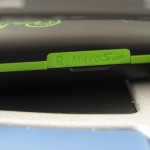
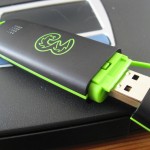
I came across this free offer for a FREE 3G USB MODEM from network provider “3”, and I thought I would share it with you all. I’ve just ordered mine to confirm this isn’t spam or a duff deal. The hardware is a ZTE MF627 BLACK PREPAY – NEW. This is the later “chewing gum stick version” similar to flash drive, not the older “pebble”.

The “3” 3G USB modem is available from http://www.3dongle4free.co.uk

You need to register on the above website, enter your address and email details, pick a username and password, a few minutes later they confirm your user account and email you a discount code.
Return to http://www.3dongle4free.co.uk and buy a 3G dongle, enter the discount code to redeem the item price to zero (from £29.99), and then you just have to pay the postage and packing, £4.95.

Credit and debit cards accepted no AMEX ;-(

So a 3G USB Modem ZTE MF627 BLACK PREPAY – NEW for a fiver!

When I get mine, I let you know how to unlock it!

This offer was correct at time of post. Get it now whilst it’s hot!

I’m not associated with this company in anyway or making any referral fees, just wanted to share a great deal!

UPDATE: How to unlock here https://andysworld.org.uk/2009/06/29/unlocking-a-3-usb-modem-zte-mf627/

Real-Time Energy (electricity) Usage from my Wattson (electric) Smart Meter

Sunday, June 21st, 2009

I’ve updated my Real-Time Energy Usage widget in the right hand side panel to update every 10 seconds.

So if you wait and watch, after 10 seconds, it should change!

twitter broke!

Tuesday, June 16th, 2009

looks like twitter is broke!

too many tweets!

A Decade with Demon Internet

Wednesday, June 10th, 2009

I’ve been with Demon Internet on and off for many years, introduced many family and friends to their Internet service. I switched to Demon Internet from CIX, when a fellow CIX member Cliff Stanford, setup Demon in 1992. I remember using DOS and Windows Trumpet Winsock to access Demon Internet and the MOSAIC web browser. So I’ve always used Spuddy, CIX, and Demon to access the Internet for many years. (not forgetting access to the early Internet from Plymouth Polytechnic in the late 80s). Access to the internet was via standard dial-up modems, at a tenner a month, from local pops (point of presence) around the UK, before demon rolled out 0845 numbers. So when I started Cyrus Computer Consultants Ltd (circa 1999), I followed my own recommendation and my business joined Demon Internet in 1999, to provide web and email hosting, and ISDN circuits for Internet access. However in 2004, I decided to obtain my ADSL broadband from Eclipse Internet, a South West company based out of Exeter, but kept my web and email hosting with Demon Internet.

Just short of a decade with Demon Internet by a few days, I have now decided to cancel and leave Demon Internet forever, it’s just not cost effective anymore for us to carry on hosting with the organization. It’s with great sadness I do this, because it feels like losing a great friend! Over the last 10 years, we’ve had great service (okay, a few times no mail for 24-48 hours, but I almost forgot that outage, but it caused real embarrassment with me, when a large World Wide IT company  couldn’t email me!).

So the Fax to terminate went off the other day (yes, I found a modem lead!), on 4 June 2009, and I asked for the domain to be transferred to our control. (I also asked them to phone me, when this has been done, so we could make arrangements, so no  email or web access would be lost – this obviously got lost in translation at the call centre! – there was no call!), but I was surprised the change was done, as soon as the fax hit the floor!

So for the last 6 days, email has been arriving from two different sources, whilst the Domain Name System synchronies across the Internet. I think DNS updates are now complete, because I’m not getting any mail from Demon at present.

So Farewell, Old friend Demon Internet…

Thanks for 10 years of service…