Archive for the ‘computing’ Category

Old Hard Disk Drives (HDD)

Sunday, April 25th, 2010

I don’t bother security erasing broken hard drives to DOD standards, I take them apart, and use the disks as bird scarers for the allotment, or reflective surfaces in case I get stuck on a desert island to signal passing ships or aircraft! Always handy to have one in your rucksac, just in case, Be Prepared! Handy toys for cats as well!

old hard disc before platters removed

old hard disc before platters removed

hard disc drive platters removed

hard disc drive platters removed

Hard Disk Drives (HDD)

Wednesday, April 21st, 2010

Winchester Disk Drive, Hard disk drive, Hard disc drive, HDD or ‘that big box under the desk‘ (which is the answer I often get!) or I’ve got 500GB of memory or is that disk! I don’t know!

it’s what makes most computers go, most of the time, and if they go bad or stop working, so does your computer usually!

A number of years ago (7 years), I always used Western Digital hard disk drives (HDDs) but after a spate of failures with the new (at the time) WDC WD1200JB, the JB features a 7200 RPM spindle speed coupled with three 40 GB platters. The JB’s key feature, is its 8-meg buffer, four times that of competing drives at the time. An ATA-standard 3-year warranty backs the drive.

But after many of these failed, I decided to switch to Seagate Technology, backed by a 5 Year Warranty, and hard drive manufacturer I’d not used for many years.

The hard drive manufaturer market has certainly got smaller over the last 20 years, many names have disappeared, Connor, DEC, Fujitsu, IBM, Maxtor, Miniscribe and Quantum have disappeared. Quantum acquired DEC, Maxtor acquired Miniscribe and Quantum HDD, Seagate acquired Connor and Maxtor, Hitachi acquired IBM HDD, Toshiba acquired Fujitsu HDD, Western Digital acquired Tandon HDD.

So that leaves us with

  1. Hitachi Global Storage Technologies (1967)
  2. Seagate Technology (1979)
  3. Toshiba (1967)
  4. Western Digital (1988)
  5. Samsung (1999?)

So, we still have plenty of HDD manufaturers to choose from!
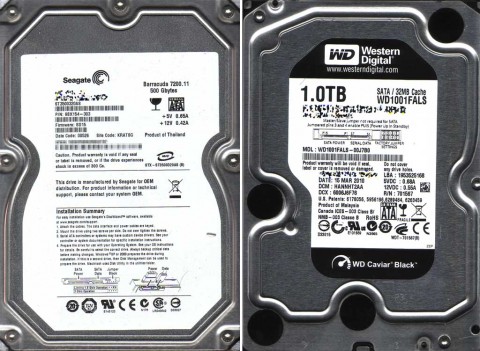
Seagate Barracuda 7200.11 500Gbytes ST3500320AS and Western Digital 1TB Caviar Black WD1001FALSq

Seagate Barracuda 7200.11 500Gbytes ST3500320AS and Western Digital 1TB Caviar Black WD1001FALS

But for me, I’ve decided to go back to purchasing Western Digital Black Drives for the moment, and spread the risk between Seagate for the NASes and Western Digital Black for the workstations!

Damn Eclipse Broadband

Tuesday, April 20th, 2010

My broadband has been all over the place again recently, back in March Eclipse my ISP, suggested they would move my broadband line onto a different line card/circuit in the exchange, the Technical Support Engineer’s never really gave away anything tecnical as to what they are actually doing. But today after another discussion it now becomes clear that before I was on a Tiscali LLU circuit, I suspect but I cannot confirm, this, I was moved to this in January 2009, when all the issues started (maybe), although now being moved to a BT circuit, the same issues occurs, extreme hot or cold, the Signal-to-noise ratio rises, and the sync speed drops, and hence throughput is very very slow. Today was the final straw, my broadband speed was as follows at 15:30 GMT. I was told, that because my sync speed had dropped the Profile on the line was slow, and I would have to wait 72 hours before it would speed-up!

Router is reporting this G.DMT SHOWTIME 448000 192000 14.5 49.0

788504536

12717770677778827686

image001

and then later it gets worse…

788825150

I’ve not done anything, I’ve just returned from a Parish Council Meeting, and now the speed is backup to 2.2 – 2.4MB/s, this is the fastest it’s ever been, apart from that strange blip and changeover!

788868135

127179904749702514052

I put this here, so I can find it later, and refer Eclipse and BT to it! (it’s there test results!)

 For your connection, the acceptable range of speeds is 600-2500 Kbps.

For your connection, the acceptable range of speeds is 600-2500 Kbps.

Gremlins

Monday, April 19th, 2010

I’ve been suffering a spate of Gremlin attacks…

  1. One of my TiVo’s stopped working.
  2. Alba Freeview Set Top Box wouldn’t turn on.
  3. Two hard disks failed in my production workstation.
  4. One hard disk failed in my NAS.
  5. Engine management on the car, is having an “off” day!

I’ve repaired the TiVo, it needed a new power supply, the Alba STB went in the bin, and I’ve ordered new hard disks for my workstation and NAS.

Salavaged from the tip BBC Micros BBC Masters Spectrums

Sunday, April 11th, 2010

A friend of mine is moving house in a few months, and has decided not to take vintage computers he’s collected over many years, and he was going to scrap them and take them down the skip, unless homes were found. So I collect a car load of vintage stuff

BBC Micros, BBC Masters, Telextet, Prestel and 6502 2nd Processors

BBC Micros, BBC Masters, Telextet, Prestel and 6502 2nd Processors

I collected the following:-

  • 10 BBC Micros ‘Beebs’
  • 4 BBC Masters
  • 3 Cumuna dual 5.25 floppy disk drives (horizontal)
  • 2 Cub Monitors
  • 2 Spectrum+3 128k
  • 2 Cherry Teletext keyboards
  • Teletext Adaptor
  • Prestel Adaptor
  • 6502 Second Processor
Teletext, Prestel and Second Processor for BBC Micro

Teletext, Prestel and Second Processor for BBC Micro

Prestel Adaptor

Prestel Adaptor

6502 Second Processor

6502 Second Processor

Teletext Adaptor

Teletext Adaptor

BSOD on my Production Workstation!

Wednesday, March 31st, 2010

I returned home this evening to find my main production workstation had hung, I left it to restart, went off to attend to other business, and when I came back it was looping with the dreaded BSOD (“Blue Screen of Death”)

… and nobody to telephone and helpme, other than me! Odd because last night I noticed that the Vista would stall with an hour glass, randomly, indicating a disk retry – disk fault, but on checking he Event Log, no errors were logged.

I should practice what I preach and backup more, after 30 minutes of chkdsk, I managed to get Vista working again, but now the Eventlog is showing a dying hard-disk and lots of disk errors are clocking-up, time for an emergency backup to one of me NASes!

I use Drive Snapshot a very simple small application, that doesn’t cost the earth. I hoping I can get all the data off before it fails completely.

snapshot

you can see in the screenshot, it’s already found 35 duff sectors, and it had found 88+ by the time I written this!

One Click Away with MrHyperlink (UK)

Tuesday, March 30th, 2010

mrhyperlinkukWeb in on click

One Click Away with MrHyperlink (USA)

Tuesday, March 30th, 2010

mrhyperlinkukusaWeb in on click

Hidden information on some Music Compact Discs – HDCD

Sunday, March 28th, 2010

The next time your browsing through your compact disc music collection, assuming you still purchase or collect compact discs, have a look for the HDCD symbol on the back of the compact disc box, or on the sleeve notes.

150px-hdcd_logosvg

HDCD – High Definition Compatible Digital, or HDCD is a patented encode-decode process, now owned by Microsoft since 2000, that improves the audio quality of standard Redbook audio CDs, while retaining backward compatibility with existing Compact disc players.  Not to be confused with SACD (Super Audio CD), it can only be dedoced on some compact disc players that have HDCD support.

HDCD encodes the equivalent of 20 bits worth of data in a 16-bit digital audio signal by using custom dithering, audio filters, and some reversible amplitude and gain encoding; Peak Extend, which is a reversible soft limiter and Low Level Range Extend, which is a reversible gain on low-level signals. There is thus a benefit at the expense of a very minor increase in noise.

But since 2000, Microsoft acquired the company and all of its intellectual property assets and included the technology in Microsoft Windows Media Player.

Windows Media Player 9, 10 or 11 running on Windows XP and Windows Media Player 11 running on Windows Vista or Windows 7 are all capable of decoding and playing HDCDs on personal computers with a 24-bit sound card installed.

hdcd-wmp9

Media Player 9 indicates the presence of an HDCD by enabling the logo in the control bar at the bottom of the application window.

hdcd-wmp111

This was changed in versions 10 and 11; if an HDCD is inserted into a compact disk player with WMP 10/11 running, the HDCD logo appears only if the HDCD feature is disabled. So again, the HDCD logo only appears if you’ve got it disabled.

To enable HDCD decode on Windows Vista and Windows 7 you need to enable it. Select Tools/Options/Devices/Speakers in Windows Media Player

hdcd-enable

Does it sound any different, well you have to test it and find out!?

I’ll blog in another post, how you can re-rip all your CDs including this new detailed information!

Broadband Connection Moved!

Friday, March 12th, 2010

I’ve been suffering broadband issues for almost a year now, extreme hot or cold have been causing the Sync speed to drop-off to nothing. My ISP have agreed to get BT to move my broadband connection to different equipment. I must stress this has been a very difficult fault to trace, as the fault has been intermittent, but My ISP have been great! Well done Eclipse!

My broadband connection has been just moved to different equipment in the local exchange and the results look promising.

745937086

An increase of almost 1Mb/s!

12376422