Archive for the ‘computing’ Category

Samsung Galaxy Tab[let] – How much?

Tuesday, November 2nd, 2010

Samsung launched it’s tablet today called the Samsung Galaxy Tab:-

  • 7″ touch-screen tablet PC
  • Android Operating System
  • Voice & video calling
  • Internet
  • Social Networking
  • e-Mails
  • Google Maps Navigation
  • Games, movies & music
  • Camera with LED Flash
  • Electronic reading

and it’s wait for it £529 GBP same price as the iPad with Wi-Fi + 3G

I know which I’d buy! (oh, I’ve already got one!) Long live Apple!

Okay so it’s got Flash 10.1, but will have iOS 4.2 Software Update. Coming soon to iPad. It was released today to developers (me and others!), and the new Skyfire mobile web browser will have Flash support!

Skyfire will issue its Flash Video-enabled browser for the iPhone on Nov. 4, allowing consumers to finally run Flash-based websites on the iPad!

So stick that Apple Haters, and go and by your Samsungs, and Google Android…..

My first website on the Wayback Machine

Monday, October 25th, 2010

It’s nice to see My first website has been captured on the internet archive on the Wayback Machine. Created in 1996, does that make me one of the first green computer re-cyclers! (yes, my HTML skills were a bit dodgy, – nothing changes!)

my first website

my first website

it’s here, if you want to check it out.

http://web.archive.org/web/19991012035710/pcm.users.netlink.co.uk/

Increase computer performance for free!

Sunday, October 24th, 2010

I get many people asking me, about upgrading their personal computer with a memory or processor upgrade, because it seems slow.

But none of them are aware they can increase the performance of their computer for free!

Many years ago, at the Microsoft Campus, Reading – I attended a briefing by Microsoft that stated that the ‘new’ NTFS filing system based on the older HPFS filing system did not become defragmented. HPFS or High Performance File System is a file system created specifically for the OS/2 operating system to improve upon the limitations of the FAT file system. The FAT filing system was used in DOS.

The NTFS (New Technology File System) is the standard file system of Windows NT, including its later versions Windows 2000, Windows XP, Windows Server 2003, Windows Server 2008, Windows Vista, and Windows 7.

NTFS supersedes the FAT file system as the preferred file system for Microsoft’s Windows operating systems. NTFS has several improvements over FAT and HPFS (High Performance File System) such as improved support for metadata and the use of advanced data structures to improve performance, reliability, and disk space utilization, plus additional extensions such as security access control lists (ACL) and file system journaling.

Both HPFS and NTFS were supposed to reduce fragmentation of data, but with the increase of disk drive capactity, and the increase of very large partition sizes, based operating system size have increased, Office installations have increased in size considerably over the years, data and file fragmentation has increased considerably, and can adversley affect disk performance of your personal computer.

Disk fragmentation is a where storage space is used inefficiently, reducing storage capacity and in most cases performance, because the files are not stored in contiguous blocks on the disk.

Windows Vista and Windows 7 have their in-built Defragmentation tools scheduled to run automatically, at a scheduled time.

However, Windows XP you have to run the tools manually, to defragment the disk drive. It can take many hours to completely defragment a disk, if you’ve never defragmented it.

C: drive on my computer (before defragmenting)

C: drive on my computer (before defragmenting)

This laptop has never had it’s disk drive (C:) defragmented, the blue shows contigious files, and the red shows heavily fragmented files, reducing disk performance.

Several hours later ...

Several hours later ...

About four hours later…

Many hours later ...

Many hours later ...

many hours later …

and finally …

C: Defragmented

C: Defragmented

Depending upon the level of degragmentation and the amount of free disk space, defragmentation can take many hours, this laptop took about 9 hours to degragment the hard drive.

You can use Microsoft own in-built degramentation utility which will defrgament you hard drive manually or at a scheduled time for FREE. But I prefer to use Diskeeper , and I’ve been using it for years, it has many options – InteliWrite Fragmentation Prevention – increases system performance by preventing fragmentation before it happens, I-FAAST, and Automatic Defragmentation.

34% Performance by defragmenting

34% Performance by defragmenting

If you are going to purchase one PC application purchase Diskeeperdownload the trial and try it out!

Back in the DOS days, a friend of mine, used to defragment his disk, with Nortons Degfrag (NDD.exe), before he started to compile software code, it also gave him the opptunity to grab a quick cigarette on the fire escape! (Hi Si – if you reading this!) – and it did make a difference to compile times!

PLEASE NOTE DO NOT DEGRAG YOU SSD (SOLID STATE DISKS) DISKS, UNLESS YOU ARE USING HYPERFAST aware Defrag utility – I don’t believe that any Microsoft defrag utilties are SSD aware. (or you will wear out your SSD!)

Hosting Down!

Thursday, September 23rd, 2010

Whoops, you may have noticed earlier, no andysworld!

Hosting issues with the server…..it’s back now….

thanks

twitter api change for the better to reduce spam

Tuesday, September 21st, 2010

looks like the last few blog posts, didn’t make it to twitter, it appears the twitter api has changed, to stop spam taking over twitter, it was only a matter of time, before it became more complicated to auto-tweet!

In the beginning …

Friday, July 30th, 2010

On driving to the bakers at lunchtime today to get a pasty and sandwich for my lunch, I was struck down by severe stabbing chest pain, so severe that I had to emergency brake and stop the car at silly speed. (the car following me, had a surprise) – I thought I was having a heart attack it came on so quick and was terribly painful, and my immediate thoughts were to stop the car quickly for safety, on getting out of the car, I immediately took off my t-shirt, to check for insects and I found five small puncture wounds and swellings under my left nipple (the owner of the car behind got out to start having a swearing competition with me – but backed down – when I mentioned I’d been stung by an insect – and showed him my left breast!).

I was rather relieved that I’d been stung, but still a little concerned that I couldn’t find anything that had caused it, about 5 minutes later, when leaving the car in the car park, I found a dying young Wasp in the handbrake console, I must have damaged/squashed it when I grasped my chest in the car. The wasp must have flown in through the window or pinged on the wing mirror into my clothing, couldn’t get out, so stung me five times around the nipple!

I was going to call this post Heart Attack, but I thought that would be too alarmist! I could have taken a picture of the dead wasp for the post, but I didn’t think that was very exciting,

so I’ve called it In the beginning …

no reference to the Bible, God or Jesus Christ but to the IBM PC XT! to which I personally owe an awful lot – Thanks IBM!

IBM XT Personal Computer Model 5160

IBM Personal Computer XT Model 5160

IBM XT Personal Computer Model 5160 Made in Scotland

IBM Personal Computer XT Model 5160 Made in Scotland

For those of you, who know your computing history, you’ll know, that I’m not correct, as the 5150 came before this – the original IBM Personal Computer (PC), and was released in 1981, the 5160 (IBM PC XT) was released 2 years later in 1983. But I don’t have a 5150 to photograph!

World of Mouth! 35% of bloggers post opinions about products or brands ONLINE

Sunday, July 18th, 2010

ORANGE Do you like what I am saying?

DVD Decrypter beaten!

Wednesday, June 23rd, 2010

I’ve been using DVD Decrypter to rip and backup my DVDs to iPods for years, despite no further developement since 2005.

DVD Decrypter Version 3.5.4.0 (final)

DVD Decrypter Version 3.5.4.0 (final)

An exceptional tiny application that easily removes the Copy Protection System from DVDs, which enables you to transcode the DVD for mobile device playback. I also use Badaboom, Badaboom is a blazingly fast media converter that formats video files for a variety of devices, including iPod, PSP, iPad, and YouTube, by using your system’s graphics processing unit (GPU).  If you have an Nvidia chipset!

DVD Decrypter output 1

DVD Decrypter output 1

So I was a little surprised when I couldn’t backup Disney’s new Alice In Wonderland…

It starts to report Read Errors (Retry 1 etc), but this DVD disc is brand new out of the cellphone wrapping, so it cannot be physical errors on the media, but something is odd, because if you look at the number of files and total it’s repoting 58GB on the disc, this should read alarm bells.

DVD Decrypter output 2

DVD Decrypter output 2

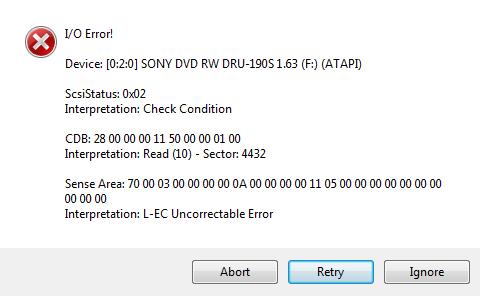
if you continue, the Retry errors increase and eventually, you’ll get an error message below

DVD Decrypter error message when trying to backup Disney's Alice in Wonderland

DVD Decrypter error message when trying to backup Disney's Alice in Wonderland

if you ignore this error message, it will continue to extract the data, but you’ll end up with a 58GB DVD! It would appear that Disney have done something with the layout to confuse DVD Decrypter Version 3.5.4.0 (final). Maybe it’s the Fast-Play, I don’t know, but as I’ve always said software can always be broken with software, so time to try another software product…

Enter DVDFab HD Decrypter, another backup tool which is also FREE.

DVDFab HD Decrypter http://www.dvdfab.com/en/hd-decrypter.htm

DVDFab HD Decrypter http://www.dvdfab.com/en/hd-decrypter.htm

Ah, this software does the job nicely, shame I still prefer the simplicity of DVD Decrypter, and it’s has a tiny footprint.

So if DVD Decrypter doesn’t work for you try DVDFab HD Decrypter

Demon Changes it’s website, but still keeps tools for nerds!

Monday, June 14th, 2010

Ever since Demon was my first true ISP (AC – After CIX) back in the days of MS-DOS, Trumpet Winsock (Microsoft Windows 3.1) and Mosaic, I’ve always used Demon’s web-based Internet Tools, (DNS info, whois etc) since to this very day, so I was a bit confused and started to panic, when they had changed the website, but they’ve still kept the tools available now at this URL (web link for people that don’t know what a URL is!).

http://knowledgebase.demon.net/article/internet-tools.html

Demon's Infamous Internet Tools

Demon's Infamous Internet Tools

If you don’t know what they do, there probably not for you!

NOW is the time

Thursday, June 10th, 2010

If there’s one video clip you got to watch this one…

Years to reach 50 million users:-

  1. RADIO – 38 Years
  2. TELEVISION – 13 YEARS
  3. INTERNET – 4 YEARS
  4. IPOD – 3 YEARS
  5. FACEBOOK added 100 million users in less than 9 months….

watch the video clip for more frightening or exciting statistics…..!