Archive for the ‘All’ Category

3..2..1.. and nothing… Umm

Monday, August 30th, 2010

Now that the UK has relaxed it’s Rocketry and Explosives requirements, it’s a little easier to acquire and use rocket motors in the UK, without all the red tape and certificates, and explosives license.

so back to Model Rocketry….

Before I complete the rest of this rocket, I’m testing the motor mounts, before adding fins and painting, it’s very important to ensure that the motor mounts are fixed and glued correctly within the body of the rocket, otherwise the motors when ignited will just seperate from the model rocket body.

Test Number 1. 3..2..1.. and nothing… Umm

Time passes and sometime later that evening….. (it’s getting dark now).

Test Number 2. 3..2..1.. and nothing… Umm

Damn Damn and Fecking Damn!!!

Back to the drawing board, electrical issues maybe……not firing….

Well it’s Rocket Science you know!

A reminder of visiting Chorley!

Tuesday, August 10th, 2010

One of my favourite applications on the iPad is called Talking Tom, you speak and he repeats what you say.


Oh, did I not tell you I’ve got an iPad!

The hints were there if you hadn’t spotted them!

Unlocking a 3 Mobile Broadband MiFi (Huawei E585)

Sunday, August 8th, 2010

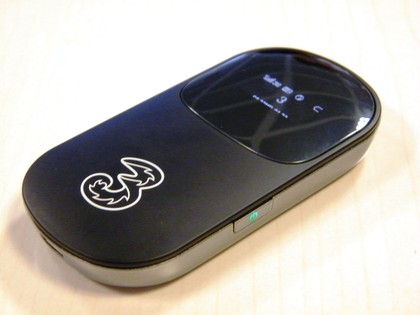
iPad Gadget of the Year – Huawei E585 – also called MiFi device.

The Huawei E585 MiFi Moble WiFi Wireless 3G Modem is currently exclusively only available on the Three network and it’s SIM-locked to this network, if you insert another SIM from another provider O2, Voda UK, Orange or T-Mobile you’ll receive an “Insert SIM”, “Bad Sim”, “Sim Lock”, “Invalid SIM” or similiar error. If you would like to use this fanastic 3G Wireless Router on another network you’ll need to remove the SIM-LOCK. This is where you need to be very careful, there are various different ways of removing the SIM-LOCK, the correct way and the wrong way, some hacks have re-written the firmware, the result removes the SIM-LOCK, but leaves you with a E585 modem with modified firmware, and you’ll not be able to change the firmware in the future.

This method reveals the true SIMLOCK code, and then you enter this SIMLOCK code into the E585 via the web interface.

Huawei 585 Hidden Unlock Menu

Huawei 585 Hidden Unlock Menu

The method is very simple

  1. Insert SIM card from another network.
  2. Turn on MiFi (E585) Invalid SIM will be displayed.
  3. Connect MiFi (E585) to computer.
  4. Read and download flash contents from MiFi (E585).
  5. Unlock code is hidden in flash contents.
  6. Enter Unlock code in hidden menu.
  7. UNLOCKED.
  8. For details on unlocking and software please make a 10 GBP donation via PayPal.
  9. and by return I’ll send you the PDF document and software to unlock your E585.
  10. The donation pays for the hosting of this website, and thousands of hits and free information I’ve provided on unlocking Three Mobile Modems.
Comments from happy blog readers from around the world, that have donated towards my hosting and bandwidth costs, that have successfully unlocked their ‘MiFi’ Huawei E585 using my information. Please note this is NOT an automated service, and I get many hundreds of emails a day about the information posted on andysworld.org.uk, please be patient!

“Daime u fast !!! Thanks andy u da man ! “
Nasser, Dubai, United Arab Emirates

“Brilliant, worked a treat. Thanks.”
Adam, Northumberland, United Kingdom

“It really works, Thanks Andy”
Anthony, Hong Kong

“Thank you it worked”
Kevin, London, United Kingdom

Followed all the great instructions and have unlocked device. Thanks Andy”
Paul, New Zealand

“it is up and working”
Chris, India

“Excellent. Thanks.”
Peter, Wales, United Kingdom

“Very quick, excellent unlock, thanks Andy”
Donny, USA

“Thank you so much Andrew. Now i can unlock my huawei e535.”
Thawatchai, Bangkok, Thailand

“Thank you!! It worked! Sucessfully unlocked. Great job!”
Eirc, South Africa

A breeding pair of Huawei E585 Unlocked for Orange and T-Mobile

A breeding pair of Huawei E585 Unlocked for Orange and T-Mobile

3G Killer Accessory – Huawei E585

Sunday, August 8th, 2010
Huawei E585 MiFi Mobile WiFi Wireless 3G Modem

Huawei E585 MiFi Mobile WiFi Wireless 3G Modem

If you have an iPadtastic iPad without 3G or have many mobile WiFi devices that could benefit from 3G connectivity, then the Huawei E585 MiFi Mobile WiFi Wireless 3G Modem is for you.  The Huawei E585 has already won Best iPad Accessory, its sold exclusively by Three here :- http://www.three.co.uk/Mobile_Broadband/MiF.

It’s basically a WiFi router with in-built 3G mobile modem, rather than ADSL or Cable modem. At present, I’m finding I’ve got four devices that all require 3G mobile internet connectivity, Laptop, Netbook, iPad and PDA and trying to keep all contracts up to date is costing me, so this one device, I can use one mobile SIM contract, and up to five devices can connect to this mobile WiFi access point, and use 3G mobile connectivity.

It’s an excellent device, with clear excellent instructions if you need them, and good software and configuration available from a web gui.

Huawei E585 MiFi Mobile WiFi Wireless 3G Modem

Huawei E585 MiFi Mobile WiFi Wireless 3G Modem

Personally in the UK, I would continue using the network Three for data, using the loophole, I’ve blogged about before. This still makes Three the cheapest data mobile provider in the UK.

If Three’s not for you, and you want to try it on another network, the Three Huawei E585 is sim-locked to the Three network.

(I’ll post later how you remove the sim-lock).

In the beginning …

Friday, July 30th, 2010

On driving to the bakers at lunchtime today to get a pasty and sandwich for my lunch, I was struck down by severe stabbing chest pain, so severe that I had to emergency brake and stop the car at silly speed. (the car following me, had a surprise) – I thought I was having a heart attack it came on so quick and was terribly painful, and my immediate thoughts were to stop the car quickly for safety, on getting out of the car, I immediately took off my t-shirt, to check for insects and I found five small puncture wounds and swellings under my left nipple (the owner of the car behind got out to start having a swearing competition with me – but backed down – when I mentioned I’d been stung by an insect – and showed him my left breast!).

I was rather relieved that I’d been stung, but still a little concerned that I couldn’t find anything that had caused it, about 5 minutes later, when leaving the car in the car park, I found a dying young Wasp in the handbrake console, I must have damaged/squashed it when I grasped my chest in the car. The wasp must have flown in through the window or pinged on the wing mirror into my clothing, couldn’t get out, so stung me five times around the nipple!

I was going to call this post Heart Attack, but I thought that would be too alarmist! I could have taken a picture of the dead wasp for the post, but I didn’t think that was very exciting,

so I’ve called it In the beginning …

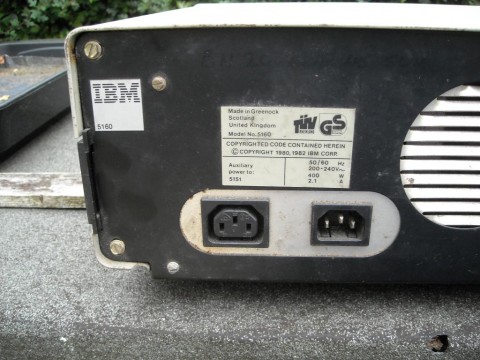
no reference to the Bible, God or Jesus Christ but to the IBM PC XT! to which I personally owe an awful lot – Thanks IBM!
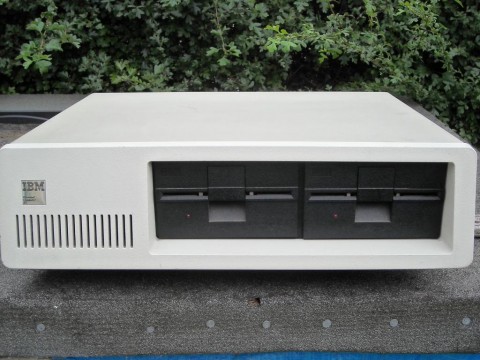
IBM XT Personal Computer Model 5160

IBM Personal Computer XT Model 5160

IBM XT Personal Computer Model 5160 Made in Scotland

IBM Personal Computer XT Model 5160 Made in Scotland

For those of you, who know your computing history, you’ll know, that I’m not correct, as the 5150 came before this – the original IBM Personal Computer (PC), and was released in 1981, the 5160 (IBM PC XT) was released 2 years later in 1983. But I don’t have a 5150 to photograph!

What I did on Saturday!

Saturday, July 24th, 2010

Before I sit down and drink a glass of cider…..I thought I’d better post this video (after an exhausting day of strimming the grass at the front of the house, cutting some of the hedge before the compost bin was full and feeding and watering the Kune Kune piglets, pigs and fowl). The video does show Lottie all grown up (https://andysworld.org.uk/2009/07/01/lottie-kune-kune-piglet/).

How to beat the UK TV License and save £145.50 a year!

Wednesday, July 21st, 2010

I’ve just received my new UK TV License for another 12 months, at a cost of £145.50 a year. I think everybody knows in the UK, if you use a service like BBC iPlayer to watch pre-recorded shows, what the TV License calls “on-demand”, a UK TV License is not required. What I didn’t know, and I’ve been told this by UK TV Licensing is if you purchase any computer or high tech mobile phone or games console your details (name and address) will also be sent to UK TV Licensing, I only thought it was TV receiving equipment, but on reading my new TV License it states “You’re now covered to do more than just watch TV at home on a TV set. You can also watch and record television programmes as they’re being shown on TV through your computer, games consoles, and digital box, DVD/VHS recorder, even your mobile phone”.

So therefore TV Licensing assumes that every household in the UK should have a TV License.

I’ve made some enquiries about the defintion of “on-demand” which doesn’t require a TV License, it doesn’t require a TV License because it’s pre-preorded content. The content was also not received by you, as you didn’t record it. In the same way, Homeowner A records a program for you as it’s broadcast, they are covered by their TV License to receive this program, they give the program to you on a USB stick, Homeower B doesn’t require a TV license to watch the program.

If you examine the above further, and watch a program, which is recorded elsewhere, not at your home, and transmitted/played-back 50 seconds later – no TV License is required.

I’ve just come off the telephone discussing this with Amie, TV Licensing on 0300 790 6055. The telephone conversation was recorded, she also stated that the Field Agents are also aware of this information.

So how do you save £145.50 a year,

  1. Firstly you must stop using your TV equipment, e.g. TV and Set-Top-Boxes that receive television through a UHF aerial (e.g. live broadcasts)
  2. Remove the TV aerial from the TV equipment.
  3. You do not have to remove the TV equipment from the premises (I’ve also discussed this with TV Licensing – they have to prove you are using it, and I was told, they would take your word that you are not using it!).
  4. Use BBC iPlayer, Sky Player, ITV Player, 4od, Demand Five to watch pre-recorded “on-demand” content from the Internet, either via computer, laptop or Internet connected TVs.
  5. Live Content use – TVCatchuphttp://www.tvcatchup.com/ from your computer, laptop, iPhone or iPad.
  6. tvcatchup_ipad1a1You can turn your iPad into a TV with TVCatchup iPad Service.

World of Mouth! 35% of bloggers post opinions about products or brands ONLINE

Sunday, July 18th, 2010

ORANGE Do you like what I am saying?

Grasshopper

Saturday, July 10th, 2010

There are eleven species of grasshopper native to Britain. They vary in length from 20 to 30mms depending on the species. I cannot recall the last time I saw a British Grasshopper. So I’m pleased to have seen this on on my Chilli plants, and I’ve photographed it for you!

British Grasshopper

British Grasshopper (click for close-up)

This could be a young Common Field Grasshopper, Chorthippus brunneus?

Genetically Modified Tropical Fish Part II – Now we’ve got fluorescent angelfish and convict cichlids

Saturday, July 3rd, 2010

I’ve not posted a fish house blog in ages, and this is an update, Part II if you like, to the blog I posted in April 2007.

Taiwan’s Council of Agriculture unveiled last week that it has successfully bred transgenic Convict cichlids (Amatitlania nigrofasciata) and Angelfish (Pterophyllum scalare) that fluoresce, in collaboration with the Academia Sinica (Taiwan’s national research academy).

Copyright © JY Lin Co Ltd

Angelfish (Pterophyllum scalare) Copyright © JY Lin Co Ltd

Convict cichlids (Amatitlania nigrofasciata) Copyright © JY Lin Co Ltd

Convict cichlids (Amatitlania nigrofasciata) Copyright © JY Lin Co Ltd

oh dear!

The species will be illegal to sell or import into the UK due to our legislation covering genetically modified organisms., but that’s what was said of the transgenic “Red/Purple” Zebra Danios, that were sold in the UK, because one authority on the matter, thought they were dyed! Only to find later they were breeding true, batches of these fish still exist today in the UK, and are breeding back with true non-transgenic Zebra Danios.

how long will it be before we see fluorescent angelfish or convict cichlids in our tropical fish shops or garden centres?