Archive for the ‘All’ Category

Time to test Google Chrome OS

Saturday, May 14th, 2011

Okay, I’m going Geek now, you’ve been warned…..

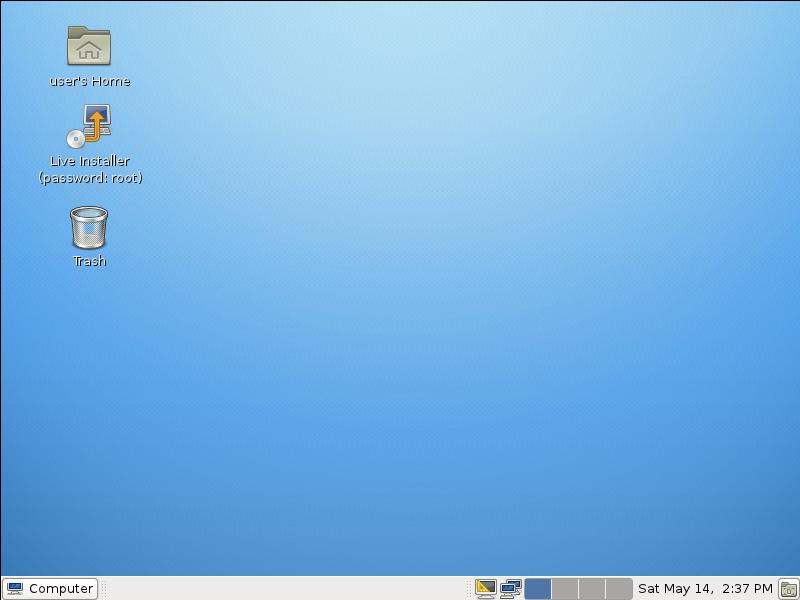
and for some of you Microsoft haters, you’ll enjoy this, as I’m about to go over to the dark side, for a few hours….(I often do, just to refresh the soul!)

Time to test Chrome OS, as it’s possible Google will take over the desktop world, and in 40 years time, when I’m dribbling down my chin, wondering what ever happened to Microsoft and Microsoft Windows that were acquired by Google 10 years earlier, the youngsters will be using Chrome OS tablets! and I’ll be telling stories of once upon a time we use to use something called Windows on a desktop computer!

Impressions, well, a very small Linux distro, well put togther, fast, easy to install, nice touch installing updates on installation, and runs very well on 512MB!

Only time will tell how compatible the Chrome OS Office applications are with Microsoft Office! I suspect if you are using complicated macros in Word and Excel, and VBA these will not work, but not everyone is a Master of Excel or Word.

Certified VMware Genius – Experts Exchange

Saturday, May 14th, 2011

Friday 13th may be un-lucky for some, but yesterday, I became a Certified VMware Genius at Experts Exchange. Here is a copy of my certificate.

Certified VMware Genius at Experts Exchange

Certified VMware Genius at Experts Exchange

Experts Exchange (EE) is a membership-based online “ask an expert” site for computer and IT related questions that was founded in 1996. Experts Exchange (EE)  enables people with technology problems to quickly and easily solve their problems by collaborating with experts from around the world.  Experts Exchange (EE) is the #1 resource on the web for solving IT related problems, pop over and take a test drive, and meet the Experts.

Checkout How it Works.

Fecking Apple! Poor Service Mobile Me eMail Very Poor

Thursday, May 12th, 2011

(I was going to write s one eye t, but I thought some children follow the blog so maybe not appropriate!)

Apple (Steve Jobs) you’ve really p****d me off now.

What do you notice about the following screenshot?

No email in over 1.5 hours?

No email in over 1.5 hours?

No email since 4.00pm. Now it might be usual for you not to receive emails in a 1.5 hour window, but not me. I checked a little further and found my iPad was not receiving any mail, and couldn’t log into Apple’s Mobile Me email, no error message. So I tried using a notebook and a desktop computer and still couldn’t login to Apple Mobile Me email, all the other options were working iDisk, Gallery etc. Again just the rotating twinky, staring at me on screen for minutes not doing anything.

Apple Mobile Me status indicated that Service Status was normal. So I called Apple Technical Support, that gave me a URL to have a Live Chat with an Engineer.

Nothing like a email from them warning of the Outage for Maintenance!

So I had a little rant, about better off with GMail, Hotmail or Yahoo, that provide better uptime and storage management, this was the response. I’ve never had any issues with Hotmail, Yahoo or Gmail.

So, there you go two weeks extension!

I bet they wouldn’t treat Mr Steve Jobs, Mobile Me Account like this.

Apple – Service – Zero Points.

And on that very note, APPLE if you would like to talk to me about Service Delivery, or Indsutrial Strength IT Servicesjust let me know!

I’m going to Leave Some Fecking Feedback!

Warning to iPhone & Ipad – Big Brother tracks you!

Friday, April 22nd, 2011

You may have read or heard in the Press in the last few days

“The iPhone and iPad collects data that shows when the user was at each location with a timestamp. The information is downloaded to the user’s computer each time the iPad or iPhone is synced. “

I’ve seen fictional programs like Crime Scene Investigation on Channel 5, magically recover location history from phones and GPS devices fitted in cars to provide evidence to convict criminals. – I’ve always thought this was rediculous until now, and just good TV Drama!

So it had me thinking, so I started poking around in the backup data that iTunes stores on your computer.

iTunes stores the backup in the following locations

on a Windows XP Computer

C:\Documents and Settings\<USERNAME>\Application Data\Apple Computer\MobileSync\Backup

on a Vista/Windows 7 computer it’s stored in

C:\Users\<USERNAME>\AppData\Roaming\Apple Computer\MobileSync\Backup\

where <USERNAME> is the user you use to login to your computer.

In the Backup folder is a folder which looks like a GUID (long hex number!) and in that is the files that itunes uses to backup your iphone or ipad and all the settings.

it looks something like this:-

d81725cff6c7b675940b71cbff4471b2f7d83a91

This folder contains many files, with similar filenames, it didn’t take me long to find the file I was looking for, if you search all files for the keywords TABLE Wifi or one of the following keywords Timestamp FLOAT, Latitude FLOAT, Longitude – once you found this file use this file to extract the data. (I’ve since discovered that this file is always appended to when you sync your Apple device, so once you found the file, just use this file to extract the data always).

This log file readily identifies itself as a SQLite format 3 database file, which is good news because using the Firefox 4.0 Add-On, we can examine the data in the database (SQLite Manager Add-on only works with Firefox 4.0, so you’ll need to upgrade!).

Install the SQLite Manager add-on, and use menu option Database/Select Database/Connect Database and open the database file you found above (just change to All files in the pick list).

You should end up with a display as follows

Using SQLite Manager to open Location file from iPhone/iPad

Using SQLite Manager to open Location file from iPhone/iPad

The table we are interested in is called CellLocation, so select Tables, CellLocation

WOW the data is there!

It would seem that the Iphone and iPad 3G version, logs the locations of mobile Cell Locations used by the device, MMC, MNC, Cell Id and LAC,  Latitude and Longitude are logged against a timestamp (number of seconds since January 1 2001).

I would suggest either deleting the file, or using the iTunes option to encrypt databackups on your computer, unless you want this file to be used in evidence against you! (remember if you ever lose you iPhone or iPad, it can be jailbroken and this information can be retreived or synced to another computer for the information to be extracted from your Apple device – so if you get caught, destroy your device!). (just hope your Wife or Girlfriend, doesn’t get hold of the file if you’ve been “playing away!” – enough said!).

My ipad locations since I've owned it!

My ipad locations since I've owned it!

I don’t often turn on 3G on the iPad, I use a E585 – MiFi, but I’m going to check if that makes a difference, because I think it’s the 3G data which is tracked!

iPad on vaction in Japan!

iPad on vaction in Japan!

Tracking is global! (as can be seen from the above when I took the iPad to Japan!)

So how do we get this information into a nice Google Maps display. Simple,

  1. Use SQLite Manager to export the data to a CSV, highlight the table CellLocation, right-click, Select Export Table, CSV (comma), select OK.
  2. Import the CSV into Excel, remove all columns except Latitude and Longitud.
  3. Save the file as a CSV.
  4. Using GPS Visualizer, import the data for a nice location map with your locations highlighted!

SCARY STUFF! BIG BROTHER!

SPAM from M&S security breach, and it’s okay!

Thursday, April 7th, 2011
 Important information from M&S

Important information from M&S

I received this email from Marks and Spencers today (7 April 2011) , it looked like the usual spam message, but after some research, Epsilon – the industry’s leading marketing services firm announced on 4 April 2011, the unauthorized entry into email system, Marks and Spencers are not listed as one of the clients. So it could be spam.

Marks and Spencers state in their email

“We wanted to bring this to your attention as it is possible that you may receive spam email messages as a result. We apologise for any inconvenience this may cause you. We take your privacy very seriously, and we will continue to work diligently to protect your personal information.”

If you have any concerns about this, I would suggest you contact Marks and Spencers Customer Services, as they seem to suggest that receving spam is okay!

phone  Marks and Spencers on: 0845 302 1234;
e-mail Marks and Spencers at: retailcustomer.services@marksandspencer.com or
write to Marks and Spencers at: Marks & Spencer, Retail Customer Services, Chester Business Park, Wrexham Road, Chester CH4 9GA

I’ll be contacting them tomorrow…….(to be continued!)

UPDATE: Just checked headers and domain key sigs of the email, the email is Authentic/Genuine and from Marks and Spencers Ltd.

Fugu

Sunday, April 3rd, 2011

As a fishkeeper, one of the fish I wanted to see in Japan was Fugu. Fugu is is the Japanese word for pufferfish and the dish prepared from it.  It’s also called Blowfish. This is a marine pufferfish, unlike most tropical freshwater puffers that are kept in the UK like the Green Pufferish, Tetraodon nigroviridis or Giant freshwater Pufferfish, Tetraodon mbu.

Giant Freshwater Puffer - Tetraodon mbu

Giant Freshwater Puffer - Tetraodon mbu

Green Pufferfish - Tetraodon nigroviridis

Green Pufferfish - Tetraodon nigroviridis

Fugu can be lethally poisonous due to its tetrodotoxin; therefore, it must be carefully prepared to remove toxic parts and to avoid contaminating the meat. The restaurant preparation of fugu is strictly controlled by law in Japan, and the chefs are licensed, and only licensed chefs who have qualified through rigorous training are allowed to deal with the fish. Experienced fugu chefs in the most expensive of restaurants sometimes leave enough poison in the flesh of the fish to give diners a little numbness around the lips!

Here’s a quick clip of a tank full of Fugu destined for the table, that I filmed in a resturant display window in Asakusa, Tokyo, Japan (22 March 2011).

A Souvenir of Japan

Saturday, April 2nd, 2011

This was the item I purchased to remind me of Japan! I purchased this 4GB USB Flash drive from the Apple store in Ginza, Tokyo.

LaCie iamaKey v2 USB-Stick 4GB

LaCie iamaKey v2 USB-Stick 4GB

Ginza is known as an upscale area of Tokyo with numerous department stores, boutiques, restaurants and coffee houses. Ginza is recognized as one of the most luxurious shopping districts in the world. Many upscale fashion clothing flagship stores are located here, being also recognized as having the highest concentration of western shops in Tokyo. Prominent are Chanel, Dior, Gucci, and Louis Vuitton. Flagship electronic retail stores like the Sony showroom (four floors of tech!) and the Apple Store of course! (a four floor building, MacBooks and iPads – 1st floor, chargers and accessories – 2nd floor,  TV from around the world – 3rd floor, technical support and repairs – 4th floor).

Sony Building in Ginza, Tokyo, Japan

Sony Building in Ginza, Tokyo, Japan

Lindsey purchase souvenirs of chopsticks, bags, Japanese doll….

well I am the computer geek!

Tokyo Council Building, Shinjuku, Tokyo

Friday, April 1st, 2011

Well I think it’s better known as Tokyo Metropolitan Government Building, located in Shinjuku, Japan was the tallest building in Tokyo. Shinjuku also has the busiest train station in the world! (and it’s busy!).

Tokyo Metropolitan Government Office

Tokyo Metropolitan Government Office Building

It has a two panoramic observation decks, one in each tower on floor 45, we went there one evening 7 days before the big one of March 11, and we also had dinner in the resturant.

View from the Tokyo Metropolitan Government Office Building

View from the Tokyo Metropolitan Government Office Building

View from Tokyo Metropolitan Government Office Building At Night

View from Tokyo Metropolitan Government Office Building At Night

and just to prove we were there, here’s a screenshot from an Ipad, using Assisted-GPS (it annoys me when people keep telling me they are using GPS with an iPad or iPhone!) of Google Maps in the  Tokyo Metropolitan Government Office Building, Shinjuku, Tokyo, Japan.

Google Maps view on iPad with GPS at the Tokyo Metropolitan Government Office Building

Google Maps view on iPad with GPS at the Tokyo Metropolitan Government Office Building

Big in Japan

Thursday, March 31st, 2011
Snow Monkey in Onsen in Nagano

Snow Monkey in Onsen in Nagano

The link from the last post yesterday is… for the last four weeks I’ve been craving Ambrosia Devon Custard! (hence not many posts for March)

Harajuku Girls

Harajuku Girls

7 days ago we returned from Japan, where we’ve travelling around Japan for 3 weeks (and if you didn’t know, yes Lindsey and I were there, when the Big 8.9M Earthquake Hit and all the tremors afterwards!) – we are okay – and the holiday wasn’t affected – other than the occasioanal room and bed shake! Overall a Fanastic, exciting time in Japan, and I’m looking forward to going back soon!

We’ve travelled over 2000km around Japan. Tokyo to Nagano, Nagano to Matsumoto, Matsumoto to Takayamma, Takayamma to Kanazawa,  Kanazawa to Hiroshima, Hiroshima to Kurashiki,  Kurashiki to Kyoto,  Kyoto to Togendai, Togendai to Tokyo, Tokyo to Nagoya.

An evening (1hr) with a maiko (an apprentice geisha) called kofuku, in Kyoto, visiting the Snow Monekys in Nagano, riding Shinkansen (bullet trains) at 182mph (confirmed and verfied!),  eating conveyor belt sushi, visting temples, japanese gardens, road cable cars and pirate ships, witnessed a rare site of Mt Fuji over two days, visited outdoor art, Henry Moore, Barbra Hepworth, and Pablo Picasso sculpture and art, and saw the plum and cherry blossom.

plum blossom

plum blossom

Lindsey has taken lots of digital photographs which will be uploaded soon. I’ve almost finished ‘An evening with a kofuku DVD’. But also have another 180 minutes of Japan to edit.

Shinkansen (bullet train)

Shinkansen (bullet train)

Ambrosia Devon Custard

Wednesday, March 30th, 2011
Ambrosia Devon Custard

Ambrosia Devon Custard

Yes, I’ve gone bonkers! What’s new! I’ll explain tomorrow!