
Tilly and Albert
Not enough pictures of Tilly on the website, so here’s another one Lindsey took today, of Tilly with Albert.
Tilly and Albert
Not enough pictures of Tilly on the website, so here’s another one Lindsey took today, of Tilly with Albert.

Marmite or Vegemite?
I needed to make a quick sandwich for lunch today, decisions?
I’ll think I’ll have a Vegemite sandwich. That reminds me…
“Buying bread from a man in Brussels
He was six-foot-four and full of muscles
I said, “Do you speak-a my language?”
He just smiled and gave me a vegemite sandwich
And he said,”
“I come from a land down under
Where beer does flow and men chunder
Can’t you hear, can’t you hear the thunder?
You better run, you better take cover.”
Men at Work, ‘Down Under’ 1982
One of my favourite tracks from the 80s, and a Great Video. Check it out here on You Tube
http://www.youtube.com/watch?v=MeG-hNXXy6I

Andy's Vegemite Sandwich
and that was Lovely Sandwich as well! I needed that!
Lindsey says, there’s never any pictures of Esther and Tilly on the blog, so I thought I would correct this.


Okay, severe lack of blogs recently, so this month I’m going to try the Blog every day challenge!
So as this is the 1st Day of Summer.
We wil kick off with a picture of Angus, that’s found a new cat basket!

Angus on HP LaserJet 2100N
It becomes a little difficult to retrieve print jobs!
In this final part, I look at virtualising Mac OS X Snow Leopard 10.6.7 on VMware Workstation 7.1.4. I don’t forsee any issues, with this as I’ve had Mac OS X 10.6.5 Snow Leopard running on VMware Workstation 6.5.3.


Over the next few days, I look at using the FREE VMware Player 3.0 to also virtualise and use these Mac OS X operating systems.
Apple Snow Leopard Software License Agreement (EULA)
It states under Section 2
2. Permitted License Uses and Restrictions.
A. Single Use License. Subject to the terms and conditions of this License, unless you have purchased a Family Pack or Upgrade license for the Apple Software, you are granted a limited non-exclusive license to install, use and run one (1) copy of the Apple Software on a single Apple-branded computer at a time. You agree not to install, use or run the Apple Software on any non-Apple-branded computer, or to enable others to do so. This License does not allow the Apple Software to exist on more than one computer at a time, and you may not make the Apple Software available over a network where it could be used by multiple computers at the same time.
So in Part II of this series of Virtualising Mac OS X opertating systems using VMware Workstation 7.1.4 , I’m going to have a look at the pre-release of Apple Mac OS X “Lion”.
Using VMware Workstation 7.1.4 and the Mac OS X Server option, I was able to install Mac OS X 10.7 “Lion”. This time I’ve boosted the RAM requirement to 4GB and 2 virtual CPUs, so the virtual machine performs better. No installation issues were observed.

Apple Mac OS X Lion 10.7.1
Apple Snow Leopard Software License Agreement (EULA)
It states under Section 2
2. Permitted License Uses and Restrictions.
A. Single Use License. Subject to the terms and conditions of this License, unless you have purchased a Family Pack or Upgrade license for the Apple Software, you are granted a limited non-exclusive license to install, use and run one (1) copy of the Apple Software on a single Apple-branded computer at a time. You agree not to install, use or run the Apple Software on any non-Apple-branded computer, or to enable others to do so. This License does not allow the Apple Software to exist on more than one computer at a time, and you may not make the Apple Software available over a network where it could be used by multiple computers at the same time.
Following up from my discovery in VMware Workstation 7.1.4
I thought I would trying virtualising a few Mac OS X systems for test and evaluation purposes.
Using VMware Workstation 7.1.4 and the Mac OS X Server option, I was able to install Mac OS X Server 10.6.7 ‘Snow Leopard’.


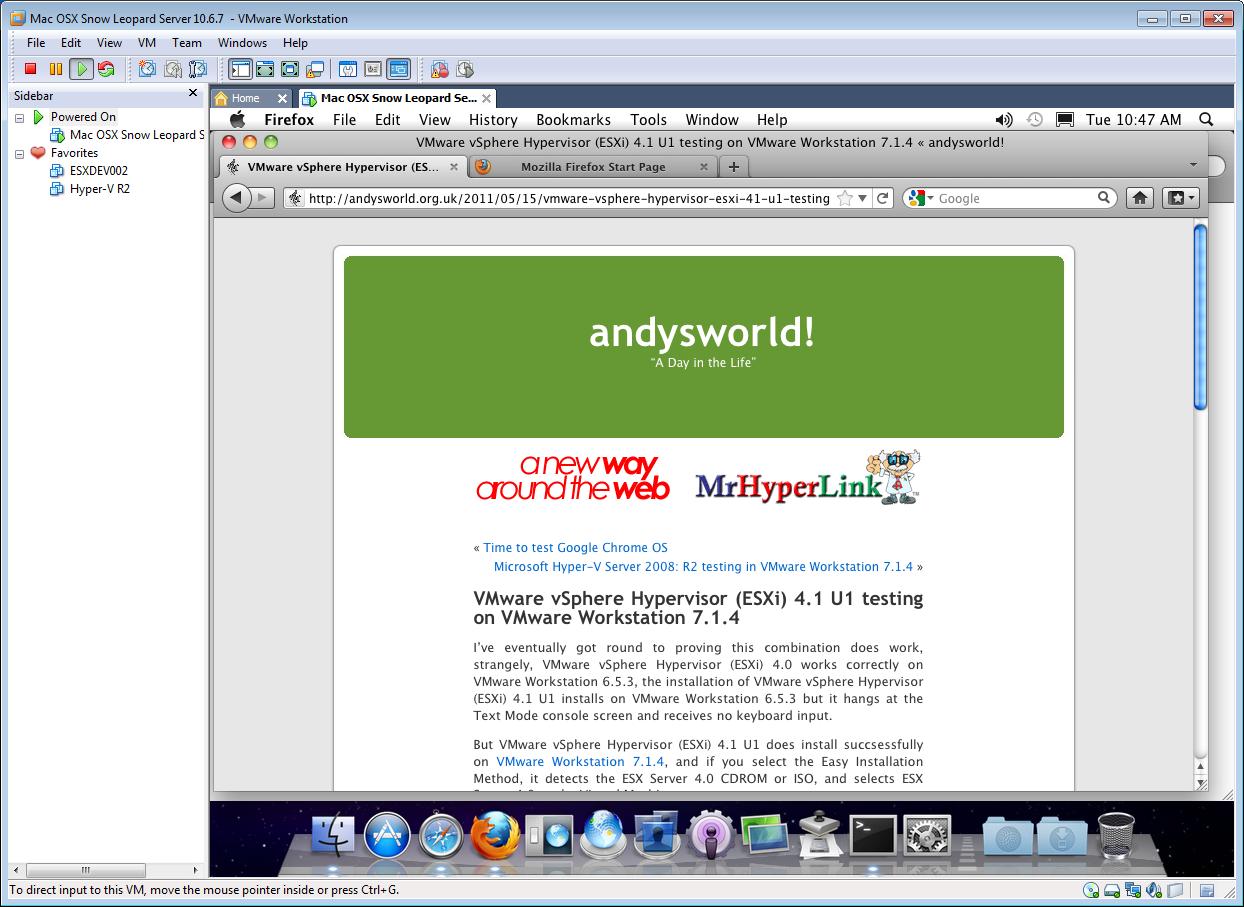


Apple Snow Leopard Software License Agreement (EULA)
It states under Section 2
2. Permitted License Uses and Restrictions.
A. Single Use License. Subject to the terms and conditions of this License, unless you have purchased a Family Pack or Upgrade license for the Apple Software, you are granted a limited non-exclusive license to install, use and run one (1) copy of the Apple Software on a single Apple-branded computer at a time. You agree not to install, use or run the Apple Software on any non-Apple-branded computer, or to enable others to do so. This License does not allow the Apple Software to exist on more than one computer at a time, and you may not make the Apple Software available over a network where it could be used by multiple computers at the same time.
I’ve been using VMware Workstation 6.5.3 for what seems like decades, but recently wanted to checkout some new Virtualisation features that are not currently available in VMware Workstation 6.5.3. and only available in VMware Workstation 7.1.4, so rather than break and upgrade my working version of 6.5.3, I thought I would install 7.1.4 on a new workstation in the office for experimental research and development work. In the early hours one morning, as the dawn chorus starts, poking around the code, I found the following…

New Virtual Machine Wizard - We have a Apple Mac OS X selection?
Apple Mac OS X support – Interesting!!!
I’ve been able to run Apple Mac OS X on VMware Workstation 6.5.3. See below.

Mac OS X 6.5.2 in VMware Workstatiobn 6.5.3 Virtual Machine
Although never had a specific option to select when creating a Virtual Machine before. It is rumoured that Mac OS X Server support will be available in vSphere 5.0.
Apple Snow Leopard Software License Agreement (EULA)
It states under Section 2
2. Permitted License Uses and Restrictions.
A. Single Use License. Subject to the terms and conditions of this License, unless you have purchased a Family Pack or Upgrade license for the Apple Software, you are granted a limited non-exclusive license to install, use and run one (1) copy of the Apple Software on a single Apple-branded computer at a time. You agree not to install, use or run the Apple Software on any non-Apple-branded computer, or to enable others to do so. This License does not allow the Apple Software to exist on more than one computer at a time, and you may not make the Apple Software available over a network where it could be used by multiple computers at the same time.
Some sites will not allow you to discuss this matter, because, the Apple software license does not allow Mac OS X to be used on hardware that is not “Apple-branded”. So I assume Apple will have to update their EULA in the future?
Time to try out some new installs, tomorrow.
Carrying on the nested hypervisor theme from the other day, when I tried VMware vSphere Hypervisor (ESXi), free download from VMware, on VMware Workstation 7.1.4, as it’s becoming common place for vendors to allow the use of Hypervisors for free, I downloaded the Microsoft Hyper-V Server 2008: R2 hypervisor for free to also try in VMware Workstation 7.1.4.
Here are the results


Microsoft Hyper-V Server 2008: R2 installs correctly, and looks like it’s going to function, but then Whoops, cannot power on any Virtual Machines!
Well these are the results I would expect from installing Hyper-V in a VMware Workstation 7.1.4 virtual machine, as often nested hypervisors do not function correctly. I just thought I would prove this.
I’ve eventually got round to proving this combination does work, strangely, VMware vSphere Hypervisor (ESXi) 4.0 works correctly on VMware Workstation 6.5.3, the installation of VMware vSphere Hypervisor (ESXi) 4.1 U1 installs on VMware Workstation 6.5.3 but it hangs at the Text Mode console screen and receives no keyboard input.
But VMware vSphere Hypervisor (ESXi) 4.1 U1 does install succsessfully on VMware Workstation 7.1.4, and if you select the Easy Installation Method, it detects the ESX Server 4.0 CDROM or ISO, and selects ESX Server 4.0 as the Virtual Machine type.
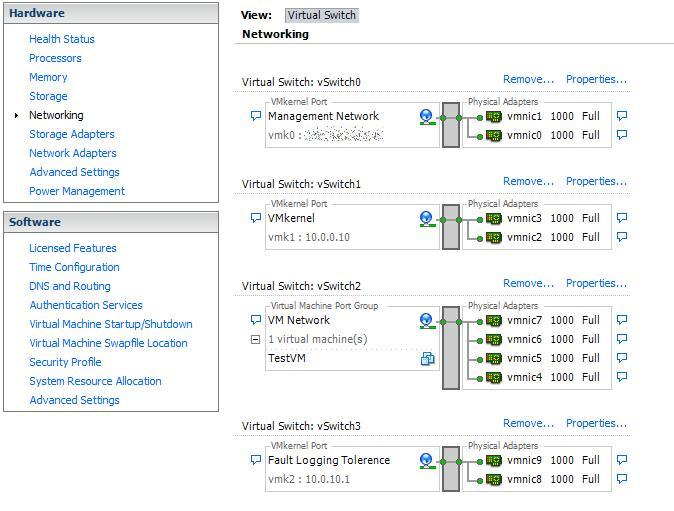
ESXi 4.1 Networking using 10 virtual network interfaces in VMware Workstation 7.1.4
An example above of how a VMware vSphere Hypervisor (ESXi) 4.1 U1 Server should be setup for networking with team network interfaces for Management Interface, VMkernel (NFS and iSCSI traffic), Virtual Machines Network, and Fault Logging Tolerence network (if required).
Ideal for Lab testing VMware ESX 4.1 U1 for VCP Learning, using VMware Workstation 7.1.4.




![[Valid RSS]](http://andysworld.org.uk/images/valid-rss.png "Validate my RSS feed")