Posts Tagged ‘iPad’

How to beat the UK TV License and save £145.50 a year!

Wednesday, July 21st, 2010

I’ve just received my new UK TV License for another 12 months, at a cost of £145.50 a year. I think everybody knows in the UK, if you use a service like BBC iPlayer to watch pre-recorded shows, what the TV License calls “on-demand”, a UK TV License is not required. What I didn’t know, and I’ve been told this by UK TV Licensing is if you purchase any computer or high tech mobile phone or games console your details (name and address) will also be sent to UK TV Licensing, I only thought it was TV receiving equipment, but on reading my new TV License it states “You’re now covered to do more than just watch TV at home on a TV set. You can also watch and record television programmes as they’re being shown on TV through your computer, games consoles, and digital box, DVD/VHS recorder, even your mobile phone”.

So therefore TV Licensing assumes that every household in the UK should have a TV License.

I’ve made some enquiries about the defintion of “on-demand” which doesn’t require a TV License, it doesn’t require a TV License because it’s pre-preorded content. The content was also not received by you, as you didn’t record it. In the same way, Homeowner A records a program for you as it’s broadcast, they are covered by their TV License to receive this program, they give the program to you on a USB stick, Homeower B doesn’t require a TV license to watch the program.

If you examine the above further, and watch a program, which is recorded elsewhere, not at your home, and transmitted/played-back 50 seconds later – no TV License is required.

I’ve just come off the telephone discussing this with Amie, TV Licensing on 0300 790 6055. The telephone conversation was recorded, she also stated that the Field Agents are also aware of this information.

So how do you save £145.50 a year,

  1. Firstly you must stop using your TV equipment, e.g. TV and Set-Top-Boxes that receive television through a UHF aerial (e.g. live broadcasts)
  2. Remove the TV aerial from the TV equipment.
  3. You do not have to remove the TV equipment from the premises (I’ve also discussed this with TV Licensing – they have to prove you are using it, and I was told, they would take your word that you are not using it!).
  4. Use BBC iPlayer, Sky Player, ITV Player, 4od, Demand Five to watch pre-recorded “on-demand” content from the Internet, either via computer, laptop or Internet connected TVs.
  5. Live Content use – TVCatchuphttp://www.tvcatchup.com/ from your computer, laptop, iPhone or iPad.
  6. tvcatchup_ipad1a1You can turn your iPad into a TV with TVCatchup iPad Service.

DVD Decrypter beaten!

Wednesday, June 23rd, 2010

I’ve been using DVD Decrypter to rip and backup my DVDs to iPods for years, despite no further developement since 2005.

DVD Decrypter Version 3.5.4.0 (final)

DVD Decrypter Version 3.5.4.0 (final)

An exceptional tiny application that easily removes the Copy Protection System from DVDs, which enables you to transcode the DVD for mobile device playback. I also use Badaboom, Badaboom is a blazingly fast media converter that formats video files for a variety of devices, including iPod, PSP, iPad, and YouTube, by using your system’s graphics processing unit (GPU).  If you have an Nvidia chipset!

DVD Decrypter output 1

DVD Decrypter output 1

So I was a little surprised when I couldn’t backup Disney’s new Alice In Wonderland…

It starts to report Read Errors (Retry 1 etc), but this DVD disc is brand new out of the cellphone wrapping, so it cannot be physical errors on the media, but something is odd, because if you look at the number of files and total it’s repoting 58GB on the disc, this should read alarm bells.

DVD Decrypter output 2

DVD Decrypter output 2

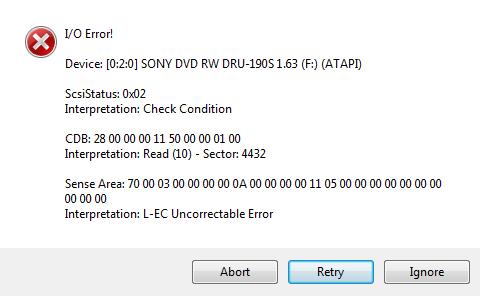
if you continue, the Retry errors increase and eventually, you’ll get an error message below

DVD Decrypter error message when trying to backup Disney's Alice in Wonderland

DVD Decrypter error message when trying to backup Disney's Alice in Wonderland

if you ignore this error message, it will continue to extract the data, but you’ll end up with a 58GB DVD! It would appear that Disney have done something with the layout to confuse DVD Decrypter Version 3.5.4.0 (final). Maybe it’s the Fast-Play, I don’t know, but as I’ve always said software can always be broken with software, so time to try another software product…

Enter DVDFab HD Decrypter, another backup tool which is also FREE.

DVDFab HD Decrypter http://www.dvdfab.com/en/hd-decrypter.htm

DVDFab HD Decrypter http://www.dvdfab.com/en/hd-decrypter.htm

Ah, this software does the job nicely, shame I still prefer the simplicity of DVD Decrypter, and it’s has a tiny footprint.

So if DVD Decrypter doesn’t work for you try DVDFab HD Decrypter

WiFi Charger software for PDA, iPhone and Smartphones

Thursday, April 1st, 2010

wifi-charger-softwareI found this new software app on the Internet that converts WiFi signals to electricity to charge your PDA, I understand the iPhone, iTouch applications will be in the AppStore shortly. I’m just having issues with using it with my old 802.11b access points, it doesn’t charge very well, but if I use on my new Belkin ‘N’ series, as you can see in the screenshot, it charges very fast. The only issue is my battery gets very hot, because it says it blast charges it, I think the instructions are not very well laid out, not written in good english. The software vendor WireFree A/S is appearing at Gadget Show 2010 Live next week on stand OZ56.