Yesterday, I managed to get Apple OS X Mavericks (OSX 10.9) Developer Preview 3 installed and working on VMware vSphere 5.1 (ESXi 5.1).


Yesterday, I managed to get Apple OS X Mavericks (OSX 10.9) Developer Preview 3 installed and working on VMware vSphere 5.1 (ESXi 5.1).
by joe, it’s hot today, I’m now hiding from the sun today, yesterday, I weeded the allotment for a few hours in the midday sun, and got sunburnt arms!
and today, at 1pm was in a full bee suit, inspecting the bees…must have sunstroke! I ate some honey comb straight out of the hive the other day, it was delicious!

not sure but these could be - Supersedure cells?
Supersedure cells – bees have decided to make themselves a new queen, either the queen is damaged, not laying, disappeared, or old.
Update – these could be drone cells, and not Supersedure cells because they are too small and not vertical.
Honey Bees coming and going from beehive – day 22 after the swarm arrived at this hive. Weather today was warm and overcast, at least 20 degrees C, and humid.

Honey Bees - Day 22 - After swarm arrived in my beehive
Are you up all night…….
fantastic….you will notice a Supertramp rift in the song from the later 70s!

I thought I'd pimp my car with a CloudCred sticker! - NICE!
My new badge…what more can I say here it is:-

The Kenya holiday photographs have now been uploaded to our Holiday Photograph Album.

or directly here :- https://andysworld.org.uk/album/Kenya/index.html
Lindsey has sorted, and out of the original 1000+ photographs taken, these are the best 40%!
These photographs are straight from the camera, and re-sampled and reduced for viewing on the website, so they are not the original 12MegaPixel images, they have not been retouched either!
These were all taken with our new CANON PowerShot SX50 HS bridge camera
No email as yet, but I’ve just heard via twitter, my name appears on the vExpert 2013 title holders announced in this document published yesterday evening?
vExpert 2013 awardees announced
Thanks again John Troyer, Corey Romero, and the VMware Social Media & Community Team

Many of you are probably thinking, my blog has turned into a VMware site, so here are some pictures of the strawberry plants, down on the allotment, I’m still working on. These were planted out last year, and the weather has been so cold, I’ve now covered and cloched two rows, so I’ll hopefully have some strawberries a little earlier.


Just finished weeding my asparagus patch, more photos to come.
If you would like to read the other articles in this series, they are listed here for your convenience.
HOW TO: Install and Configure VMware vSphere Hypervisor 5.1 (ESXi 5.1)
HOW TO: Connect to the VMware vSphere Hypervisor 5.1 (ESXi 5.1) using the vSphere Client
In this series of basic VMware articles for the Novice, I’ll be showing you the basic VMware skills required to install, configure and deploy virtual machines using VMware’s FREE VMware vSphere Hypervisor (ESXi).
In this article we will show you HOW TO: Enable SSH Remote Access on a VMware vSphere Hypervisor 5.1 (ESXi 5.1) so you can remotely connect to the VMware vSphere Hypervisor 5.1 (ESXi 5.1) server remotely via SSH (PuTTY).
Please refer to my Andysworld! article on HOW TO: Connect to the VMware vSphere Hypervisor 5.1 (ESXi 5.1) using the vSphere Client
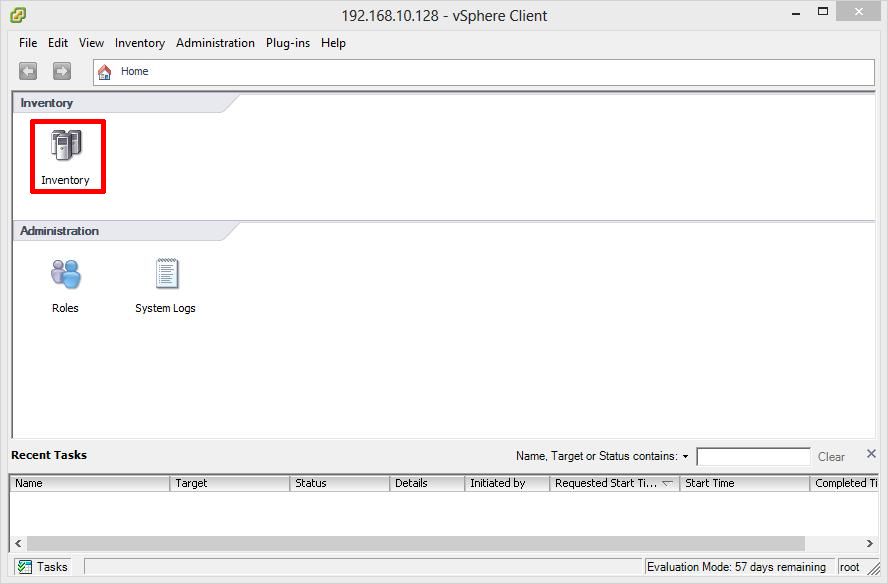
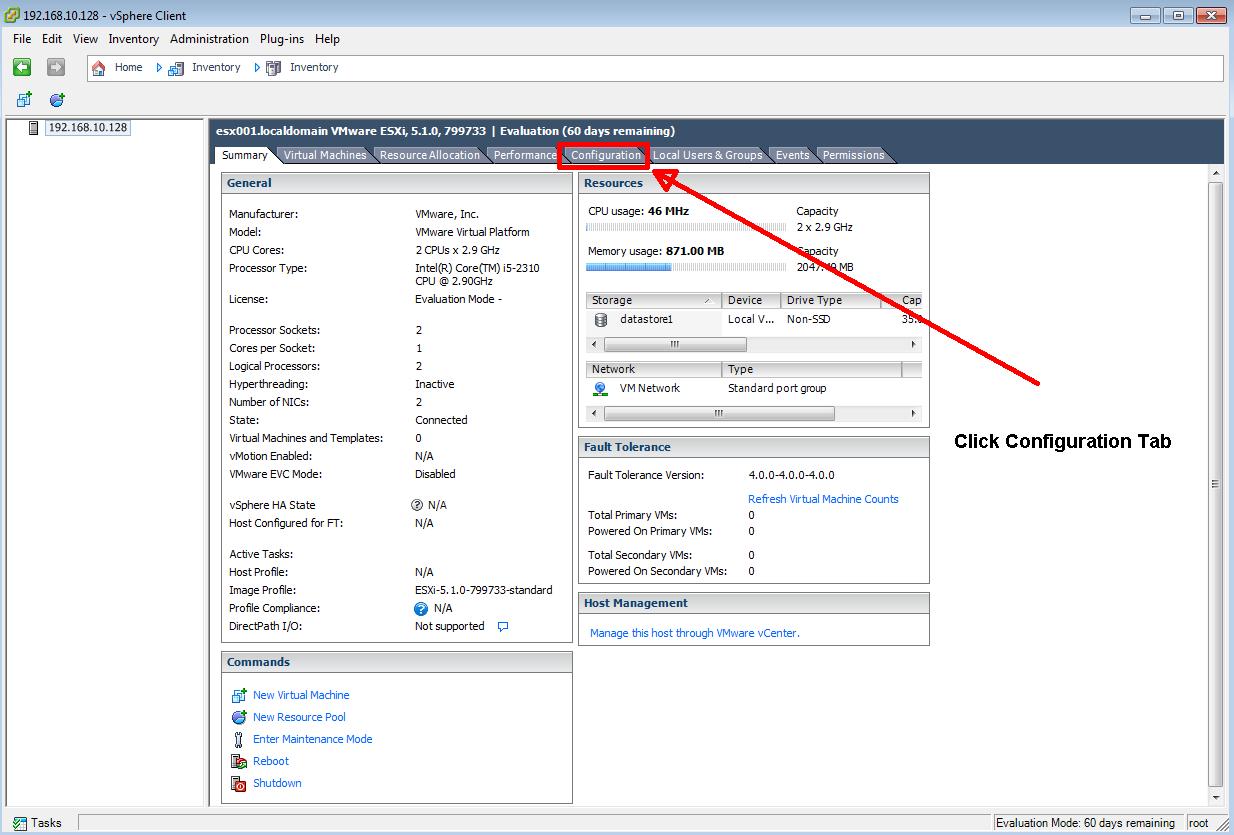
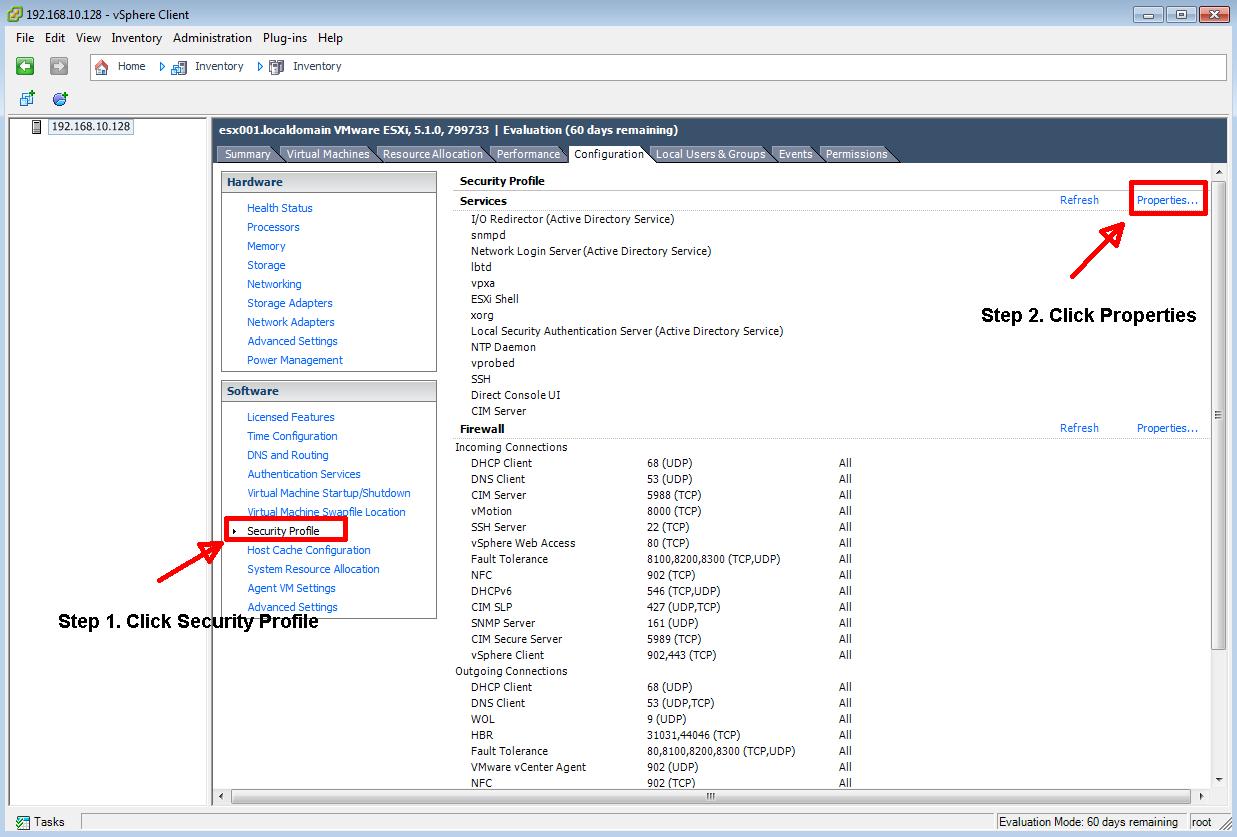
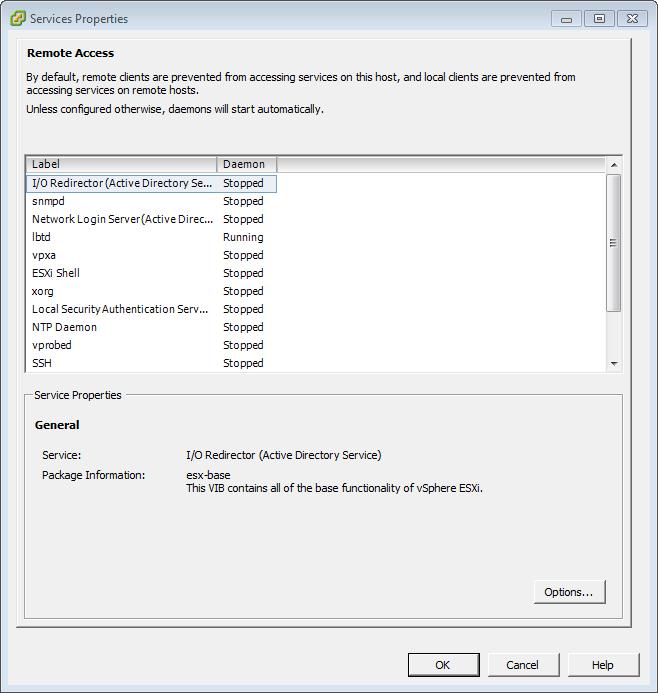
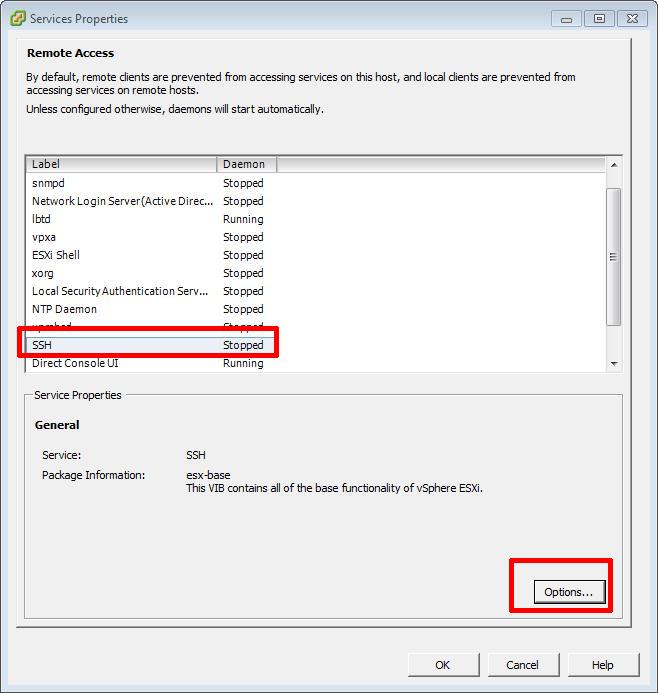
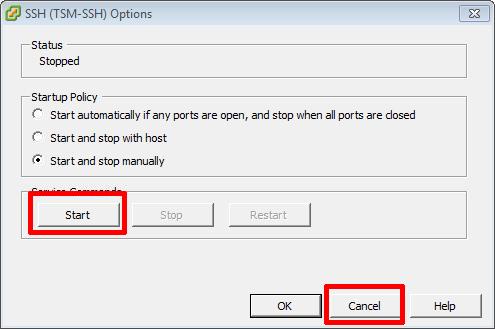

Confirm using PuTTY, you can connect to the server successfully.
In vSphere 4 1, 5.0 and 5.1, when you have enabled Remote SSH management of hosts from the vSphere Client, you may notice that that a Configuration Issues warning yellow box appears on the Summary page of the host ESXi server.

This Configuration Issues warning yellow box only appears when Remote SSH and/or ESXi shell has been enabled.
Please refer to my Andysworld! Article on HOW TO: Suppress Configuration Issues and Warnings Alert displayed in Summary status for ESXi 4.1 U2 or ESXi 5.0 after enabling SSH or ESXi Shell
Congratulations, you have successfully Enable SSH Remote Access on a VMware vSphere Hypervisor 5.1 (ESXi 5.1)




![[Valid RSS]](http://andysworld.org.uk/images/valid-rss.png "Validate my RSS feed")
