 Thank you if you donated in the month of September 2011 your Donation has been forwarded to WaterAid.


Thank you if you donated in the month of September 2011 your Donation has been forwarded to WaterAid.
Two achievements in the same month of July 2011.

1st July 2011 – vExpert 2011
I’ve not had much time to reflect on this, because I received an email out of the blue just before travelling down to Devon and Cornwall on the Friday 1st July 2011!

10 July 2011 – Q2 2011 Expert of the Quarter at Experts Exchange
So, I need a hatrick now.
?? July 2011 – ????
I’ve been sorting through my Outlook Inbox, that’s not been tidy-ed (South Wales Welsh word!) in 6 months, so I had about 9,000 emails in my Inbox, so it needed some maintenance, and sorting!
Here’s My Inbox afterwards

Outlook Tidy Inbox
I’ve left the York Auction Centre emails on view as evidence, because they are another victims of hacker, and had their mailing list stolen, and now I am on another SPAM mailing list, so that’s three, Marks and Spencers, York Auction Centre and now Travelodge.
York Auction Centre, again think it’s okay to send me an “Important Message from York Auction Centre”, telling me everthing is okay, don’t worry, we’ve only been hacked, and they’ve got your email address! So ignore any emails from us, because they’ve not come from us!
Another telephone call to the ICO for another two claim forms !

Data Allowance Pie Chart

Detailed Usage Report
I’ve been rather puzzled as to where my data allowance has been disappearing, in the office, in the past two days, according to the new reports from Eclipse Internet, 2GB has disappeared in p2p. Now I’ve been moved to a 50GB monthly limit during peak hours, I trying to understand more, what data is being used.
The interesting thing, is I don’t run any P2P, or so I thought, after looking at the firewalls and traffic passing through the router, I managed to establish a NAS, has been running a Bit Torrents service for an eternity. It’s been turned off now!
I’ll check in a few days, if any more data allowance is being eaten up!
Well it’s not often that I praise an Internet Service Provider, and as you may have seen by my recent “rants” and “tweets” I had a little issue with my ISP Eclipse Internet, based in Exeter, Devon, UK in the last approx 23 hours. (alright my lover!)
So I thought I’d put my hand in the air, and put the record straight on this, one, the simple fact is we have a 40GB limit under the Fair Usage Policy between the hours of 9am – 11pm, if you exceed it, you are restricted to 256Kbps. (horrible!).
At the end of May we’ve been downloading new Microsoft, VMware software, and new Vendor virtual applicances for testing, these were only a few DVDs, but the data adds up. We do track throughput and data usage here in the office, for our own statitics, and have been doing this for the last 6 years. This is collected from the router, so ALL traffic is monitored in and out of the network. This isn’t collected from a single PC.

Data throughput from 2006 - Present day
Our average daily peak usage (9am – 11pm) is approx 1.5GB, that is general email and web browsing. At the end of May (24th, 25th, 27th) see here

DVD downloads from Microsoft, VMware and other vendors
we boosted the limit up a bit, on June 6th 2011, we received an email from Eclipse Internet stating we had hit the Amber zone, and if we continue to download at the current rate, we would be stuffed into the Red Zone, and limited to 256kbps. We cannot stop the mail flow during the day, or the web browsing, so we did move large downloads into off-peak, hoping not to get the Red Zone treatment, my only small complaint, was we did email Eclipse asking how much data allowance we had left in peak hours, which went unanswered.
Yesterday evening at approximately 11pm we received the dreaded Red Zone email and we were restricted to 256kbps broadband speed.
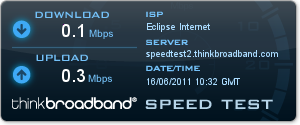
0.1MBps Download and 0.3MBps Upload
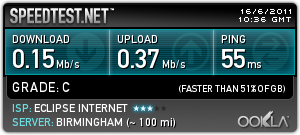
0.1MBps Download and 0.3MBps Upload
This was horrible, the internet is un-useable at the speed, you really notice all the cookie, tracking websites, waiting for websites to load, I’m glad I usually have between 1.5Mbps – 2.7MBps (to be confirmed!).
At 4.00pm today, enough was enough, and I called Eclipse Internet, Business Sales, and spoke to a very nice Sales agent called “John”, to switch our current older product (Evolution Pro 3) to Business Bronze, we’ll we get 50GB peak, and it costs less, on a 1 month contract – Fantastic, oh, and the Data Allowance gets reset! –
We’ve just been switched to Business Bronze. A Result. Thank you Eclipse!
We are very happy with Eclipse Internet, and we’ve now been with Eclipse for 7.5 years.
So far this month we downloaded 70GB!
and if I look in the new Control Panel, I’ve got some new controls and graphs to play with
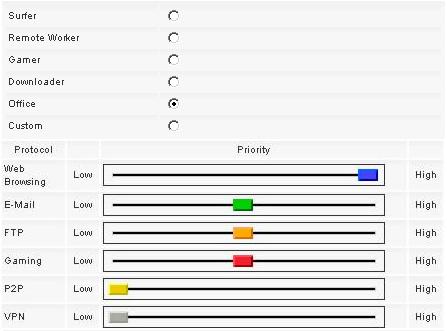
Data controller to prioritize traffic
and a new statistics utility

New data graph
We will just have to see if 50GB is enough!
Thanks Eclipse!

I was getting bored with the stock template image, and although I had changed it from the default blue to green, I’ve been wanting to change it for a while. As you may have noticed we have a new “clickable Logo “. If you click it, it will return to the homepage (root of the website).

Andysworld New Logo and Indentity
I’ve been testing VMware View 4.6 (Virtual Desktops using PCoIP) experimenting with Windows 7 64 bit Professional and Adobe Photoshop CS5 64 bit, using virtual desktop workstations. I wanted to test fully, so I spent a few hours testing Adobe Photoshop Cs5 (64 bit) and Corel Paint Shop Pro x3 to check what performance was like testing the in the Cloud! I think the performance was better than installing it on my standard PC.
As more web site traffic comes to Andysworld! than it did five years ago, I’ve decided it’s time for a facelift, so the logo is the start.
As you may have noticed I “borrowed” the theme for the logo, from a well known Search Engine, if it works for them! the random colours in the logo, reflect the choas in my life, from one day to the next!
“a day in the life’ – Andy
Okay, it’s POETS day, and if you are winding down for the weekend, and you’ve got five minutes at you office desk, have you ever visitied the Press the Space Bar 2000 Web site.
It’s simple, you just whack hell out of your space bar, and see how many hits you can get in 5, 10 or 20 seconds. At this point I must point out that I’m not reponsible for any damage caused to your keyboard, by playing this game, so play it at work, and break you office keyboard!! (he he!).
I remember BBC Micros with broken Z,X,@,?, Enter and Space Bar keys after playing Defender, or Chuckie Egg!
oh, and here are my High Scores…

Press the Space Bar 2000 Personal Best
and for that trip down memory lane for a few of you…

Chuckie Egg on the BBC Micro

Chuckie Egg on the BBC Micro
In the ’80’s my Poppy (Grandfather), loved playing this game! This was the only computer game he played! He was actually very good, but it was quite funny hearing him swear at the computer, you’d often here him say ” b****y chuckie egg!” as he went for a smoke!
(I was going to write s one eye t, but I thought some children follow the blog so maybe not appropriate!)
Apple (Steve Jobs) you’ve really p****d me off now.
What do you notice about the following screenshot?

No email in over 1.5 hours?
No email since 4.00pm. Now it might be usual for you not to receive emails in a 1.5 hour window, but not me. I checked a little further and found my iPad was not receiving any mail, and couldn’t log into Apple’s Mobile Me email, no error message. So I tried using a notebook and a desktop computer and still couldn’t login to Apple Mobile Me email, all the other options were working iDisk, Gallery etc. Again just the rotating twinky, staring at me on screen for minutes not doing anything.
Apple Mobile Me status indicated that Service Status was normal. So I called Apple Technical Support, that gave me a URL to have a Live Chat with an Engineer.
 Nothing like a email from them warning of the Outage for Maintenance!
So I had a little rant, about better off with GMail, Hotmail or Yahoo, that provide better uptime and storage management, this was the response. I’ve never had any issues with Hotmail, Yahoo or Gmail.


 So, there you go two weeks extension!
I bet they wouldn’t treat Mr Steve Jobs, Mobile Me Account like this.
Apple – Service – Zero Points.
And on that very note, APPLE if you would like to talk to me about Service Delivery, or Indsutrial Strength IT Services, just let me know!
I’m going to Leave Some Fecking Feedback!
You may have read or heard in the Press in the last few days
“The iPhone and iPad collects data that shows when the user was at each location with a timestamp. The information is downloaded to the user’s computer each time the iPad or iPhone is synced. “
I’ve seen fictional programs like Crime Scene Investigation on Channel 5, magically recover location history from phones and GPS devices fitted in cars to provide evidence to convict criminals. – I’ve always thought this was rediculous until now, and just good TV Drama!
So it had me thinking, so I started poking around in the backup data that iTunes stores on your computer.
iTunes stores the backup in the following locations
on a Windows XP Computer
C:\Documents and Settings\<USERNAME>\Application Data\Apple Computer\MobileSync\Backup
on a Vista/Windows 7 computer it’s stored in
C:\Users\<USERNAME>\AppData\Roaming\Apple Computer\MobileSync\Backup\
where <USERNAME> is the user you use to login to your computer.
In the Backup folder is a folder which looks like a GUID (long hex number!) and in that is the files that itunes uses to backup your iphone or ipad and all the settings.
it looks something like this:-
d81725cff6c7b675940b71cbff4471b2f7d83a91
This folder contains many files, with similar filenames, it didn’t take me long to find the file I was looking for, if you search all files for the keywords TABLE Wifi or one of the following keywords Timestamp FLOAT, Latitude FLOAT, Longitude – once you found this file use this file to extract the data. (I’ve since discovered that this file is always appended to when you sync your Apple device, so once you found the file, just use this file to extract the data always).
This log file readily identifies itself as a SQLite format 3 database file, which is good news because using the Firefox 4.0 Add-On, we can examine the data in the database (SQLite Manager Add-on only works with Firefox 4.0, so you’ll need to upgrade!).
Install the SQLite Manager add-on, and use menu option Database/Select Database/Connect Database and open the database file you found above (just change to All files in the pick list).
You should end up with a display as follows

Using SQLite Manager to open Location file from iPhone/iPad
The table we are interested in is called CellLocation, so select Tables, CellLocation
WOW the data is there!
It would seem that the Iphone and iPad 3G version, logs the locations of mobile Cell Locations used by the device, MMC, MNC, Cell Id and LAC, Latitude and Longitude are logged against a timestamp (number of seconds since January 1 2001).
I would suggest either deleting the file, or using the iTunes option to encrypt databackups on your computer, unless you want this file to be used in evidence against you! (remember if you ever lose you iPhone or iPad, it can be jailbroken and this information can be retreived or synced to another computer for the information to be extracted from your Apple device – so if you get caught, destroy your device!). (just hope your Wife or Girlfriend, doesn’t get hold of the file if you’ve been “playing away!” – enough said!).

My ipad locations since I've owned it!
I don’t often turn on 3G on the iPad, I use a E585 – MiFi, but I’m going to check if that makes a difference, because I think it’s the 3G data which is tracked!

iPad on vaction in Japan!
Tracking is global! (as can be seen from the above when I took the iPad to Japan!)
So how do we get this information into a nice Google Maps display. Simple,
SCARY STUFF! BIG BROTHER!




![[Valid RSS]](http://andysworld.org.uk/images/valid-rss.png "Validate my RSS feed")