mrhyperlinkukplain Get a free Giffgaff Sim

Archive for the ‘DIY’ Category

Broken Storage Heater

Tuesday, January 5th, 2010

I noticed the other day that one of our storage heaters (the only heating we have), was cold as ice.

storage heater thermal fuselink

storage heater thermal fuselink

and this is the reason why! The thermal fuselink has blown, indicating that the storage heater has over heated, and the thermal fuse has blown, a safety feature. I spoke to a very nice man from http://www.storageheater.co.uk/, and ordered some replacement thermal fuselinks (blue!). He also emailed me the service manuals for these Creda storage heaters. The thermal fuselinks arrived very promptly today, Thanks Roger!

So quickly fitted the new fuselink.

new fuselink fitted

new fuselink fitted

closeup of new thermal fuselink

closeup of new thermal fuselink

It has a temperature of 145 degrees C written on it, so I assume this is the temperature at which it blows! Hopefully the room will be warmer this evening, I’ll have to wait for the Ecnomoy 7 electric to come on at 12.30am, to check it’s working!

Post to Twitter

Wireless (WiFi) Remote Control of X10 Modules using USB Remote Access

Sunday, December 20th, 2009
  1. The Active Home Pro software is installed on/in a virtual Windows XP Professional computer, I don’t like cluttering up my main production Workstation which happens to be Vista 64-bit Ultimate.
  2. The CM15PRO Programmable Computer Interface is connected by USB to this computer. The Active Home Pro software is the software that drives the computer interface, I’ve saved the “house file” house.ahx on my NAS (network attached storage) device, so it can be easily shared on my network.
  3. This is the clever Tech bit, USB over Network by Fabula Tech, I’ve been using this software in the virtual work I do for a few years, and it allows you to share a USB device over your network, e.g. you can plug in you USB device on one computer, and connect to it on another via your network. Very handy… USB remote access!
  4. The USB over Network by Fabula Tech is installed on the computer connected to the CM15PRO Programmable Computer Interface. We will call this the server.

USB over network

USB over network

The above snapshot, shows the USB over Network server software running, and the current USB devices attached to the server, which can then be shared, just like any resource, disk, printer etc.

USB over network device shared waiting for connection

USB over network device shared waiting for connection

The device is shared, and is waiting for a client computer to connect to it.

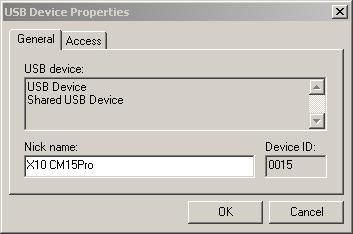
USB device properties

USB device properties

You can give the devices meaningful friendly names, that you’ll remember. On the client computer (remote computer), install another copy of Active Home Pro, making sure the drivers are installed for the CM15Pro. Run the USB over Network client software.

USB over Network client setup

USB over Network client setup

Select USB Device, Add, browser for the computer or enter IP address. You should see, a list of devices that can be connected to.

Client connecting...

Client connecting...

Right click the device, and click connect, if this is the first time you’ve connected to the device, you’ll get the usual, bing-bong tones, and plug N play will start and register the drives.

Now you can use your ActiveHome Pro software on another wireless (WiFi) computer, just open the *.AHX home file, from a shared location.

Client Connected to device

Client Connected to device

Post to Twitter

X10 Computer Control

Saturday, December 19th, 2009

With this blog post comes a warning, this post is for Geeks, Nerds, Techno-freaks, or people that just like 100% Tech! (you’ve been warned!).

This isn’t new Tech, the X10 protocol was invented 30 years ago, the X10 protocol sends packets of information across house hold mains wiring to receivers to turn items on or off. Computer software is then used to build macros and timers, which can be downloaded to the standalone programmable computer interface to instruct various modules (appliances) to turn on or off, so no need for a computer to be left on and running. What X10 can do for you is limited only by your imagination or programming skills!
I’ve recently invested in X10 computer control, because

  1. various appliances which need timers.
  2. take more advantage of Economy 7 and reduce electrical consumption.
  3. and I like my tech!

okay, I could do this with manual/electronic timers from a well known DIY store, but there would be no fun, but on a serious note, the timers I’ve been purchasing in the last few years, have all failed, the manual segment timers (which I need for the fish house, because digital timers will not start the ballast units on the lighting circuit, because digital timers will not start-up fluorescent tubes). Also various other projects, and I also wanted to create a moonlight light in the fish house, a ceiling rose light which comes on before tank lighting (goes off), and then on before tank lighting goes off - since I’ve turned off fish house main lighting 2 x 70 watt tubes, the fish frighten to easily from dark –> light (vice versa).

So I’ve purchased a Marmitek CM15PRO standalone programmable computer interface, and various X10 Modules, the modules I’ve purchased are plugin modules which plug in to a standard UK 13Amp socket, your appliance then plugs into this socket, you can also get DIN rail modules, wall switches, micro modules as well, and wired modules, and also lamp modules which plug into bayonet or edison screw light fittings. The modules I’ve purchased are:-

  1. AM12 Appliance / Switch Module
  2. AM12W Appliance / Switch Module (Wired)
  3. LM15 Bayonet Lamp module

The following screen shot shows all the modules (appliances) in the house, that are currently being computer controlled. The green light currently indicates they are on. Macros and timers vary the on and off times for every module.

Active Home Professional Software

All Rooms in the house with modules

Screen shot of the software, rooms can be created to organise your modules.

ActiveHome Professional screen shot

ActiveHome Professional screen shot

Here are some pictures of the computer interface and the actual modules in use:-

Now if you think this Tech is OTT, it gets worse, I’ve also found that sometimes I need to be able to control these modules when I’m not at my main production workstation. I could purchase an X10 remote control to send signals to the transceiver to send to the units, but hey that’s too easy, lets find a Tech way to do it!

I leave this to another exciting Geek, Nerdy, Techno-freak blog entry here!

Post to Twitter

eaga ShowerSmart - Get yours FREE and Save the Planet!

Friday, July 3rd, 2009

eaga ShowerSmart unit

eaga ShowerSmart unit

I’ve just done some quick DIY (5 minutes)  in the bathroom and fitted an eaga ShowerSmart, and the good news is they are free of charge to UK householders. I applied for mine so long ago, I forgot about it!

It’s a small metal unit, which restricts the flow of water through your shower head, saving water and energy.

Read and apply for one here at http://www.shower-smart.co.uk/

The eaga ShowerSmart is suitable for use with non-electric mixer showers or bath/shower mixer taps, provided they run off the mains water pressure.

It’s supplied with two washers, good instructions, and a small plastic bag which you use to check if your shower is in-efficient.

eaga shower unit fitted on our old shower!

eaga shower unit fitted on our old shower!

Post to Twitter

Compost frame (After)

Wednesday, April 22nd, 2009

(sorry folks got distracted, the Chairperson of the newly formed Allotment Association came to collect some of my Tomatoe plants!)

After some cutting with the jigsaw, hammering of nails, and stapling here we have the new lid.


it sits on top of the composter

Composter

Composter


I’ve recently dug out over 500 litres of organic compost, which has been used in the garden. Here’s a picture of compost corner.


Compost Corner

Compost Corner

Two plastic composters made from recycled plastic, and a 1m x 1m square wooden composter, the wood has started to rot, so this will need replacing in the next year or so.

Post to Twitter

Compost frame (Before)

Wednesday, April 22nd, 2009

Compost Frame with Angus No.1

Compost Frame with Angus No.1

This is a little job, I’ve been meaning to do for a while. The lid on my composter broke a year ago, the cooking apples on the tree above the composter, fell and broke the black pvc on the compost lid. The result of this was the compost has been getting too wet and too dry. So armed with a Black and Decker jigsaw, hammer, staple-gun and nails time to fix.

Compost Frame with Angus No.2

Compost Frame with Angus No.2

Compost Frame with Angus No.3

Compost Frame with Angus No.3

Oh, and Angus (the ginger cat in frame!), decided he was going to help as well! In the background is an old whiteboard, I no longer use, that I’m going to recycle to nail to the lid, so the apples don’t break the black PVC when it ages!

Post to Twitter

No Clothes!

Friday, June 13th, 2008

Our washing machine has broken, it’s the end of an era, our Ariston AF883 has lasted us 12 years, without breaking down. We originally paid £200 for it. As the Ariston advert said, they go on and on and on!

It’s taken me over two weeks to find somewhere to deliver a new washing machine on the day I want, and remove the old unit.

Our local Euronics store Eric Lee (Electrical) Ltd had stock, guaranteed a delivery date and time, and would remove the old unit for free.

When I arrived home from work today, early at 4.10pm, the new washing machine had been delivered, the old unit, was already in the back of the van, and the delivery men were waiting for me to check over the washing machine, they did offer to install for free, but have a look at the picture and you’ll see the complication!

Washing Machine 1
A new Zanussi-Electrolux ZWF12070 washing machine in box! It has a 6kg drum, Delay start, cold fill, and is rated AAB. I hope it lasts 12 years with no breakdowns!

Washing Machine 2
Umm, it’s bigger than the old one! Spot the bread knife to cut a larger hole!

Post to Twitter

Bay Window finally dressed!

Saturday, January 12th, 2008

We’ve finally dressed the front lounge bay window. Well to be exact a very nice man called John Hall from John Hall designs visited us last year in November/December, and we’ve had roman blinds made and fitted today by him. I can highly recommend John, Lindsey had originally discounted roman blinds, and wanted curtains fitting! I look forward to inviting John back again to complete the other rooms in our house.

Give John a call, and tell him I sent you! Thanks John for your help and excellent work!

Bay Window Before Blinds fitted
Before

Bay Window Before Blinds fitted Outside
Before - Outside

Bay Window After Blinds fitted
After - Roman Blinds fitted.

Roman Blinds by www.johnhalldesigns.co.uk

Post to Twitter

A year on!

Saturday, August 25th, 2007

It’s been 12 months today, since we moved into the house. Still lots to do, the lounge is almost finished, I was going to post a few more entries of DIY around the house, but I didn’t think hanging up pictures and the mirror was very exciting, so I didn’t bother. The three wall lights we purchased were all smashed, so they were returned to the shop for a full refund, and we’ve ordered three new wall lights from another lighting shop, the wall lights ordered should be with us, by the end of the week.

Angus and Tilda are growing, and getting up to more mischief, as they are learning bad habits from Esther.


Post to Twitter

Paint your Wagon!

Sunday, June 3rd, 2007

Lindsey now has the painting bug! So she’s been painting our Antique Wagon/Cart with another flavour of Cuprinol Shades.

Wagon
Antique Wagon


Post to Twitter