Archive for the ‘computing’ Category

Numero Uno at Experts Exchange

Friday, June 17th, 2011
EE All Zones 1st 17 June 2011

EE All Zones 1st 17 June 2011

Well I’ve finally reached No.1 at  Experts Exchange (for today) for the Year so far anyway!

That’s me at the top!

And to quote Freddy (dear Freddy!)

We are the champions – my friends
And we’ll keep on fighting – till the end
We are the champions
No time for losers
‘Cause we are the champions – of the world “

(And Sorry, if this autostarted in you Office today with the Sound On! :-))

Experts Exchange (EE) is a membership-based online “ask an expert” site for computer and IT related questions that was founded in 1996. Experts Exchange (EE) enables people with technology problems to quickly and easily solve their problems by collaborating with experts from around the world. Experts Exchange (EE) is the #1 resource on the web for solving IT related problems, pop over and take a test drive, and meet the Experts.

Checkout How it Works.

Many Thanks, and thumbs up to Eclipse Internet (UK)

Friday, June 17th, 2011

Well it’s not often that I praise an Internet Service Provider, and as you may have seen by my recent “rants” and “tweets”  I had a little issue with my ISP Eclipse Internet, based in Exeter, Devon, UK in the last approx 23 hours. (alright my lover!)

So I thought I’d put my hand in the air, and put the record straight on this, one, the simple fact is we have a 40GB limit under the Fair Usage Policy between the hours of 9am – 11pm, if you exceed it, you are restricted to 256Kbps. (horrible!).

At the end of May we’ve been downloading new Microsoft, VMware software, and new Vendor virtual applicances for testing, these were only a few DVDs, but the data adds up. We do track throughput and data usage here in the office, for our own statitics, and have been doing this for the last 6 years. This is collected from the router, so ALL traffic is monitored in and out of the network. This isn’t collected from a single PC.
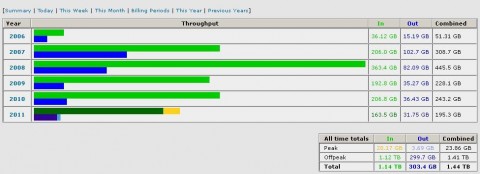
Data throughput from 2006 - Present day

Data throughput from 2006 - Present day

Our average daily peak usage (9am – 11pm) is approx 1.5GB, that is general email and web browsing. At the end of May (24th, 25th, 27th) see here

DVD downloads from Microsoft, VMware and other vendors

DVD downloads from Microsoft, VMware and other vendors

we boosted the limit up a bit, on June 6th 2011, we received an email from Eclipse Internet stating we had hit the Amber  zone, and if we continue to download at the current rate, we would be stuffed into the Red Zone, and limited to 256kbps. We cannot stop the mail flow during the day, or the web browsing, so we did move large downloads into off-peak, hoping not to get the Red Zone treatment, my only small complaint, was we did email Eclipse asking how much data allowance we had left in peak hours, which went unanswered.

Yesterday evening at approximately 11pm we received the dreaded Red Zone email and we were restricted to 256kbps broadband speed.
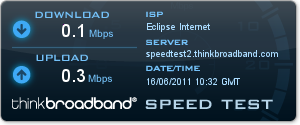
0.1MBps Download and 0.3MBps Upload
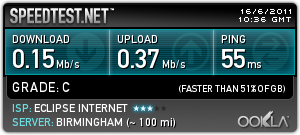
0.1MBps Download and 0.3MBps Upload

0.1MBps Download and 0.3MBps Upload

0.1MBps Download and 0.3MBps Upload

This was horrible, the internet is un-useable at the speed, you really notice all the cookie, tracking websites, waiting for websites to load, I’m glad I usually have between 1.5Mbps – 2.7MBps (to be confirmed!).

At 4.00pm today, enough was enough, and I called Eclipse Internet, Business Sales, and spoke to a very nice Sales agent called “John”, to switch our current older product (Evolution Pro 3) to Business Bronze, we’ll we get 50GB peak, and it costs less, on a 1 month contract – Fantastic, oh, and the Data Allowance gets reset! –

We’ve just been switched to Business Bronze. A Result. Thank you Eclipse!

We are very happy with Eclipse Internet, and we’ve now been with Eclipse for 7.5 years.

So far this month we downloaded 70GB!

and if I look in the new Control Panel, I’ve got some new controls and graphs to play with
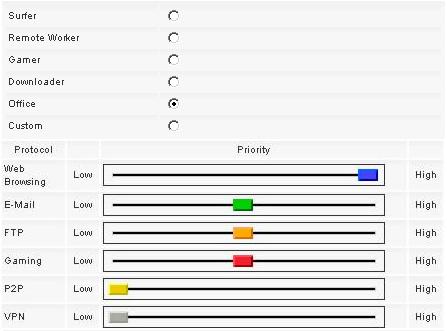
Data controller to prioritize traffic

Data controller to prioritize traffic

and a new statistics utility

New data graph

New data graph

We will just have to see if 50GB is enough!

Thanks Eclipse!

Eclipse Logo

Andysworld! new logo and identity on the internet

Tuesday, June 14th, 2011

I was getting bored with the stock template image, and although I had changed it from the default blue to green, I’ve been wanting to change it for a while. As you may have noticed we have a new “clickable Logo “. If you click it, it will return to the homepage (root of the website).

Andysworld New Logo and Indentity

Andysworld New Logo and Indentity

I’ve been testing VMware View 4.6 (Virtual Desktops using PCoIP) experimenting with Windows 7 64 bit Professional and Adobe Photoshop CS5 64 bit, using virtual desktop workstations. I wanted to test fully, so I spent a few hours testing Adobe Photoshop Cs5 (64 bit) and Corel Paint Shop Pro x3 to check what performance was like testing the in the Cloud! I think the performance was better than installing it on my standard PC.

As more web site traffic comes to Andysworld! than it did five years ago, I’ve decided it’s time for a facelift, so the logo is the start.

As you may have noticed I “borrowed” the theme for the logo, from a well known Search Engine, if it works for them! the random colours in the logo, reflect the choas in my life, from one day to the next!

“a day in the life’ – Andy

Microsoft Cloud Power in Japan!

Sunday, June 12th, 2011
Cloud Power - Microsoft advertising in Japan

Cloud Power - Microsoft advertising in Japan

I spotted this on the Shinkansen (bullet train) in Japan in March! When was the last time you saw a nicely framed advertisement on a British Train! (and this was not in First Class!)

Okay, it’s POETS day – Press the Space Bar 2000

Friday, June 10th, 2011

Okay, it’s POETS day, and if you are winding down for the weekend, and you’ve got five minutes at you office desk, have you ever visitied the Press the Space Bar 2000 Web site.

It’s simple, you just whack hell out of your space bar, and see how many hits you can get in 5, 10 or 20 seconds. At this point I must point out that I’m not reponsible for any damage caused to your keyboard, by playing this game, so play it at work, and break you office keyboard!! (he he!).

I remember BBC Micros with broken Z,X,@,?, Enter and Space Bar keys after playing Defender, or Chuckie Egg!

oh, and here are my High Scores…

Press the Space Bar 2000 Personal Best

Press the Space Bar 2000 Personal Best

and for that trip down memory lane for a few of you…

Chuckie Egg on the BBC Micro

Chuckie Egg on the BBC Micro

Chuckie Egg on the BBC Micro

Chuckie Egg on the BBC Micro

In the ’80’s my Poppy (Grandfather), loved playing this game! This was the only computer game he played! He was actually very good, but it was quite funny hearing him swear at the computer, you’d often here him say ” b****y chuckie egg!” as he went for a smoke!

Mac OS X Virtualization Part V – Install Mac OS X 10.7 Lion on VMware Player 3.1.4

Tuesday, June 7th, 2011

Wow, it’s all happening at Apple, iCloud and now Mac OS X 10.7 Lion in July 2011!

OS X Lion coming to a store near you in July 2011

OS X Lion coming to a store near you in July 2011

I’ve just an email reminding me that Mac OS X 10.7 Lion, is available from July 2011.  So I thought I’d blog this now.

Oddly, when I try to un Mac OS X 10.7 Lion on VMware Player 3.1.4, I get the following error message!

Mac OS X Lion 10.7 running under VMware Player 3.1.4 'This is not a MAC'

Mac OS X Lion 10.7 running under VMware Player 3.1.4 'This is not a MAC'

More work required, when trying Mac OS X Lion 10.7, I get the error message “The guest operating system is not Mac OS X Server”.

Apple Snow Leopard Software License Agreement (EULA)

It states under Section 2

2. Permitted License Uses and Restrictions.
A. Single Use License. Subject to the terms and conditions of this License, unless you have purchased a Family Pack or Upgrade license for the Apple Software, you are granted a limited non-exclusive license to install, use and run one (1) copy of the Apple Software on a single Apple-branded computer at a time. You agree not to install, use or run the Apple Software on any non-Apple-branded computer, or to enable others to do so. This License does not allow the Apple Software to exist on more than one computer at a time, and you may not make the Apple Software available over a network where it could be used by multiple computers at the same time.

Mac OS X Virtualization Part IV – Install Mac OS X 10.6.7 Snow Leopard on VMware Player 3.1.4

Tuesday, June 7th, 2011
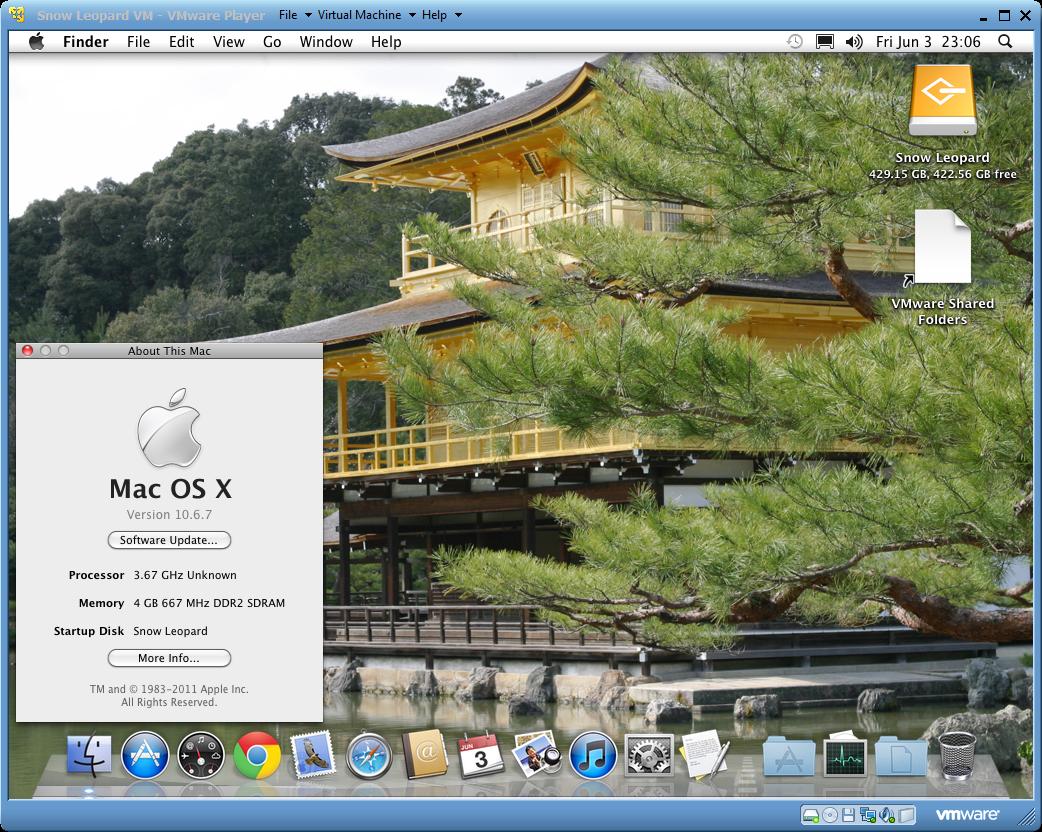
Mac OS-X-10.6.7 Snow Leopard installed and running using VMware Player 3.1.4

Mac OS-X-10.6.7 Snow Leopard installed and running using VMware Player 3.1.4

You can also use the FREE VMware Player 3.1.4. to also install and run Mac OS X 10.6.7 Snow Leopard. rather than VMware Workstation 7.1.4. But you’ll not have all the additional features that VMware Workstation 7.1.4 has included. VMware Player can play only one virtual machine at a time. You must close the virtual machine currently running in VMware Player before you can open another, also Snapshots are not supported in VMware Player.

Apple Snow Leopard Software License Agreement (EULA)

It states under Section 2

2. Permitted License Uses and Restrictions.
A. Single Use License. Subject to the terms and conditions of this License, unless you have purchased a Family Pack or Upgrade license for the Apple Software, you are granted a limited non-exclusive license to install, use and run one (1) copy of the Apple Software on a single Apple-branded computer at a time. You agree not to install, use or run the Apple Software on any non-Apple-branded computer, or to enable others to do so. This License does not allow the Apple Software to exist on more than one computer at a time, and you may not make the Apple Software available over a network where it could be used by multiple computers at the same time.

VMware vSphere Hypervisor (ESXi) 4.1 U1 testing on VMware Player 3.1.4

Monday, June 6th, 2011
VMware vSphere Hypervisor (ESXi) installed and operating in VMware Player 3.1.4

VMware vSphere Hypervisor (ESXi) 4.1 U1 installed and operating in VMware Player 3.1.4

So here’s the proof, it’s not a requirement to use VMware Workstation 7.1.4, to install and run VMware vSphere Hypervisor (ESXi). You can use the FREE VMware Player 3.1.4.

It’s also rather interesting is that ESX/ESXi is not a supported operating system, when you select the New Virtual Machine Wizard, there is no ESX Server 4.0 option to select, like with Workstaton 7.0.

But if you use the Easy Install option, it detects the ISO/CDROM as ESX Server 4.0 detected!

The June 2011 Challenge to Blog every-day! – Angus, finds a new cat basket!

Wednesday, June 1st, 2011

Okay, severe lack of blogs recently, so this month I’m going to try the Blog every day challenge!

So as this is the 1st Day of Summer.

We wil kick off with a picture of Angus, that’s found a new cat basket!

Angus on HP LaserJet 2100N

Angus on HP LaserJet 2100N

It becomes a little difficult to retrieve print jobs!

Mac OS X Virtualization Part III – Install Mac OS X 10.6.7 Snow Leopard

Tuesday, May 31st, 2011

In this final part, I look at virtualising Mac OS X Snow Leopard 10.6.7 on VMware Workstation 7.1.4. I don’t forsee any issues, with this as I’ve had Mac OS X 10.6.5 Snow Leopard running on VMware Workstation 6.5.3.

Over the next few days, I look at using the FREE VMware Player 3.0 to also virtualise and use these Mac OS X operating systems.

Apple Snow Leopard Software License Agreement (EULA)

It states under Section 2

2. Permitted License Uses and Restrictions.
A. Single Use License. Subject to the terms and conditions of this License, unless you have purchased a Family Pack or Upgrade license for the Apple Software, you are granted a limited non-exclusive license to install, use and run one (1) copy of the Apple Software on a single Apple-branded computer at a time. You agree not to install, use or run the Apple Software on any non-Apple-branded computer, or to enable others to do so. This License does not allow the Apple Software to exist on more than one computer at a time, and you may not make the Apple Software available over a network where it could be used by multiple computers at the same time.